
ShotX
Advanced Screenshot & Screen Capture Utility for Linux


A free, open-source screenshot and screen capture tool for Linux — inspired by ShareX.
ShotX brings the power of ShareX to the Linux desktop: instant screen capture, region selection with auto-detect, annotation tools, screen recording, image editing, OCR, and upload to multiple destinations — all from a single hotkey press or system tray.
Status: Beta — Core features complete, actively maintained.
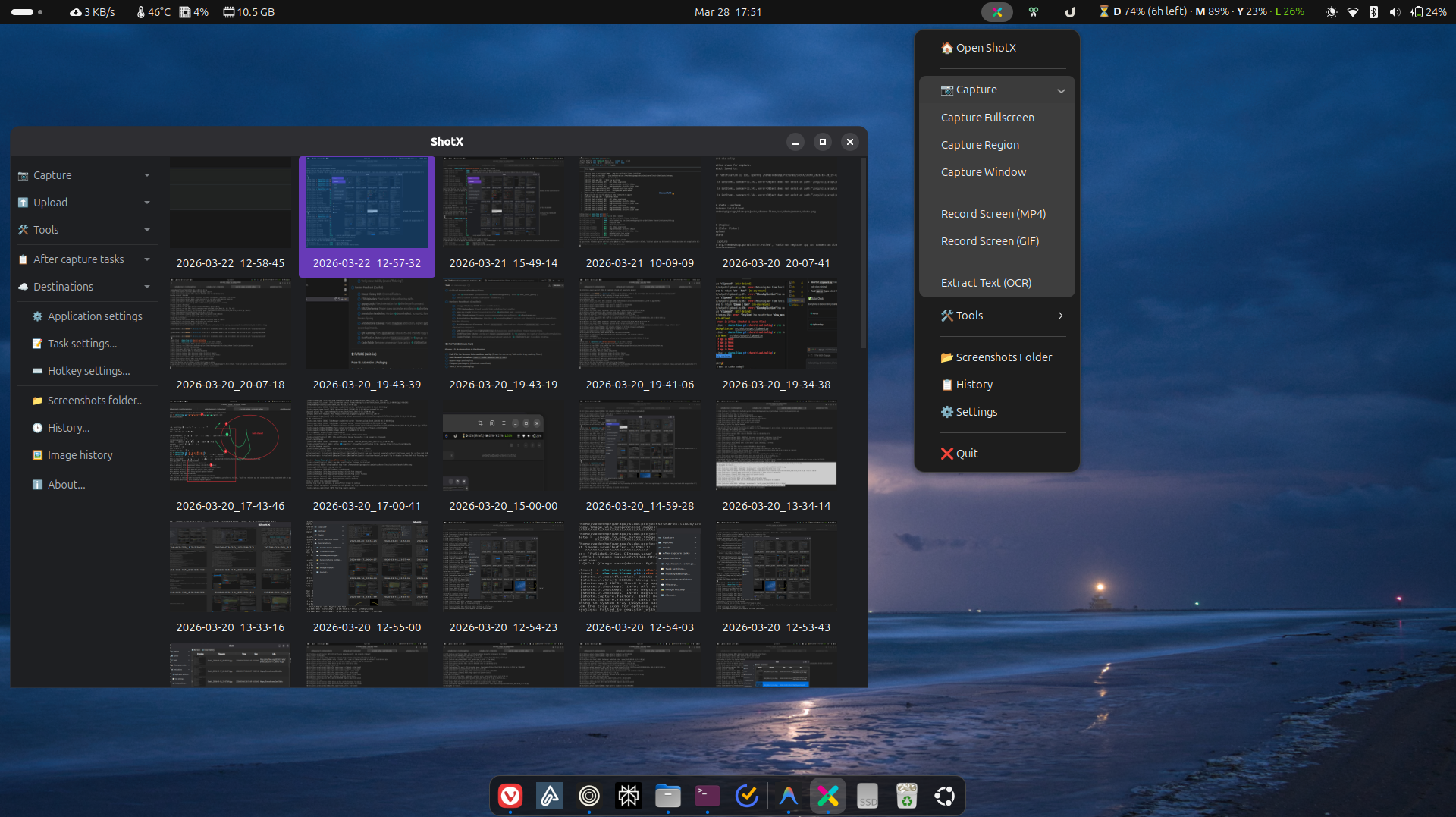
- Fullscreen — capture entire screen or specific monitor
- Region — drag-select with auto-detect (windows + AT-SPI2 widgets)
- Annotation overlay — annotate directly during region capture
- Configurable delay — countdown timer before capture
- Cursor visibility — option to include/exclude cursor
Built into both the capture overlay and the standalone editor:
- Arrow, rectangle, ellipse, text, freehand draw
- Blur / pixelate, highlight, step numbers
- Eraser, undo/redo, color picker
- Record any region as MP4 or GIF
- Audio capture (PulseAudio / PipeWire)
- Wayland (
wf-recorder) and X11 (ffmpeg) backends
- Built-in: Imgur, ImgBB, tmpfiles.org
- Cloud: Amazon S3 / S3-compatible (Backblaze, MinIO, etc.)
- Protocol: FTP, SFTP
- Custom:
.sxcuformat compatible with ShareX custom uploaders - URL Shortener: Multiple providers, auto-shorten after upload
QGraphicsView-based canvas with zoom, pan, keyboard shortcuts- All annotation tools
- Crop & resize with interactive handles
- Effects: borders, shadows, watermarks
- Beautifier: rounded corners, gradient backgrounds, drop shadow
- Combiner: horizontal/vertical image stacking
- OCR — extract text from any screen region (Tesseract)
- Color Picker — magnifier overlay to pick exact hex color
- Screen Ruler — measure pixel distances and boundaries
- QR Code — scan from screen/clipboard, generate from text
- Hash Checker — file integrity verification (MD5, SHA-1, SHA-256, SHA-512)
- Pin to Screen — pin a captured region as a floating always-on-top window
- Directory Indexer — generate styled HTML index of a directory tree
- Thumbnail Grid — browse recent captures edge-to-edge in the Main Window
- Split-View History — spreadsheet viewer with live preview panel
- Search & Filtering — find captures by filename, extension, or URL
- Batch Operations — multi-select and delete files/records in bulk
- ShareX Formats — copy links as Markdown, HTML, or plain text codes
- Wayland-first — xdg-desktop-portal D-Bus API for capture
- X11 fallback — XCB/Xlib capture backend
- Auto-detection of display server
ShotX is a Python application, but some features require system packages:
| Package | Required For | Install (Ubuntu/Debian) |
|---|---|---|
tesseract-ocr |
OCR text extraction | sudo apt install tesseract-ocr |
libzbar0 |
QR code scanning | sudo apt install libzbar0 |
ffmpeg |
Screen recording (X11) | sudo apt install ffmpeg |
wf-recorder |
Screen recording (Wayland) | sudo apt install wf-recorder |
grim |
Screenshot capture (Wayland, sway) | sudo apt install grim |
slurp |
Region selection (Wayland, sway) | sudo apt install slurp |
xclip |
Clipboard fallback | sudo apt install xclip |
Note: On GNOME Wayland, capture uses the xdg-desktop-portal — no extra packages needed for basic screenshots.
curl -sSL https://shotx.vedeshpadal.me/install.sh | shThis installs all system dependencies, including OCR, QR scanning, and screen recording.
Download the latest .deb, .rpm, or AppImage from the GitHub Releases page.
# Ubuntu / Debian
sudo dpkg -i shotx_*.deb

# Fedora / RHEL
sudo rpm -i shotx-*.rpm

# AppImage (any distro)
chmod +x ShotX-*.AppImage && ./ShotX-*.AppImage
The
.deband.rpmpackages bundle a private Python runtime — no system Python or library conflicts.
brew tap vedesh-padal/tap
brew install shotxpip install shotx
# or with uv:
uv tool install shotxgit clone https://github.com/vedesh-padal/ShotX.git
cd ShotX
uv sync
uv run shotx# Launch as system tray app (default)
shotx
shotx --tray
# Screen capture
shotx --capture-fullscreen
shotx --capture-region
shotx --capture-window
# Productivity tools
shotx --ocr # OCR: select region → text to clipboard
shotx --color-picker # Pick color → hex to clipboard
shotx --ruler # Measure pixel distances
shotx --qr-scan # Scan QR from screen region
shotx --qr-generate # Generate QR from clipboard text
shotx --qr-scan-clipboard # Scan QR from clipboard image
shotx --pin-region # Pin region as floating window
# Standalone tools
shotx --hash # Open hash checker
shotx --index-dir [PATH] # Open directory indexer
shotx --edit [IMAGE] # Open image editor
shotx --history # Open capture history viewer
# URL tools
shotx --shorten-url [URL] # Shorten URL (reads clipboard if no URL)
# Options
shotx --config-dir PATH # Override config directory
shotx --verbose # Enable colored debug loggingSettings are stored in ~/.config/shotx/settings.yaml. Configuration is managed via the Settings dialog in the Main Window, or edited directly.
Key configuration areas:
- Capture — output directory, filename pattern, image format, delay, cursor
- Upload — default uploader, API keys, S3/FTP credentials
- Hotkeys — global keyboard shortcuts
- Workflow — after-capture actions (save, clipboard, upload, open editor)
- Notifications — enable/disable desktop notifications
ShotX uses an event-driven architecture with domain-specific controllers:
main.py (CLI)
  └── app.py (orchestrator)
        ├── CaptureController  — capture workflows
        ├── UploadController   — upload + URL shortener
        ├── ToolController     — editor, hash, indexer
        ├── EventBus           — inter-component signals
        └── TaskManager        — background thread management
- Phase 1-3 — Core capture, region selection, annotations
- Phase 4 — Screen recording (MP4/GIF)
- Phase 5 — Upload engine (6 backends + custom + URL shortener)
- Phase 6 — Productivity tools (OCR, color picker, ruler, QR, etc.)
- Phase 7 — Image editor (effects, beautifier, combiner)
- Phase 8 — Main Window, history, settings, architecture refactoring
- Phase 9 — Documentation site, PyPI packaging, testing, auto-start
- Phase 10 — Image History grid & enhanced History viewer
- Phase 11 — Automated release pipeline (CI/CD)
- Phase 12 — Native packaging (.deb, .rpm, AppImage, Homebrew)
- Future — Wayland global hotkeys, active window capture on Wayland, watch folders
| Component | Technology |
|---|---|
| Language | Python 3.10+ |
| GUI Framework | Qt6 / PySide6 |
| Config | YAML (PyYAML) |
| Screen Capture | xdg-desktop-portal (Wayland), XCB/Xlib (X11) |
| Recording | FFmpeg (X11), wf-recorder (Wayland) |
| Upload | httpx, boto3 (S3), paramiko (SFTP) |
| OCR | Tesseract (pytesseract) |
| QR Code | pyzbar, qrcode |
| Image Processing | Pillow, QPainter |
| D-Bus | dbus-next |
Contributions are welcome! This project follows clean engineering practices:
- Each commit does one thing
- Clear commit messages following conventional commits
- Feature branches merged via
--no-ff
# Run tests
uv run pytest

# Lint
uv run ruff check src/

# Type check
uv run mypy src/
Tip
You can also use the inclusive Justfile or Makefile in the root for automated setup and development tasks.
GPL-3.0 — see LICENSE for details. Same license as ShareX.