Real-time digital office visualization for multi-agent AI systems. Monitor, control, and collaborate with AI agents through an immersive 2D interface built on OpenClaw.
ClawNexus Office is a professional-grade visual monitoring and management frontend for the OpenClaw Multi-Agent system. It connects to the OpenClaw Gateway via WebSocket and renders your AI agent fleet as an interactive digital office — giving operators a live, spatial view of every agent's state, conversation, tool activity, and performance metrics alongside a full system management console.
Install in seconds:
npx clawnexusCore Metaphor: Agent = Digital Employee | Office = Agent Runtime | Desk = Session | Meeting Pod = Collaboration Context
ClawNexus combines three powerful layers:
- 🏢 Virtual Office — Immersive 2D floor plan with live agent avatars and collaboration visualization
- 📊 Analytics & Insights — Real-time metrics, token tracking, cost breakdown, and activity heatmaps
- ⚙️ System Console — Complete control over agents, channels, skills, cron jobs, and configurations
Transform your multi-agent AI system into a live, interactive digital office:
- SVG Floor Plan — Isometric 2D office scene with desk zones, meeting areas, and realistic furniture (desks, chairs, sofas, plants, coffee cups, meeting tables)
- Dynamic Agent Avatars — Deterministically generated SVG avatars from agent IDs, with real-time status animations across five states:
idle,working,speaking,tool_calling, anderror - Collaboration Visualization — Live connection lines rendering inter-agent message flow and session relationships
- Live Speech Bubbles — Real-time Markdown text streaming and tool call display as HTML overlays directly above agent desks
- Zone Labels & Desk Units — Named office zones with individual desk assignments per agent session
- Agent Movement Animation — Smooth avatar transitions as agents change state or move between desk zones
In-depth observability for every agent without leaving the office view:
- Agent Detail Panel — Identity, model, active session, assigned skills, and current tool status
- Token Line Chart — Real-time token consumption history per agent (Recharts)
- Cost Pie Chart — Cost breakdown visualization across agents and models
- Activity Heatmap — Agent activity density over time
- Event Timeline — Chronological event log for agent lifecycle, tool calls, and errors
- Sub-Agent Relationship Graph — Network graph visualizing agent spawning and delegation hierarchies
Seamless bottom-docked communication panel for direct agent interaction:
- Multi-agent Selector — Switch target agents and sessions without losing context
- Streaming Message Display — Watch AI responses generate token-by-token with full Markdown rendering
- Chat History Drawer — Timeline-based conversation replay with full message history
- Session Switcher — Navigate between active and past sessions per agent
- Abort Control — Interrupt in-flight agent runs instantly
- Streaming Indicator — Visual feedback during response generation
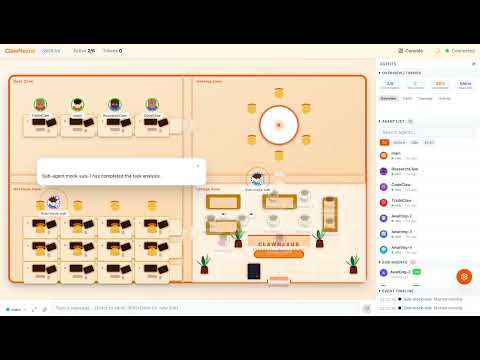
Watch the ClawNexus Office in action — Real-time agent visualization, live collaboration tracking, and instant system control.
# 1. Install and run (auto-detects your OpenClaw Gateway)
npx clawnexus

# 2. Open browser (automatically opens)
# http://localhost:5180

# 3. Start monitoring your AI agents!
Prerequisites: Node.js 22+ | OpenClaw Gateway running locally
That's it! No configuration files, no setup wizard — just run and go.
A complete operator console for managing every aspect of your OpenClaw deployment.
Get instant visibility into your deployment with stat cards, real-time alerts, channel and skill summaries, plus a quick-navigation grid and live activity feed.

Create, manage, and monitor agents with comprehensive detail tabs for configuration, assigned channels, active skills, tool calls, scheduled cron jobs, and file management.

Connect to messaging platforms (Telegram, Discord, WhatsApp, Signal, Slack, Matrix, LINE) with channel cards, configuration dialogs, status monitoring, and QR code binding flows.

Discover and install skills from the ClawHub marketplace directly in the console. Manage dependencies, enable/disable skills, and configure skill-specific settings.

Create and manage scheduled tasks with a visual cron editor, preset templates, execution history, and real-time status monitoring.

Configure LLM providers (OpenAI, Anthropic, Claude, custom), manage API keys, set appearance preferences, connect to remote gateways, and access developer tools.

- ClawHub Marketplace — Discover and install skills from the ClawHub registry directly from the console
- Provider Management — Add and configure LLM providers (OpenAI, Anthropic, and custom) with per-model settings
- Connection Setup Dialog — First-run guided Gateway connection wizard with token auto-detection
- Mock Mode — Full development environment with simulated agent data, no live Gateway required
- Workspace Customization — Appearance and layout preferences persisted locally
- Toast Notifications — Non-blocking operator feedback for system events and errors
- Remote Gateway Support — Connect to local, LAN, or cloud-hosted OpenClaw deployments
- i18n Foundation — Internationalization architecture with English locale across all UI namespaces
| Feature | ClawNexus | Traditional Dashboards |
|---|---|---|
| Visual Workspace | Interactive 2D office with avatars and collaboration lines | Static tables and charts |
| Real-time Updates | Live WebSocket events, instant state changes | Polling-based, delayed updates |
| Spatial Navigation | Agents arranged in office zones, zones = context | Linear agent lists |
| Collaboration Tracking | Visual connections between agents, see who's talking to whom | Message logs only |
| Token Tracking | Per-agent token consumption with cost breakdown | Aggregate usage only |
| Complete Control | Manage agents, channels, skills, cron jobs all in one place | Multiple separate tools |
| Mobile Friendly | Responsive design works on tablets and laptops | Desktop-only typically |
| Open Source | Transparent, extensible, community-driven | Vendor lock-in |
| Layer | Technology |
|---|---|
| Language | TypeScript (strict mode, ESM) |
| Framework | React 19 |
| Build Tool | Vite 6 |
| State Management | Zustand 5 + Immer |
| Styling | Tailwind CSS 4 |
| 2D Rendering | SVG + CSS Animations |
| Routing | React Router 7 (HashRouter) |
| Data Visualization | Recharts |
| Markdown | react-markdown + remark-gfm |
| Icons | Lucide React |
| i18n | i18next + react-i18next |
| Real-time | Native WebSocket API (OpenClaw Gateway protocol) |
| Testing | Vitest + React Testing Library |
- Node.js 22+ — LTS or current stable
- npm/pnpm — Package manager (comes with Node.js)
- OpenClaw Gateway — 2026.2.15 or later, running and accessible
- Gateway Auth Token — Automatically detected from
~/.openclaw/openclaw.jsonor provide via-tflag - Device Auth Bypass — Enable with:
openclaw config set gateway.controlUi.dangerouslyDisableDeviceAuth true
Note: ClawNexus is a companion frontend only. It connects to a running OpenClaw Gateway and does not start or manage it.
The easiest way to run ClawNexus is via npm without any configuration:
npx clawnexusThis command:
- Downloads the latest ClawNexus build
- Starts the web server on
http://localhost:5180 - Automatically detects your local OpenClaw Gateway token
- Opens your browser to the dashboard
Custom Configuration:
npx clawnexus --gateway ws://my-gateway.com:18789 --port 3000All CLI Options:
| Flag | Description | Default |
|---|---|---|
-t, --token <token> |
Gateway authentication token | auto-detected from ~/.openclaw/openclaw.json |
-g, --gateway <url> |
Gateway WebSocket URL | ws://localhost:18789 |
-p, --port <port> |
Server HTTP port | 5180 |
--host <host> |
Server bind address | 0.0.0.0 |
-h, --help |
Show help message | — |
Install Globally (optional):
npm install -g clawnexus
clawnexus # Run from anywhereFor development, customization, or running from source:
git clone https://github.com/prantikmedhi/openclaw-office
cd openclaw-office
pnpm installCreate .env.local (gitignored) with your Gateway token:
cat > .env.local << 'EOF'
VITE_GATEWAY_TOKEN=<your-gateway-token>
VITE_GATEWAY_URL=ws://localhost:18789
EOF
Get your token:
openclaw config get gateway.auth.tokenRequired for web clients (Gateway 2026.2.15+):
openclaw config set gateway.controlUi.dangerouslyDisableDeviceAuth true
# Restart Gateway after this changepnpm devOpens http://localhost:5180 with hot reload. Code changes instantly reflect in the browser.
Development Commands:
pnpm build      # Production build
pnpm test       # Run tests
pnpm typecheck  # TypeScript validation
pnpm lint       # Code analysis
pnpm format # Auto-format codepnpm install # Install dependencies
pnpm dev # Start dev server (port 5180) with hot reload
pnpm build # Production-optimized build
pnpm test # Run test suite
pnpm test:watch # Watch mode testing
pnpm typecheck # TypeScript validation
pnpm lint # Oxlint code analysis
pnpm format # Oxfmt code formatting
pnpm check # Combined lint + format checkClawNexus automatically connects to OpenClaw running on your machine:
# Automatic (no flags needed)
npx clawnexus

# Token and Gateway URL auto-detected from ~/.openclaw/openclaw.json
# Connects to ws://localhost:18789 by defaultConnect to hosted OpenClaw environments (cloud, LAN, remote servers):
npx clawnexus \
  --gateway ws://my-gateway.example.com:18789 \
--token YOUR_AUTH_TOKENIf OpenClaw is installed locally, the Gateway auth token is automatically read from ~/.openclaw/openclaw.json — no manual setup required.
On first launch, ClawNexus shows a connection wizard to:
- Verify Gateway connectivity
- Input or confirm auth tokens
- Test the connection before proceeding
- Save settings for future launches
ClawNexus resolves settings in this order:
- CLI flags —
--token,--gateway,--port(highest priority) - Environment variables —
OPENCLAW_GATEWAY_TOKEN,OPENCLAW_GATEWAY_URL - Config file —
~/.openclaw/openclaw-office.json(persisted from previous runs) - Defaults —
ws://localhost:18789(Gateway), auto-detected token (lowest priority)
Example with environment variables:
export OPENCLAW_GATEWAY_TOKEN=your-token-here
export OPENCLAW_GATEWAY_URL=ws://10.0.0.5:18789
npx clawnexusopenclaw-office/
├── src/
│ ├── main.tsx / App.tsx # Entry point and route definitions
│ ├── i18n/ # i18next config + English locale files
│ │ └── locales/en/ # common, layout, office, panels, chat, console
│ ├── gateway/ # OpenClaw Gateway communication layer
│ │ ├── ws-client.ts # WebSocket client
│ │ ├── ws-adapter.ts # Auth, reconnect, and session handling
│ │ ├── rpc-client.ts # RPC request/response wrapper
│ │ ├── event-parser.ts # Event parsing and agent state mapping
│ │ ├── adapter.ts / adapter-provider.ts # Adapter pattern (real / mock)
│ │ ├── mock-adapter.ts # Simulated data for development
│ │ └── clawhub-client.ts # ClawHub marketplace API client
│ ├── store/ # Zustand state management
│ │ ├── office-store.ts # Main store: agents, metrics, UI state
│ │ ├── agent-reducer.ts # Agent state transition logic
│ │ ├── metrics-reducer.ts # Metrics computation
│ │ ├── meeting-manager.ts # Agent collaboration tracking
│ │ ├── toast-store.ts # Toast notification state
│ │ └── console-stores/ # Per-page console stores
│ │ ├── agents-store.ts
│ │ ├── channels-store.ts
│ │ ├── skills-store.ts / clawhub-store.ts
│ │ ├── cron-store.ts
│ │ ├── dashboard-store.ts
│ │ ├── settings-store.ts
│ │ ├── chat-dock-store.ts
│ │ └── config-store.ts
│ ├── components/
│ │ ├── layout/ # AppShell, ConsoleLayout, Sidebar, TopBar
│ │ ├── office-2d/ # 2D SVG floor plan + furniture components
│ │ │ ├── FloorPlan.tsx
│ │ │ ├── AgentAvatar.tsx
│ │ │ ├── DeskUnit.tsx
│ │ │ ├── ConnectionLine.tsx
│ │ │ ├── ZoneLabel.tsx
│ │ │ └── furniture/ # Desk, Chair, Sofa, Plant, CoffeeCup, MeetingTable
│ │ ├── overlays/ # SpeechBubble HTML overlay
│ │ ├── panels/ # AgentDetailPanel, MetricsPanel, charts, timeline
│ │ ├── chat/ # ChatDockBar, AgentSelector, MessageBubble, etc.
│ │ ├── console/ # Console feature components by domain
│ │ │ ├── agents/ # List, detail header, tabs (Overview/Channels/Skills/Tools/Cron/Files)
│ │ │ ├── channels/ # Cards, config dialog, stats, WhatsApp QR flow
│ │ │ ├── skills/ # Marketplace cards, detail/install dialogs, ClawHub integration
│ │ │ ├── cron/ # Task cards, create/edit dialog, stats bar
│ │ │ ├── dashboard/ # Stat cards, alert banner, quick nav, activity feed
│ │ │ ├── settings/ # Provider CRUD, model editor, appearance, gateway, about
│ │ │ └── shared/ # StatusBadge, LoadingState, EmptyState, ErrorState, ConfirmDialog
│ │ ├── pages/ # Console route page containers
│ │ └── shared/ # Avatar, SvgAvatar, ToastContainer, ConnectionSetupDialog, etc.
│ ├── hooks/ # useGatewayConnection, useResponsive, useSidebarLayout, etc.
│ ├── lib/ # Utilities: avatar-generator, position-allocator, movement-animator,
│ │ │ # gateway-url, local-persistence, cron-presets, provider-types, etc.
│ └── styles/
│ └── globals.css # Global Tailwind + custom styles
├── bin/ # Node.js server and CLI configuration utilities
├── public/ # Static assets
├── tests/ # Test files
└── vite.config.ts / tsconfig.json / vitest.config.ts
Data Flow: OpenClaw Gateway → WebSocket → Event Parser → Zustand Store → React Components
OpenClaw Gateway
    │
    ├─ WebSocket Events ──> ws-adapter.ts ──> event-parser.ts ──┐
    │                                                             ├──> Zustand Store ──> React UI
    └─ RPC Methods ──────> rpc-client.ts ──────────────────────-┘
Event Processing Pipeline:
- Gateway broadcasts real-time events:
agent,presence,health,heartbeat event-parser.tsmaps agent lifecycle events to visual states (idle,working,speaking,tool_calling,error)- Zustand store applies updates atomically via reducers
- React components re-render the office floor plan, speech bubbles, and panels
Agent State Mapping:
| Gateway Stream | Key Field | Frontend State | Visual |
|---|---|---|---|
lifecycle |
phase: "start" |
working |
Loading animation |
lifecycle |
phase: "end" |
idle |
Idle state |
tool |
name: "..." |
tool_calling |
Tool panel popup |
assistant |
text: "..." |
speaking |
Markdown speech bubble |
error |
message: "..." |
error |
Red error indicator |
Used in local development (via .env.local):
| Variable | Required | Default | Purpose |
|---|---|---|---|
VITE_GATEWAY_TOKEN |
Yes (real Gateway) | — | OpenClaw Gateway auth token |
VITE_GATEWAY_URL |
No | ws://localhost:18789 |
Dev Gateway upstream address |
VITE_MOCK |
No | false |
Enable mock mode (no Gateway needed) |
VITE_CLAWHUB_REGISTRY |
No | https://clawhub.com |
ClawHub marketplace registry URL |
Test and develop the full UI without needing a running OpenClaw Gateway:
# Run with simulated data
VITE_MOCK=true pnpm dev

# Or with npm
VITE_MOCK=true npx clawnexus
This is great for UI development, testing, and demos.
Run the test suite to ensure your changes work correctly:
pnpm test              # Run all tests once
pnpm test:watch        # Watch mode (re-run on changes)
pnpm test:coverage     # Generate coverage report
Test Coverage:
- Store logic and state management (Zustand)
- Event parsing and Gateway protocol handling
- Component interactions and rendering (React Testing Library)
- Critical data flows and edge cases
Tips:
- Use
test:watchduring development for instant feedback - Add tests when fixing bugs or adding features
- Check coverage to identify untested code paths
Symptom: "Connection refused" or "WebSocket error"
Solution:
# 1. Verify Gateway is running
openclaw gateway status

# 2. Check Gateway is on correct port
curl http://localhost:18789/health

# 3. Get and verify your auth token
openclaw config get gateway.auth.token

# 4. Enable device auth bypass (required for web clients)
openclaw config set gateway.controlUi.dangerouslyDisableDeviceAuth true

# 5. Restart Gateway
openclaw gateway restart

# 6. Try connecting with explicit token and gateway
npx clawnexus --token YOUR_TOKEN --gateway ws://localhost:18789Symptom: "Address already in use" error
Solution:
# Run on a different port
npx clawnexus --port 5181

# Or kill the process using port 5180
lsof -i :5180
kill -9 <PID>Symptom: "No token found" or "token missing"
Solution:
# Provide token explicitly
npx clawnexus --token $(openclaw config get gateway.auth.token)

# Or set environment variable
export VITE_GATEWAY_TOKEN=$(openclaw config get gateway.auth.token)
pnpm devFor developers working from source:
# Check types
pnpm typecheck

# Fix type issues
pnpm lint --fix
pnpm formatTo develop without a Gateway:
# For npm install
VITE_MOCK=true npx clawnexus

# For local development
VITE_MOCK=true pnpm dev- Check OpenClaw docs: github.com/openclaw/openclaw
- Report issues: github.com/prantikmedhi/openclaw-office/issues
- Join OpenClaw community channels for support
© 2026 Prantik Medhi
All code, design, and documentation are created and maintained by Prantik Medhi. Licensed under MIT.
This project is a companion frontend for the OpenClaw multi-agent framework.
After getting ClawNexus running, here are some things you can do:
- Connect Your Agents — Go to the Agents console and create or connect your first AI agent
- Set Up Channels — Configure messaging channels (Telegram, Discord, WhatsApp, etc.) for your agents
- Install Skills — Browse the ClawHub marketplace and install skills your agents need
- Schedule Tasks — Create cron jobs for automated agent workflows
- Monitor Metrics — Watch the Dashboard for real-time system health and performance
- Read CLAUDE.md — Deep dive into architecture and development patterns
- Explore the Code — Start with
src/main.tsxand the store architecture - Modify Features — Customize the office visualization or add new console pages
- Write Tests — Add test coverage for your changes
- Contribute — Submit pull requests with improvements
- Set Gateway URL — If running remote OpenClaw:
npx clawnexus --gateway ws://your-server:18789 - Add Providers — Settings → AI Providers → Add OpenAI, Anthropic, or custom models
- Enable Mock Mode —
VITE_MOCK=true pnpm devfor UI development without Gateway - Check Logs — Monitor console output for debugging and performance insights
Contributions are welcome. Please follow the coding standards in CLAUDE.md.
- Fork the repository
- Create a feature branch (
git checkout -b feature/your-feature) - Commit using Conventional Commits
- Open a Pull Request
- CLAUDE.md — Detailed architecture and development guide
- OpenClaw Repository — Gateway protocol and API reference
Made with care by Prantik Medhi