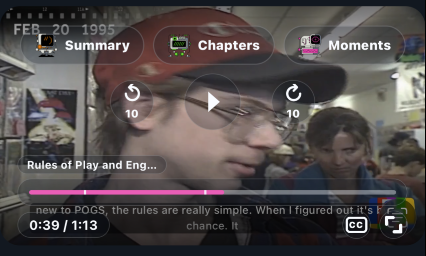
A React native video player with built-in Mux Data and Mux Robots integrations. Native playback is delegated to:
- iOS:
muxinc/mux-player-swift - Android:
muxinc/mux-player-android
Full guides live in docs/:
- Getting Started
- Orientation & Fullscreen — required setup for landscape/theater mode
- API Reference
- Mux Robots
- React Native 0.75+ with Expo Modules
- iOS 15+, Android minSdk 23+
npm install @mux/mux-react-native-player{
"expo": {
"plugins": [
[
"@mux/mux-react-native-player/plugin",
{ "enablePictureInPicture": true }
]
]
}
}npx expo prebuild
npx expo run:ios
npx expo run:androidimport { MuxVideoView, useMuxVideoPlayer } from "@mux/mux-react-native-player";
export default function Player() {
const player = useMuxVideoPlayer({
playbackId: "qxb01i6T202018GFS02vp9RIe01icTcDCjVzQpmaB00CUisJ4",
metadata: {
envKey: "YOUR_MUX_DATA_ENV_KEY",
playerName: "MuxReactNativePlayerExample",
videoTitle: "Mux playback in React Native",
viewerUserId: "user-123",
},
});
return (
<MuxVideoView
player={player}
controls="custom"
contentFit="contain"
style={{ width: "100%", aspectRatio: 16 / 9, backgroundColor: "black" }}
/>
);
}controls: "native" for platform controls, "custom" for the shared cross-platform JS controls, "none" for the bare video surface.
type MuxVideoSource = {
  playbackId: string;
  assetId?: string;
  playbackToken?: string;
  drmToken?: string;
  customDomain?: string;
  minResolution?: "480p" | "540p" | "720p" | "1080p" | "1440p" | "2160p";
  maxResolution?: "720p" | "1080p" | "1440p" | "2160p";
  renditionOrder?: "default" | "desc";
  clipping?: { assetStartTime?: number; assetEndTime?: number };
  metadata?: {
    envKey?: string;
    playerName?: string;
    videoTitle?: string;
    videoId?: string;
    viewerUserId?: string;
    customData?: Record<string, string>;
  };
};metadata.envKeyenables Mux Data.drmTokenrequiresplaybackToken.- The source is mutable — pass it from state and the player will reload when it changes.
await player.play();
await player.pause();
await player.seekTo(12);
await player.seekBy(10);
await player.replay();
await player.setMuted(true);
await player.setVolume(0.5);
await player.setLoop(true);
await player.setPlaybackRate(1.25);
player.replace({ playbackId: "NEW_PLAYBACK_ID" });
await player.release();When using controls="custom", you can add Mux Robots buttons (summary, chapters, key moments). Keep MUX_TOKEN_ID / MUX_TOKEN_SECRET on a backend and pass callbacks:
<MuxVideoView
  player={player}
  controls="custom"
  robots={{
    onSummarize: ({ assetId }) =>
      fetchJson("/mux/robots/summarize", { assetId }),
    onGenerateChapters: ({ assetId }) =>
      fetchJson("/mux/robots/chapters", { assetId }),
    onFindKeyMoments: ({ assetId }) =>
      fetchJson("/mux/robots/key-moments", { assetId }),
  }}
/>
Buttons appear only for actions with a callback. Chapters render as timeline markers; key moments render as highlighted ranges. Selecting either seeks to its start time.