Releases: ludwig-ai/ludwig
Release list
v0.6.1

What's Changed
- Cherry pick hyperopt plots by @arnavgarg1 in #2567
- AUTO: by @tgaddair in #2571
- AUTO: by @tgaddair in #2572
- fix: Limit frequency array to top_n_classes in F1 viz (#2565) by @hungcs in #2575
- AUTO: by @tgaddair in #2581
- AUTO: by @tgaddair in #2583
- AUTO: by @tgaddair in #2590
- Cherrypick: Comprehensive Configs by @justinxzhao in #2580
- AUTO: by @tgaddair in #2591
- Update version to 6.1 by @justinxzhao in #2582
- Readme fixes by @justinxzhao in #2592
Full Changelog: v0.6...v0.6.1
Contributors


Assets 2
v0.6 - Gradient Boosted Models, Schema Validation, and Pipelined TorchScript
Overview
Ludwig 0.6 introduces several exciting features focused on modeling, deployment, and testing that make it more flexible, reliable, and easy to use in production.
- Gradient boosted models: Historically, Ludwig has been built around a single, flexible neural network architecture called ECD (for Encoder-Combiner-Decoder). With the release of 0.6 we are adding support for a different model architecture: gradient-boosted tree models (GBMs).
- Richer configuration schema and validation: We formalized the schema of Ludwig configurations and now validate it before initialization, which can help you avoid mistakes like typos and syntax errors.
- Probability calibration for binary and multi-class classification: With deep neural networks, the probabilities given by models often don't match the true likelihood of the data. Ludwig now supports temperature scaling calibration (On Calibration of Modern Neural Networks), which brings class probabilities closer to their true likelihoods in the validation set.
- Pipelined TorchScript: We improved the TorchScript model export functionality, making it easier than ever to train and deploy models for high performance inference.
- Model parameter update unit tests: The code to update parameters of deep neural networks can be too complex for developers to make sure the model parameters are updated. To address this difficulty and improve the robustness of our models, we implemented a reusable utility to ensure parameters are updated during one cycle of a forward-pass / backward-pass / optimizer step.
Additional improvements include a new global configuration section, time-based dataset splitting and more flexible hyperparameter optimization configurations. Read more about each specific feature below.
If you are learning about Ludwig for the first time, or if these new features are relevant and exciting to your research or application, we'd love to hear from you. Join our Ludwig Slack Community here.
Gradient Boosted Models (@jppgks)
Historically, Ludwig has been built around a single, flexible neural network architecture called ECD (for Encoder-Combiner-Decoder). With the release of 0.6 we are, adding support for a different model architecture: gradient-boosted tree models (GBM).
This is motivated by the fact that tree models still outperform neural networks on some tabular datasets, and the fact that tree models are generally less compute-intensive, making them a better choice for some applications. In Ludwig, users can now experiment with both neural and tree-based architectures within the same framework, taking advantage of all of the additional functionalities and conveniences that Ludwig offers like: preprocessing, hyperparameter optimization, integration with different backends (local, ray, horovod), and interoperability with different data sources (pandas, dask, modin).
How to use it
Install the tree extra package with pip install ludwig[tree]. After the installation, you can use the new gbm model type in the configuration. Ludwig will default to using the ECD architecture, which can be overridden as follows to use GBM:
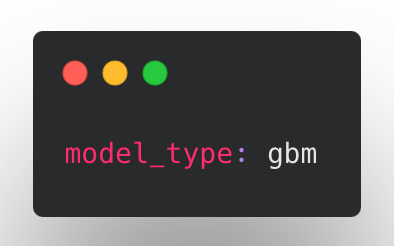
In some initial benchmarking we found that GBMs are particularly performant on smaller tabular datasets and can sometimes deal better with class imbalance compared to neural networks. Stay tuned for a more in-depth blogpost on the topic. Like the ECD neural networks, GBMs can be sensitive to hyperparameter values, and hyperparameter tuning is important to get a well-performing model.
Under the hood, Ludwig uses LightGBM for training gradient-boosted tree models, and the LightGBM trainer parameters can be configured in the trainer section of the configuration. For serving, the LightGBM model is converted to a PyTorch graph using Hummingbird for efficient evaluation and inference.
Limitations
Ludwig's initial support for GBM is limited to tabular data (binary, categorical and numeric features) with a single output feature target.
Calibrating probabilities for category and binary output features (@dantreiman)
Suppose your model outputs a class probability of 90%. Is there a 90% chance that the model prediction is correct? Do the probabilities given by your model match the true likelihood of the data? With deep neural networks, they often don't.
Drawing on the methods described in On Calibration of Modern Neural Networks (Chuan Guo, Geoff Pleiss, Yu Sun, Kilian Q. Weinberger), Ludwig now supports temperature scaling for binary and category output features. Temperature scaling brings a model's output probabilities closer to the true likelihood while preserving the same accuracy and top k predictions.
How to use Calibration
To enable calibration, add calibration: true to any binary or category output feature configuration:
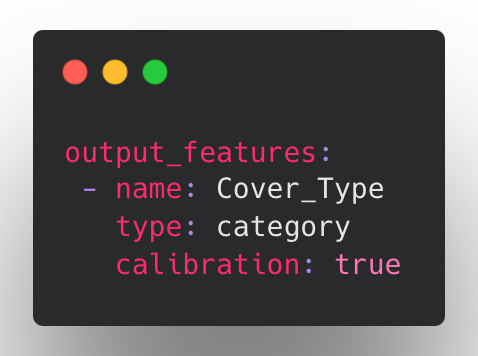
With calibration enabled, Ludwig will find a scale factor (temperature) which will bring the class probabilities closer to their true likelihoods in the validation set. The calibration scale factor is determined in a short phase after training is complete. If no validation split is provided, the training set is used instead.
To visualize the effects of calibration in Ludwig, you can use Calibration Plots, which bin the data based on model probability and plot the model probability (X) versus observed (Y) for each bin (see code examples).
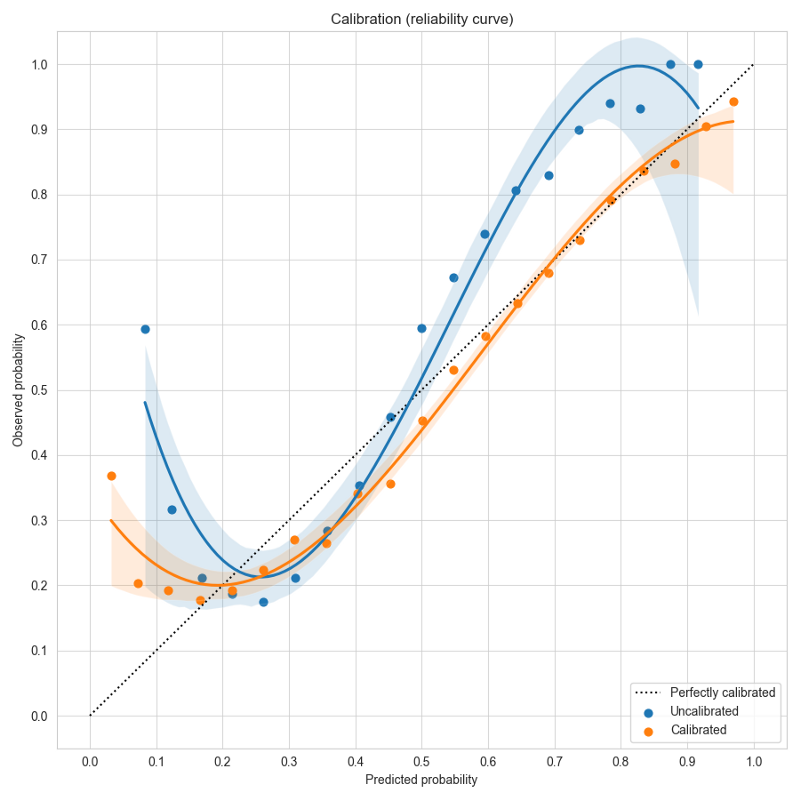
In a perfectly calibrated model, the observed probability equals the predicted probability, and all predictions will land on the dotted line y=x. In this example using the forest cover dataset, the uncalibrated model in blue gives over-confident predictions near the left and right edges close to probability values of 0 or 1. Temperature scaling learns a scale factor of 0.51 which improves the calibration curve in orange, moving it closer to y=x.
Limitations
Calibration is currently limited to models with binary and category output features.
Richer configuration schema and validation (@connor-mccorm @ksbrar @justinxzhao )
Ludwig configurations are flexible by design, as they internally map to Python function signatures. This allows configurations for expressive configurations with many parameters for the users to play with, but we have found that users would too easily have typos in their configs like incorrect value types or other syntactical inconsistencies that were not easy to catch.
We have now formalized the Ludwig config with a strongly typed schema, serving as a centralized source of truth for parameter documentation and config validation. Ludwig validation now explicitly restricts each parameter's values to valid ones, decreasing the chance of syntactical and logical errors and signaling immediately to the user where the issues lie, before processing data or starting training. Schemas also provide many future benefits including autocompletion.
Nested encoder and decoder parameters (@connor-mccorm )
We have also restructured the way that encoders and decoders are configured to now use a nested structure, consistent with other modules in Ludwig such as combiners and loss.
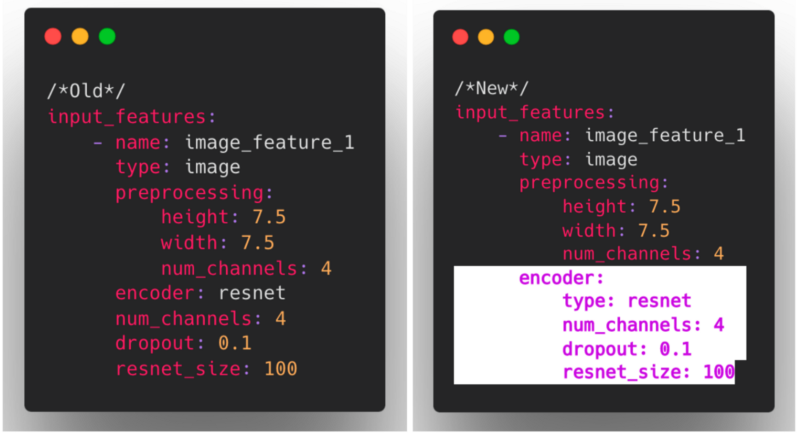
As these changes impact what constitutes a valid Ludwig config, we also introduced a mechanism for ensuring backward compatibility that invisibly and automatically upgrades older configs to the current config structure.
We hope with the new Ludwig schema and the improved encoder/decoder nesting structure, that you find using Ludwig to be a much more robust and user friendly experience!
New Defaults Ludwig Section (@arnavgarg1 )
In Ludwig 0.5, users could specify global preprocessing parameters on a per-feature-type basis through the preprocessing section in Ludwig configs. This is useful if users know they always want to apply certain transformations to their data for every feature of the same type. However, there was no equivalent mechanism for global encoder, decoder or loss related parameters.
For example, say we have a mammography dataset to predict breast cancer that contains many categorical features. In Ludwig 0.5, we might define our input features with encoder parameters in the following way:
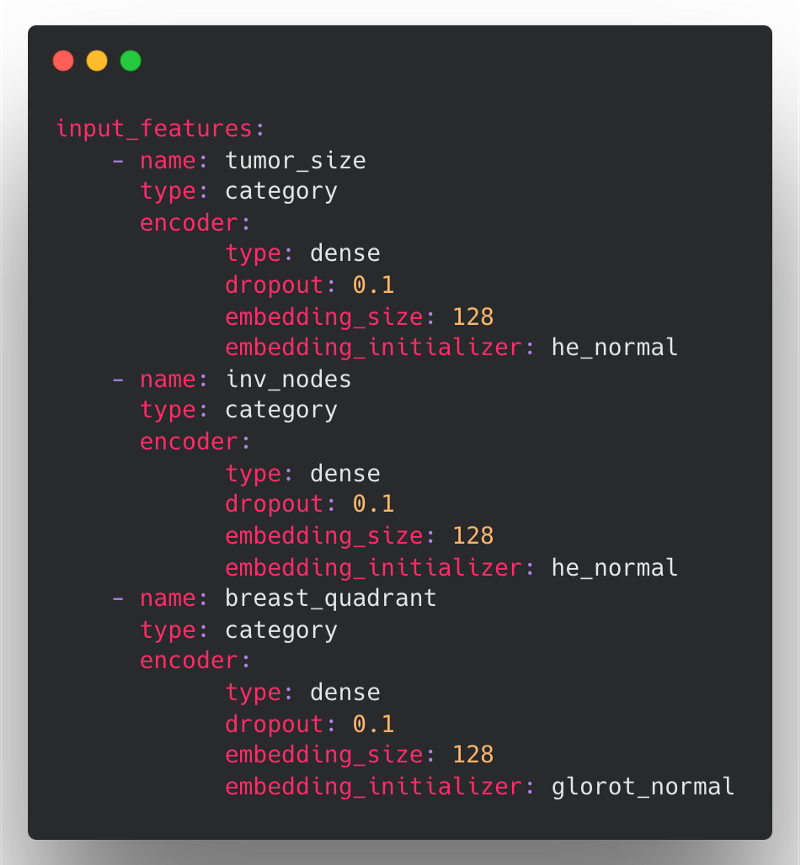
Here, the problem is that we have to redefine the same encoder parameters (type, dropout, and embedding_size) for each of the input features if we want to override the default value across all categorical features.
In Ludwig 0.6, we are introducing a new defaults section within the Ludwig config to define feature-type defaults for preprocessing, encoders, decoders, and loss. Default preprocessing and encoder configurations will be applied to all input_features of that feature type, while decoder ...
Contributors


Assets 2
v0.6rc1
What's Changed
- [release-0.6] Cherry-pick bugfixes from upstream by @tgaddair in #2471
- [release-0.6] Cherry-pick upstream commits by @tgaddair in #2473
- [release-0.6] Cherry-pick upstream by @tgaddair in #2476
- Cherry-pick backwards-compatibility fixes by @jeffreyftang in #2487
- [cherry-pick] Fixed usage of checkpoints for AutoML in Ray 2.0 (#2485) by @tgaddair in #2491
- fix: Automatically assign title to OneOfOptionsField (#2480) by @ksbrar in #2492
- [cherry-pick] Fixed stratified splitting with Dask (#1883) by @jppgks in #2494
- AUTO: by @tgaddair in #2505
- AUTO: Enable hyperopt to be launched from a ray client by @tgaddair in #2504
- [cherry-pick] Pin transformers < 4.22 until issues resolved (#2495) by @tgaddair in #2510
- [cherry-pick] Fix flaky ray nightly image test (#2493) by @tgaddair in #2511
- AUTO: by @tgaddair in #2513
- Add in-memory dataset size calculation to dataset statistics and hyperopt (#2509) by @arnavgarg1 in #2518
- AUTO: by @tgaddair in #2521
- AUTO: by @tgaddair in #2528
- AUTO: by @tgaddair in #2534
- Cherrypick: Cleanup: move to per-module loggers instead of the global logging object by @justinxzhao in #2539
- Update version to 0.6rc1. by @justinxzhao in #2529
Full Changelog: v0.6.beta...v0.6rc1
Contributors
Assets 2
v0.6.beta
What's Changed
- Fix ray nightly import by @jppgks in #2196
- Restructured split config and added datetime splitting by @tgaddair in #2132
- enh: Implements
InferenceModuleas a pipelined module with separate preprocessor, predictor, and postprocessor modules by @brightsparc in #2105 - Explicitly pass data credentials when reading binary files from a RayBackend by @jeffreyftang in #2198
- MlflowCallback: do not end run on_trainer_train_teardown by @jppgks in #2201
- Fail hyperopt with full import error when Ray not installed by @tgaddair in #2203
- Make convert_predictions() backend-aware by @hungcs in #2200
- feat: MVP for explanations using Integrated Gradients from captum by @jppgks in #2205
- [Torchscript] Adds GPU-enabled input types for Vector and Timeseries by @geoffreyangus in #2197
- feat: Added model type GBM (LightGBM tree learner), as an alternative to ECD by @jppgks in #2027
- [Torchscript] Parallelized Text/Sequence Preprocessing by @geoffreyangus in #2206
- feat: Adding feature type shared parameter capability for hyperopt by @arnavgarg1 in #2133
- Bump up version to 0.6.dev. by @justinxzhao in #2209
- Define
FloatOrAutoandIntegerOrAutoschema fields, and use them. by @justinxzhao in #2219 - Define a dataclass for parameter metadata. by @justinxzhao in #2218
- Add explicit handling for zero-length image byte buffers to avoid cryptic errors by @jeffreyftang in #2210
- [pre-commit.ci] pre-commit suggestions by @pre-commit-ci in #2231
- Create dataset util to form repeatable train/vali/test split by @amholler in #2159
- Bug fix: Use safe rename which works across filesystems when writing checkpoints by @dantreiman in #2225
- Add parameter metadata to the trainer schema. by @justinxzhao in #2224
- Add an explicit call to merge_wtih_defaults() when loading a config from a model directory. by @justinxzhao in #2226
- Fixes flaky test test_datetime_split[dask] by @dantreiman in #2232
- Fixes prediction saving for models with Set output by @geoffreyangus in #2211
- Make ExpectedImpact JSON serializable by @hungcs in #2233
- standardised quotation marks, added missing word by @Marvjowa in #2236
- Add boolean postprocessing to dataset type inference for automl by @magdyksaleh in #2193
- Update get_repeatable_train_val_test_split to handle non-stratified split w/ no existing split by @amholler in #2237
- Update R2 score to handle single sample computation by @arnavgarg1 in #2235
- Input/Output Feature Schema Refactor by @connor-mccorm in #2147
- Fix nan in entmax loss and flaky sparsemax/entmax loss tests by @dantreiman in #2238
- Fix preprocessing dataset split API backwards compatibility upgrade bug. by @justinxzhao in #2239
- Removing duplicates in constants from recent PRs by @arnavgarg1 in #2240
- Add attention scores of the vit encoder as an additional return value by @dennis-rall in #2192
- Unnest Audio Feature Preprocessing Config by @connor-mccorm in #2242
- Fixed handling of invalud number values to treat as missing values by @tgaddair in #2247
- Support saving numpy predictions to remote FS by @hungcs in #2245
- Use global constant for description.json by @hungcs in #2246
- Removed import warnings when LightGBM and Ray not requested by @tgaddair in #2249
- Adds ability to read images from numpy files and numpy arrays by @geoffreyangus in #2212
- Hyperopt steps per epoch not being computed correctly by @arnavgarg1 in #2175
- Fixed splitting when providing pre-split inputs by @tgaddair in #2248
- Added Backwards Compatibility for Audio Feature Preprocessing by @connor-mccorm in #2254
- [pre-commit.ci] pre-commit suggestions by @pre-commit-ci in #2256
- Fix: Don't skip saving the model if the save path already exists. by @justinxzhao in #2264
- Load best weights outside of finally block, since load may throw an exception by @dantreiman in #2268
- Reduce number of distributed tests. by @justinxzhao in #2270
- [WIP] Adds
inference_utils.pyby @geoffreyangus in #2213 - Run github checks for pushes and merges to *-stable. by @justinxzhao in #2266
- Add ludwig logo and version to CLI help text. by @justinxzhao in #2258
- Add hyperopt_statistics.json constant by @hungcs in #2276
- fix: Make
BaseTrainerConfigan abstract class by @ksbrar in #2273 - [Torchscript] Adds
--deviceargument toexport_torchscriptCLI command by @geoffreyangus in #2275 - Use pytest tmpdir fixture wherever temporary directories are used in tests. by @justinxzhao in #2274
- adding configs used in benchmarking by @abidwael in #2263
- Fixes #2279 by @noahlh in #2284
- adding hardware usage and software packages tracker by @abidwael in #2195
- benchmarking utils by @abidwael in #2260
- dataclasses for summarizing benchmarking results by @abidwael in #2261
- Benchmarking core by @abidwael in #2262
- Fixed default eval_batch_size when setting batch_size=auto by @tgaddair in #2286
- Remove obsolete postprocess_inference_graph function. by @justinxzhao in #2267
- [Torchscript] Adds BERT tokenizer + partial HF tokenizer support by @geoffreyangus in #2272
- Support passing ground_truth as df for visualizations by @hungcs in #2281
- catching urllib3 exception by @abidwael in #2294
- Run pytest workflow on release branches. by @justinxzhao in #2291
- Save checkpoint if train_steps is smaller than batcher's steps_per_epoch by @dantreiman in #2298
- Fix typo in amazon review datasets: s/review_tile/review_title by @dantreiman in #2300
- Refactor non-distributed automl utils into a separate directory. by @justinxzhao in #2296
- Don't skip normalization in TabNet during inference on a single row. by @dantreiman in #2299
- Fix error in postproc_predictions calculation in model.evaluate() by @arnavgarg1 in #2304
- Test for parameter updates in Ludwig components by @jimthompson5802 in #2194
- [pre-commit.ci] pre-commit suggestions by @pre-commit-ci in #2311
- Use warnings to suppress repeated logs for failed image reads by @arnavgarg1 in #2312
- Use ray dataset and drop type casting in binary_feature prediction post processing for speedup by @magdyksaleh in #2293
- Add size_bytes to DatasetInfo and DataSource by @jeffreyftang in #2306
- Fixes TensorDtype TypeError in Ray nightly by @geoffreyangus in #2320
- Add configuration section for global feature parameters by @arnavgarg1 in #2208
- Ensures unit tests are deleting artifacts during teardown by @geoffreyangus in #2310
- Fixes unit test that had empty Dask partitions after splitting by @geoffreyangus in #2313
- Serve json numpy encoding by @jeffkinnison in #2316
- fix: Mlflow config being injected in hyperopt config by @hungcs in #2321
- Update tests that use preprocessing to match new defaults config structure by @arn...
Contributors
Assets 2
v0.5.5

What's Changed
- Bump Ludwig From v0.5.4 -> v0.5.5 by @arnavgarg1 in #2340
- Bug fix: Use safe rename which works across filesystems when writing checkpoints
- Fixed default eval_batch_size when setting batch_size=auto
- Update R2 score to handle single sample computation
Full Changelog: v0.5.4...v0.5.5
Contributors
Assets 2
v0.5.4
What's Changed
- Cherrypick fixes to 0.5 by @justinxzhao in #2257
- Update ludwig version to v0.5.4. by @justinxzhao in #2265
Full Changelog: v0.5.3...v0.5.4
Contributors
Assets 2
v0.5.3
What's Changed
- Changed CheckpointManager to write the latest checkpoint to a consistent filename by @tgaddair in #2123
- fix: restore existing credentials when exiting use_credentials context manager by @jeffreyftang in #2112
- Torchscript-compatible TabNet by @geoffreyangus in #2126
- Add tests to ensure optional imports are optional by @tgaddair in #2116
- Added ray 1.13.0 and nightly wheel tests to CI by @tgaddair in #2128
- fix: Add
defaultto top level ofNumericOrStringOptionsschema by @ksbrar in #2119 - Comprehensive configs for trainer and combiner. by @justinxzhao in #2118
- Set saved_weights_in_checkpoint immediately after creating model. Also adds test. by @dantreiman in #2131
- Fix Torchscript for exclusively binary feature inputs by @geoffreyangus in #2103
- Fixes NaN handling in boolean dtypes by @geoffreyangus in #2058
- [pre-commit.ci] pre-commit suggestions by @pre-commit-ci in #2135
- Parallelizes URL reads for images using Ray/Multithreading by @geoffreyangus in #2048
- Fixes dtype of SPLIT column if already provided in CSV by @geoffreyangus in #2140
- Fixes FILL_WITH_MEAN missing value strategy with appropriate cast by @geoffreyangus in #2141
- Remove
tune_batch_sizefrom tabnet config by @ksbrar in #2145 - Accept kwargs in read_xsv by @jeffreyftang in #2151
- Remove all torch packages from the nightly test requirements by @tgaddair in #2157
- [Torchscript] Add Set output feature by @geoffreyangus in #2161
- Cleaning hyperopt logging by @arnavgarg1 in #2162
- enh: Aim experient tracking for Ludwig by @osoblanco in #2097
- Update to packaging version instead of LooseVersion by @arnavgarg1 in #2173
- rmspe: add epsilon to avoid division by zero by @jppgks in #2139
- Fix creating tensor from copy of numpy array warning messages by @arnavgarg1 in #2170
- [Torchscript] Add Vector preprocessing and postprocessing by @geoffreyangus in #2160
- [Torchscript] Add H3 preprocessing by @geoffreyangus in #2164
- Expose dtype as a parameter of the read_xsv function instead of a purely hardcoded value by @jeffreyftang in #2177
- [Torchscript] Adds Sequence and Text feature postprocessing by @geoffreyangus in #2163
- [Torchscript] Add Date feature preprocessing by @geoffreyangus in #2178
- Added flag for writing per trial logs in hyperopt by @ShreyaR in #2149
- Replace ray.state.nodes() with ray.nodes(). by @justinxzhao in #2183
- HYPEROPT: Migrate Sampler functionality to Executor by @jimthompson5802 in #2165
- Changes for enabling checkpoint syncing for hyperopt by @ShreyaR in #2115
- Adds mechanism for calibrating probabilities for category and binary features by @dantreiman in #1949
- fix: Set divisions for proc_cols directly from original dataset by @jeffreyftang in #2187
- Avoid unneeded total_entropy calculation when sparsity=0 by @amholler in #2190
- Fix changing parameters on plateau. by @justinxzhao in #2191
- [Torchscript] Adds NaN handling to preprocessing modules by @geoffreyangus in #2179
- Fix postprocessing on binary feature columns with number dtype by @geoffreyangus in #2189
- automl: Use auto batch size by default with tabnet by @tgaddair in #2150
- Update ludwig version to v0.5.3. by @justinxzhao in #2184
New Contributors
- @arnavgarg1 made their first contribution in #2162
- @osoblanco made their first contribution in #2097
Full Changelog: v0.5.2...v0.5.3
Contributors

Assets 2
v0.5.2
What's Changed
- Addresses
SettingWithCopyWarninginread_csv_with_nanby @geoffreyangus in #2053 - Update AutoML to check for imbalanced binary or category output features by @amholler in #2052
- fix: Pin
jsonschemarequirement by @ksbrar in #2059 - fix: Adjust custom JSON schema for
betasfield on optimizers by @ksbrar in #2056 - Use the smaller, unanimated GIF version so that it loads properly in PyPi by @justinxzhao in #2063
- Make text encoder trainable property default to False for pre-trained HF encoders by @dantreiman in #2060
- Pin protobuf to 3.20.1 to workaround FieldDescriptor error by @justinxzhao in #2062
- Use the smaller, unanimated GIF version so that it loads properly in PyPI by @justinxzhao in #2064
- Factor pytorch device setting code by @amholler in #2068
- fix: pin protobuf to 3.20.1 in tests by @jeffreyftang in #2070
- Update torch nightly and pin torchvision to fix CI by @tgaddair in #2072
- Added explicit encode, combine, decode functions to ECD by @tgaddair in #2073
- Revert "Adds rule of thumb for determining embeddings size" by @justinxzhao in #2069
- Unpin torchvision by @tgaddair in #2077
- Restrict torchmetrics<0.9 and whylogs<1.0 until compatibility fixed by @tgaddair in #2079
- Adding new export for Triton by @brightsparc in #2078
- Adds step tracking at epoch level by @geoffreyangus in #2081
- Fix ray hyperopt by @ShreyaR in #1999
- Adds regression test for #2081 by @geoffreyangus in #2084
- Complete PR comments for hyperopt refactoring by @jimthompson5802 in #2082
- Parallelizes URL reads using Ray / Multithreading by @geoffreyangus in #2040
- Set Hyperopt Executor Type default to RAY by @jimthompson5802 in #2093
- Fixes shape issue in
_BinaryPostprocessingby @geoffreyangus in #2094 - Rename
sequence_size->max_sequence_lengthby @justinxzhao in #2086 - Fix type hints for dropout, dropout parameter references, and add docs for FCLayer and FCStack. by @justinxzhao in #2061
- Fix to_numpy_dataset() for Dask series by @hungcs in #2095
- Add DATA_TRAIN_HDF5_FP in training_set_metadata for ParquetPreprocessor by @hungcs in #2096
- Adds torchscript-compatible Audio input feature by @geoffreyangus in #1980
- Fix progress bar ray by @magdyksaleh in #2051
- Fixes binary feature postprocessing upcast by @geoffreyangus in #2101
- Fixes for large scale hyperopt by @ShreyaR in #2083
- Changes batch norm momentum defaults to 1-momentum by @dantreiman in #2100
- Add imbalanced tabular dataset for developing AutoML heuristics by @amholler in #2106
- Deflakes and refactors torchscript tests by @geoffreyangus in #2109
- Fixed combiner schema creation by @tgaddair in #2114
- Added ability to stop and resume hyperopt / automl runs by @tgaddair in #2108
- Use the Backend to check for dask dataframes, instead of a hard check. by @justinxzhao in #2113
- Rename 'bias' to 'use_bias' for consistency by @dantreiman in #2104
- Update ludwig version to v0.5.2. by @justinxzhao in #2098
New Contributors
- @magdyksaleh made their first contribution in #2051
Full Changelog: v0.5.1...v0.5.2
Contributors
Assets 2
v0.5.1
What's Changed
- refactor: Rename, reorganize schema module by @ksbrar in #1963
- Fix redundant import by @tgaddair in #2019
- fix: Various marshmallow improvements. by @ksbrar in #1975
- fixes nans in dask df engine by @geoffreyangus in #2020
- Adds regression tests for #2020 by @geoffreyangus in #2021
- Removes pinned torchtext and torch for windows. by @dantreiman in #1998
- Add AutoML inference for audio by @hungcs in #2023
- Added support for batch size and learning rate tuning using Ray backend by @tgaddair in #2024
- Added split column for a deterministic output so flakes stop by @connor-mccorm in #2028
- Workaround test_tune_batch_size_lr flakiness by @tgaddair in #2030
- Fixed ordering of imports for comet test by @tgaddair in #2031
- Adds regression tests for #2007 by @geoffreyangus in #2018
- Improve performance of
DataFrameEngine.df_likeby @geoffreyangus in #2029 - Fixed infinite loop in tune_batch_size by @tgaddair in #2034
- Fixed learning rate tuning on gpu by @tgaddair in #2035
- Fix SIGINT handler to modify the number of remaining training steps. by @justinxzhao in #2032
- upgrade: Update jsonschema validator to latest spec. by @ksbrar in #2036
- Bumps py3.7 Ray version to 1.12.0 by @geoffreyangus in #2041
- Added blocking warning for experiment CLI, and visual warning for tra… by @connor-mccorm in #2043
- Adds ability to export scripted ECD model without pre-/post- processing modules by @geoffreyangus in #2042
- Convert nan to 0 in avg_num_tokens() by @hungcs in #2046
- Fixing the trainable parameter in pretrained encoders by @w4nderlust in #2047
- Fixes trainability of sparse embeddings by @w4nderlust in #2049
- Adds rule of thumb for determining embeddings size by @w4nderlust in #2050
- Refactor HyperOpt to use RayTune by @jimthompson5802 in #1994
Full Changelog: v0.5...v0.5.1
Contributors

Assets 2
v0.5: Declarative Machine Learning, now on PyTorch
Ludwig v0.5 is a complete renovation of Ludwig from the ground up with a focus on parity, scalability, deployment, reliability, and documentation. Ludwig v0.5 migrates our entire backend from TensorFlow to PyTorch and introduces several new features and technical improvements, including:
- Step-based training and evaluation to enable frequent sub-epoch monitoring of model health and evaluation metrics. This is particularly useful for large datasets that may be trained using large models.
- Data balancing: upsampling and downsampling during preprocessing to better proportioned datasets.
- End-to-end torchscript to support low-level optimized model deployment, including preprocessing and post-processing, to go directly from example to predictions.
- Ludwig on Ray with RayDatasets enabling significant training speed boosts for reading large datasets while training Ludwig models on a Ray cluster.
- The addition of MLPMixer and ViTEncoder as image encoders for state-of-the-art deep learning on image data.
- AutoML for tabular and text classification, integrated with distributed hyperparameter search using RayTune.
- Scalability optimizations with Dask, Modin, and Ray, enabling Ludwig to preprocess, train, and evaluate over datasets hundreds of gigabytes in size in tens of minutes.
- Config validation using marshmallow schemas revealing configuration typos or bad values early and increasing reliability.
- More tests. We've quadrupled the number of unit tests and end-to-end integration tests and we've expanded our CI testing to run in distributed and GPU settings. This strengthens Ludwig's stability and helps build confidence in new changes going forward.
Our team is thoroughly invested in improving the declarative ML experience, and, as part of the v0.5 release, we've revamped the getting started guide, user guide, and developer documentation. We've also published a handful of end-to-end tutorials with thoroughly documented notebooks on text, tabular, image, and multimodal classification that provide a deep walkthrough of Ludwig's functionality.
Migrating to PyTorch
Ludwig's migration to PyTorch comes from a substantial 6 month undertaking involving 230+ commits, changes to 70k+ lines of code, and contributions from 40+ people.
PyTorch's pythonic design and emphasis on developer experience are well-aligned with Ludwig's principles of simplicity, modularity, and extensibility. Switching to use PyTorch as Ludwig’s backend of choice was strongly motivated by the increase in productivity in development, debugging, and iteration that the more pythonic PyTorch API affords us as well as the great ecosystem the PyTorch community has built around it. With Ludwig on PyTorch, we're thrilled to see what developers, researchers, and data scientists in the PyTorch and broader deep learning community can bring to Ludwig.
Feature and Performance Parity
Over the last several months, we've moved all Ludwig encoders, combiners, decoders, and metrics for every data modality that Ludwig supports, as well as all of the backend infrastructure on Horovod and Ray, to PyTorch.
At the same time, we wanted to make sure that the experience of Ludwig users continues to be performant and delightful. We've run extensive comparisons between Ludwig v0.5 (PyTorch-based) and Ludwig v0.4 on text, image, and tabular datasets, evaluating training speed, inference throughput, and model performance, to verify that there's been no degradation.
Our results reveal roughly the same high GPU utilization (~90%) on several datasets with significant improvements in distributed training speed and memory usage without impacting model accuracy nor time to convergence. We'll be publishing a blog with more details on benchmarking soon.
New Features
In addition to the PyTorch migration, Ludwig v0.5 is packed with new functionality, features, and additional changes that make v0.5 the most feature-rich and robust release of Ludwig yet.
Step-based training and evaluation
Ludwig's train loop is epoch-based by default, with one round of evaluation per epoch (one pass through the dataset).
for epoch in num_epochs:
	for batch in training_data.batches:
		train(batch)
        save_model(model_dir)
	evaluation(training_data)
        evaluation(validation_data)
        evaluation(test_data)
        print_results()
This is an appropriate fit for tabular datasets, which are small, fit in memory, and train quickly. However, this can be awkward for unstructured datasets, which tend to be much larger, and train more slowly due to larger models. Now, with step-based training and evaluation, users can configure a more frequent sub-epoch evaluation cadence to more regularly monitor metrics and model health.
Use steps_per_checkpoint to run evaluation every N training steps, or checkpoints_per_epoch to run evaluation N times per epoch.
trainer:
    steps_per_checkpoint: 1000
trainer:
    checkpoints_per_epoch: 2
Note that it is invalid to specify both checkpoints_per_epoch and steps_per_checkpoint simultaneously.
To further speed up evaluation, users can skip evaluation on the training set by setting evaluate_training_set to False.
trainer:
    evaluate_training_set: false
Data balancing
Users working with imbalanced datasets can specify an oversampling or undersampling parameter which will balance the data during preprocessing.
In this example, Ludwig will oversample the minority class to achieve a 50% representation in the overall dataset.
preprocessing:
    oversample_minority: 0.5
In this example, Ludwig will undersample the majority class to achieve a 70% representation in the overall dataset.
preprocessing:
    undersample_majority: 0.7
Data balancing is only supported for binary output classes. Specifying both parameters at the same time is also not supported.
When developing models, it can be useful to iterate quickly with a smaller portion of the dataset. Ludwig supports this with a new preprocessing parameter, sample_ratio, which subsamples the dataset.
preprocessing:
    sample_ratio: 0.7
End-to-end torchscript
Users can export trained ludwig models to torchscript with ludwig export_torchscript.
ludwig export_torchscript –model=/path/to/model
Models that use number, category, and text binary features now support torchscript-compatible preprocessing, enabling end-to-end torchscript compilation.
inputs = {
    'cat_feature': ['foo', 'bar']
    'num_feature': torch.tensor([42, 7])
    'bin_feature1': torch.tensor([True, False])
    'bin_feature2': ['No', 'Yes']
}

scripted_model = model.to_torchscript()
output = scripted_model(inputs)
End to end torchscript compilation is also supported for text features that use torchscript-enabled torchtext tokenizers. We are actively working on adding support for other data types.
AutoML for Text Classification
In v0.4, we introduced experimental AutoML functionalities into Ludwig.
Ludwig AutoML automatically creates deep learning models given a dataset, its label column, and a time budget. Ludwig AutoML infers the input and output feature types, chooses the model architecture, and specifies the parameters and ranges across which to perform hyperparameter search.
auto_train_results = ludwig.automl.auto_train(
   dataset=my_dataset_df,
   target=target_column_name,
   time_limit_s=7200,
   tune_for_memory=False
)
Our initial AutoML work focused on tabular datasets, since good performance on such datasets is a current area of interest in the DL community. In v0.5, we expand on this work to develop and validate Ludwig AutoML for text classification.
Config validation against Marshmallow Schemas
The combiner and trainer sections of Ludwig configurations are now validated against official Marshmallow schemas. This centralizes documentation, flags configuration typos or bad values, and helps catch regressions.
Better Test Coverage
We've quadrupled the number of unit and integration tests and we've established new testing guidelines for well-tested contributions going forward. This strengthens Ludwig's stability, iterability, and helps build confidence in new changes.
Backward Compatibility
Despite all of the code changes...


