📖 日本語版はこのページの一番下にあります。

AI Agent Orchestra for You


Welcome to Symphony Agent Conductor!
This is the command center that orchestrates capable AI agents (Browser automation, IoT, Schedule management, and more) to support your life and tasks.
Just talk to it in chat, and the agents will work together! 🤖✨

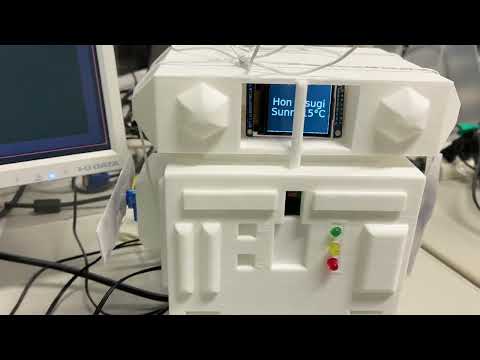
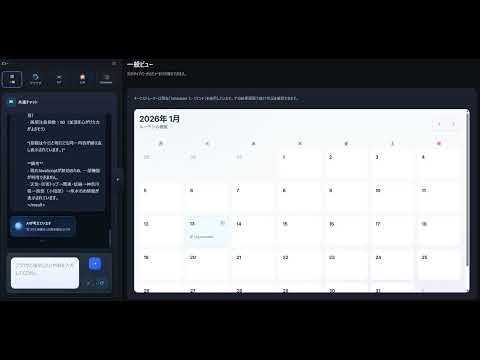
The Browser Agent fetches weather information, the Scheduler Agent saves a weather memo, and the IoT Agent displays it on the screen.
Click a thumbnail to open the video on YouTube.
 |
 |
|---|---|
| What it actually looks like on screen | Agents in action |
- 🗣️ Chat Requests: Give instructions naturally like "Check tomorrow's weather" or "Turn on the lights".
- 🌐 Browser Automation: Browses websites to gather information or perform actions on your behalf.
- 🏠 Smart Home (IoT): Controls home appliances and checks room environments (temperature, etc.).
- 📅 Schedule Management: Leave schedule adjustments and confirmations to us.
- 🧠 Memory: Remembers conversation contents and your preferences, getting smarter over time.

flowchart TD
    User["👤 User"] -->|Natural language| Frontend["Frontend SPA\n(React / TypeScript)"]
    Frontend -->|HTTP / SSE| Backend["FastAPI Backend"]

    subgraph ORCH["Orchestrator (LangGraph + LangChain)"]
        direction LR
        P[Plan] --> E[Execute] --> R[Review]
        R -->|Retry if needed| P
    end

    Backend --> P

    subgraph MEM["Memory (Orchestrator-managed)"]
        LM["Long-term Memory\nAddress · Hobbies · Health"]
        SM["Short-term Memory\nRecent Context (TTL: 45 min)"]
    end

    P <-->|Context lookup| MEM

    E -->|MCP| BA["🌐 Browser Agent\n(browser-use)"]
    E -->|MCP| IoT["🏠 IoT Agent\n(MicroPython + llama-cpp)"]
    E -->|MCP| LA["💡 Life-Style Agent\n(FAISS + multilingual-e5)"]
    E -->|MCP| SA["📅 Scheduler Agent\n(SQLAlchemy)"]

    BA -->|SSE stream| Backend
Symphony Agent Conductor orchestrates the following specialized agents:
| Agent | Repository | Description |
|---|---|---|
| 🌐 Browser Agent | kota-kawa/Browser-Agent | LLM-powered browser automation with FastAPI backend and noVNC web interface |
| 🏠 IoT Agent | kota-kawa/IoT-Agent | Conversational IoT control platform for Jetson, Raspberry Pi, and Pico W |
| 💡 Life-Style Agent | kota-kawa/Life-Style-Agent | RAG-powered lifestyle assistant with MCP support and conversation analysis |
| 📅 Scheduler Agent | kota-kawa/Scheduler-Agent | Chat-first scheduling assistant supporting OpenAI, Gemini, and Anthropic models |
This project was designed and implemented from scratch, including:
- Orchestrator: A LangGraph-based state machine with three nodes —
plan,execute, andreview— that iterates through task lists and retries up to twice on failure. The Conductor dynamically routes tasks to the appropriate agent based on natural language intent. - Memory System: A dual-layer architecture where short-term memory (TTL: 45 min) automatically promotes high-importance entries to long-term storage, enabling personalization across sessions without context bloat.
- Agent Bridges: Concurrent SSE streaming from the Browser Agent — simultaneously opening
/api/stream(event stream) and/api/chat(task execution) and merging their outputs into a unified real-time feed. - IoT Integration: MCP-based device control that resolves tool schemas dynamically at runtime, without hardcoding device capabilities.
- Frontend SPA: A single-page application with an orchestrator sidebar, live agent status display, and a memory editor (currently migrating to React / TypeScript).
| Technology | Where used | Why |
|---|---|---|
| LangGraph | Orchestrator | Graph-based state machine naturally models the plan → execute → review cycle and supports conditional retry edges without custom loop logic |
| MCP (Model Context Protocol) | Orchestrator ↔ Agents | Standardizes the interface for calling heterogeneous agents, making the system extensible — new agents can be added without changing orchestrator logic |
| FastAPI | Backend | Native async/await and SSE support are essential for streaming multi-agent progress in real time |
| Docker Compose | Deployment | Agents run as independent services, enabling composable deployment and independent scaling |
| Dual-layer Memory (JSON) | Orchestrator | Separating short-term (session-scoped) and long-term (persistent) memory with semantic diffing prevents duplicates and unbounded context growth |
Each scenario defines multiple sub-goals (criteria). Each criterion is scored as pass (○) or fail (×). The final score penalizes the agent for asking clarification questions:
Score = max(0, G − Q) G = number of criteria achieved, Q = number of clarification questions asked to the user
This treats user burden (being interrupted by questions) as a deduction, rewarding agents that resolve ambiguity through memory rather than asking. Evaluation was conducted manually by the developer, comparing a no-memory baseline against three user personas with memory enabled.
10 scenarios were used, ranging from simple conversational responses to complex multi-agent coordination (web search + scheduling + IoT control).
| # | Task Overview | # Criteria |
|---|---|---|
| 1 | Respond to an abstract conversational message | 1 |
| 2 | Look up weekly weather using stored location + log the result | 2 |
| 3 | Find cheapest Tokyo→Atlanta weekday flight in Jan 2026 + add to calendar | 2 |
| 4 | Look up moonrise direction & time + schedule "moonbathing" + turn off lights | 3 |
| 5 | Check online evacuation manual + get shelter advice (Life-Style agent) + blink red LED | 3 |
| 6 | Suggest dinner recipe (health/allergy-aware) + add to task list + display "complete" | 3 |
| 7 | Find upcoming hobby-related events near user's location + schedule them | 3 |
| 8 | Find nearby restaurant serving user's favorite food + save as memo + display store name | 3 |
| 9 | Find picnic spot + get family planning advice + schedule for next Sunday + sound buzzer | 4 |
| 10 | Recognize and execute the user's predefined daily routine | 3 |
Memory-enabled conditions scored ~1.7× higher than the no-memory baseline (max possible: 27 points).
| Condition | Score |
|---|---|
| No Memory (Baseline) | 15 / 27 |
| Persona 1 (with memory) | 24 / 27 |
| Persona 2 (with memory) | 26 / 27 |
| Persona 3 (with memory) | 25 / 27 |
Per-scenario breakdown
| Scenario | Baseline | Persona 1 | Persona 2 | Persona 3 | Max |
|---|---|---|---|---|---|
| 1 | 1 | 1 | 1 | 1 | 1 |
| 2 | 1 | 2 | 2 | 2 | 2 |
| 3 | 0 | 0 | 2 | 2 | 2 |
| 4 | 1 | 3 | 3 | 3 | 3 |
| 5 | 3 | 3 | 3 | 2 | 3 |
| 6 | 2 | 3 | 3 | 3 | 3 |
| 7 | 1 | 2 | 2 | 2 | 3 |
| 8 | 2 | 3 | 3 | 3 | 3 |
| 9 | 3 | 4 | 4 | 4 | 4 |
| 10 | 1 | 3 | 3 | 3 | 3 |
| Total | 15 | 24 | 26 | 25 | 27 |
- Memory dramatically improves ambiguous task handling — stored user context (location, preferences, allergies, routines) enabled correct interpretation without needing to ask clarification.
- Without memory, the agent resorted to general assumptions or asked clarification questions (e.g., defaulted to Tokyo when location was unspecified).
- Browser step count was not reduced by memory — instead, memory caused more verification steps (checking details against user preferences). This is the desired behavior: higher output quality over raw speed.
- Date interpretation can be inconsistent — the Browser Agent occasionally searched 2024 data instead of 2025 due to the model's knowledge cutoff. Passing an explicit year in the prompt resolves this.
- Scenario 3 (flight search) consistently struggled with date-picker UIs on booking sites.
| Challenge | How It Was Addressed |
|---|---|
| Real-time multi-agent streaming | Browser Agent required opening two concurrent connections — an event stream and a task execution request — and merging them into a single SSE feed for the frontend. Handled via asyncio and a shared progress-tracking state. |
| Memory promotion logic | Designed an importance/score-based algorithm to selectively promote short-term entries to long-term storage at TTL expiry, preventing both memory loss and unbounded growth. |
| LLM date interpretation | Model knowledge cutoff caused the Browser Agent to fetch 2024 data when 2025 results were needed. Resolved by explicitly injecting the current year into task prompts. |
| Browser date-picker automation | Flight booking sites (Scenario 3) consistently defeated automation due to JavaScript-heavy calendar widgets. Documented as a known limitation; requires specialized UI interaction strategies. |
| Ambiguous instruction handling | Without memory, the orchestrator defaulted to general assumptions (e.g., Tokyo as a fallback location). Memory-backed planning at the plan node eliminated clarification questions entirely. |
If you have Docker, the concert (system) starts with a single command! 🎼
First, write the API key that serves as the AI's brain into the configuration file.
Copy secrets.env.example in the project folder to create a file named secrets.env, and fill in your actual API keys.
cp secrets.env.example secrets.envsecrets.env
OPENAI_API_KEY=sk-proj-xxxxxxxx... (Your OpenAI API Key)
# Check secrets.env.example for other configurations
💡 Note:
secrets.envis a secret key, so please do not show it to others or upload it to Git.
Run the following command in your terminal (command prompt).
docker compose up --build webVarious text will flow, like tuning instruments. Please wait a while.
When ready, access the following URL in your browser.
If the screen appears, it's a success! Type "Hello!" in the chat box and enjoy interacting with the agents.
Press Ctrl + C in the terminal to stop the containers.
For detailed agent settings and development behind-the-scenes, please take a look at AGENTS.md. Technical details and customization methods are written there.
日本語 (クリックして開く)
あなたのためのAIエージェント・オーケストラ
Symphony Agent Conductor へようこそ!
ここは、様々な能力を持ったAIエージェントたち(ブラウザ操作、IoT、スケジュール管理など)を指揮し、あなたの生活やタスクをサポートする司令塔です。
チャットで話しかけるだけで、エージェントたちが連携して動いてくれます! 🤖✨
ブラウザエージェントで天気情報を取得した後、スケジューラーエージェントが天気の情報をメモに残し、IoTエージェントがスクリーンに表示する様子です。
サムネイルをクリックすると YouTube で動画が開きます。
|
|
|---|---|
| 実際にスクリーンに表示される様子 | エージェントが動いている様子 |
- 🗣️ チャットでお願い: 「明日の天気を調べて」「電気をつけて」など、自然な会話で指示を出せます。
- 🌐 ブラウザ操作: あなたの代わりにWebサイトを見て情報を集めたり、操作したりします。
- 🏠 スマートホーム (IoT): 家電の操作や部屋の環境(温度など)の確認ができます。
- 📅 スケジュール管理: 予定の調整や確認もお任せあれ。
- 🧠 記憶: 会話の内容やあなたの好みを覚えて、どんどん賢くなります。
flowchart TD
    User["👤 ユーザー"] -->|自然言語| Frontend["フロントエンド SPA\n(React / TypeScript)"]
    Frontend -->|HTTP / SSE| Backend["FastAPI バックエンド"]

    subgraph ORCH["Orchestrator (LangGraph + LangChain)"]
        direction LR
        P[Plan] --> E[Execute] --> R[Review]
        R -->|必要に応じてリトライ| P
    end

    Backend --> P

    subgraph MEM["メモリ (Orchestratorが管理)"]
        LM["長期メモリ\n住所・趣味・健康状態"]
        SM["短期メモリ\n直近のコンテキスト (TTL: 45分)"]
    end

    P <-->|コンテキスト参照| MEM

    E -->|MCP| BA["🌐 Browser Agent\n(browser-use)"]
    E -->|MCP| IoT["🏠 IoT Agent\n(MicroPython + llama-cpp)"]
    E -->|MCP| LA["💡 Life-Style Agent\n(FAISS + multilingual-e5)"]
    E -->|MCP| SA["📅 Scheduler Agent\n(SQLAlchemy)"]

    BA -->|SSE ストリーム| Backend
Symphony Agent Conductor は以下の専門エージェントを連携・指揮します:
| エージェント | リポジトリ | 説明 |
|---|---|---|
| 🌐 Browser Agent | kota-kawa/Browser-Agent | FastAPI バックエンドと noVNC Web UI を備えた LLM 駆動ブラウザ自動化エージェント |
| 🏠 IoT Agent | kota-kawa/IoT-Agent | Jetson・Raspberry Pi・Pico W に対応した会話型 IoT 制御プラットフォーム |
| 💡 Life-Style Agent | kota-kawa/Life-Style-Agent | MCP サポートと会話分析機能を備えた RAG 駆動ライフスタイルアシスタント |
| 📅 Scheduler Agent | kota-kawa/Scheduler-Agent | OpenAI・Gemini・Anthropic モデルに対応したチャット型スケジュール管理エージェント |
本プロジェクトは以下をゼロから設計・実装しました。
- オーケストレーター:
plan・execute・reviewの3ノードからなる LangGraph ベースのステートマシン。最大2回のリトライ付きでタスクリストを反復処理し、自然言語の意図に基づいて適切なエージェントへ動的にルーティングします。 - メモリシステム: 短期メモリ(TTL: 45分)から重要度の高いエントリを長期メモリへ自動昇格させる2層アーキテクチャ。セッションをまたいだパーソナライズをコンテキスト肥大化なしに実現します。
- エージェントブリッジ: ブラウザエージェントとの並行 SSE ストリーミング(
/api/streamと/api/chatを同時接続し、進捗をリアルタイムで中継)。 - IoT 連携: MCP ベースのデバイス制御により、デバイス能力をハードコードせずランタイムでツールスキーマを動的解決します。
- フロントエンド SPA: オーケストレーターサイドバー・ライブエージェントステータス・メモリエディタを備えたシングルページアプリケーション(React / TypeScript 移行中)。
| 技術 | 使用箇所 | 選定理由 |
|---|---|---|
| LangGraph | Orchestrator | グラフ型ステートマシンが plan → execute → review サイクルと条件付きリトライに自然にフィット。カスタムループ不要。 |
| MCP(Model Context Protocol) | Orchestrator ↔ 各エージェント | 異種エージェントの呼び出しインターフェースを標準化し、新エージェントをオーケストレーター側の変更なしに追加可能にする。 |
| FastAPI | バックエンド | ネイティブな async/await と SSE サポートが、マルチエージェントの進捗リアルタイム配信に必須。 |
| Docker Compose | デプロイ | エージェントを独立サービスとして分離し、コンポーザブルなデプロイと個別スケーリングを実現。 |
| 2層メモリ(JSON) | Orchestrator | 短期(セッション)と長期(永続)を分離し、セマンティック差分更新で重複を防ぎつつコンテキスト肥大化を回避。 |
各シナリオに複数のサブゴール(基準)を設定し、各基準を達成(○)または未達成(×)で評価します。スコアは確認質問の回数をペナルティとして差し引きます:
スコア = max(0, G − Q) G = 達成した基準の数、Q = ユーザーへの確認質問回数
これにより、曖昧な指示を質問で解消するのではなく、メモリを使って自律的に補完できるエージェントほど高いスコアを得られます。評価は開発者が事前に定義した基準に従い手動で実施し、メモリなしのベースラインとメモリ有りの3ペルソナを比較しました。
シンプルな会話応答から,複数エージェントの連携(Web検索・スケジュール・IoT制御)を必要とする複雑なタスクまで,10種類のシナリオで評価しました.
| # | タスク概要 | 基準数 |
|---|---|---|
| 1 | 抽象的な発話への適切な返答 | 1 |
| 2 | メモリから居住地を特定し,週間天気を検索・記録 | 2 |
| 3 | 2026年1月の東京→アトランタ最安値便を検索し,カレンダーに登録 | 2 |
| 4 | 月の出の方角・時間を調査し,「月光浴」の予定登録→照明消灯 | 3 |
| 5 | 避難マニュアル確認→Life-Styleエージェントで助言取得→赤色LED点滅 | 3 |
| 6 | 健康・アレルギー配慮の夕飯レシピ提案→タスク追加→"complete"表示 | 3 |
| 7 | ユーザーの趣味に関連する近隣イベントを検索→スケジュール登録 | 3 |
| 8 | 好きな食べ物の近隣店舗を検索→メモ保存→店名をディスプレイ表示 | 3 |
| 9 | ピクニックスポット調査→家族会議の進め方助言→来週日曜に予定登録→ブザー鳴動 | 4 |
| 10 | ユーザー定義のルーティンを認識して順次実行 | 3 |
メモリ機能を有効にすることで,ベースラインと比較してスコアが約 1.7倍 向上しました(最高スコア:27点).
| 評価対象 | スコア |
|---|---|
| メモリなし(ベースライン) | 15 / 27 |
| ペルソナ1(メモリあり) | 24 / 27 |
| ペルソナ2(メモリあり) | 26 / 27 |
| ペルソナ3(メモリあり) | 25 / 27 |
シナリオ別スコア内訳
| シナリオ | ベースライン | ペルソナ1 | ペルソナ2 | ペルソナ3 | 最大 |
|---|---|---|---|---|---|
| 1 | 1 | 1 | 1 | 1 | 1 |
| 2 | 1 | 2 | 2 | 2 | 2 |
| 3 | 0 | 0 | 2 | 2 | 2 |
| 4 | 1 | 3 | 3 | 3 | 3 |
| 5 | 3 | 3 | 3 | 2 | 3 |
| 6 | 2 | 3 | 3 | 3 | 3 |
| 7 | 1 | 2 | 2 | 2 | 3 |
| 8 | 2 | 3 | 3 | 3 | 3 |
| 9 | 3 | 4 | 4 | 4 | 4 |
| 10 | 1 | 3 | 3 | 3 | 3 |
| 合計 | 15 | 24 | 26 | 25 | 27 |
- メモリにより曖昧な指示の解釈精度が向上 — 居住地・好み・アレルギー・ルーティンなどをメモリから参照することで,追加質問なしに適切な行動を選択できました.
- メモリなしの場合,エージェントは一般的な前提(例:場所未指定なら東京と解釈)で動作したり,確認質問を行う場面がありました.
- ブラウザのステップ数はメモリの有無で有意差なし — ただしメモリありの場合,詳細ページの確認など「検証的なステップ」が増加しました.これはスピードより出力品質を優先する望ましい挙動です.
- 日時解釈の一貫性に課題あり — モデルの知識カットオフの影響で,2025年の検索をすべき場面で2024年の情報を取得するケースがありました.プロンプトに年を明示することで回避できます.
- シナリオ3(航空券検索) は,予約サイトの日付選択UIの操作に継続的に失敗しました.
| 課題 | 対応内容 |
|---|---|
| マルチエージェントのリアルタイムストリーミング | ブラウザエージェントとの2本の並行接続(イベントストリームとタスクリクエスト)を asyncio と共有進捗ステートで統合し、単一の SSE フィードとしてフロントエンドへ中継。 |
| メモリ昇格ロジックの設計 | TTL 切れ時に重要度・スコアで短期メモリから長期メモリへ選択的に昇格させ、メモリ消失と無制限な肥大化の両方を防止するアルゴリズムを設計・実装。 |
| LLM の日時解釈ずれ | モデルの知識カットオフで2025年検索が2024年になる問題が発生。プロンプトへの年の明示により解決。 |
| UI 日付選択の自動化 | 予約サイト(シナリオ3)の JavaScript 重厚なカレンダーUIへの操作が継続的に失敗。専門的な UI 操作戦略が必要な既知の課題として記録。 |
| 曖昧な指示のハンドリング | メモリなしではオーケストレーターが東京などの一般的な前提で動作。plan ノードでのメモリ参照を組み込むことで確認質問を排除し、精度を向上。 |
Docker があれば、コマンドひとつでコンサート(システム)が開演します! 🎼
まずは、AIの頭脳となる APIキーを設定ファイルに書き込みます。
プロジェクトのフォルダにある secrets.env.example をコピーして secrets.env という名前のファイルを作り、実際の APIキーなどを書き込んで保存してください。
cp secrets.env.example secrets.envsecrets.env
OPENAI_API_KEY=sk-proj-xxxxxxxx... (あなたのOpenAI APIキー)
# その他の設定は secrets.env.example を確認してください
💡 ポイント:
secrets.envは秘密の鍵なので、他人に見せたり Git にアップロードしたりしないでくださいね。
ターミナル(コマンドプロンプト)で以下のコマンドを実行します。
docker compose up --build webいろいろな文字が流れますが、準備をしている音合わせのようなものです。しばらく待ちましょう。
準備ができたら、ブラウザで以下のURLにアクセスしてください。
画面が表示されたら成功です!チャット欄に「こんにちは!」と入力して、エージェントたちとの対話を楽しみましょう。
ターミナルで Ctrl + C を押すと停止できます。
詳しいエージェントの設定や、開発の裏側を知りたい方は AGENTS.md を覗いてみてください。技術的な詳細やカスタマイズ方法が書いてあります。