Robustness of Jalangi2
In this document, we examine the robustness of applying Jalangi2 on modern webpages.
We use a MITM (Man-in-the-Middle) proxy to intercept all JavaScript and HTML responses from servers, allowing Jalangi2 to perform instrumentation on the intercepted content. Responses are filtered based on their headers to identify javascript or html content. The Jalangi2 runtime and analysis scripts are injected during the page loading stage by browser driven by playwright.

Ideally, all JavaScript code that being executed in the browser should be instrumented by Jalangi2. However, due to limitations in Jalangi2 and its dependencies, we cannot process all JavaScript code on real-world web pages. Here, we document several issues we have identified. Some have been patched by us, while others remain open issues that we continue to monitor.
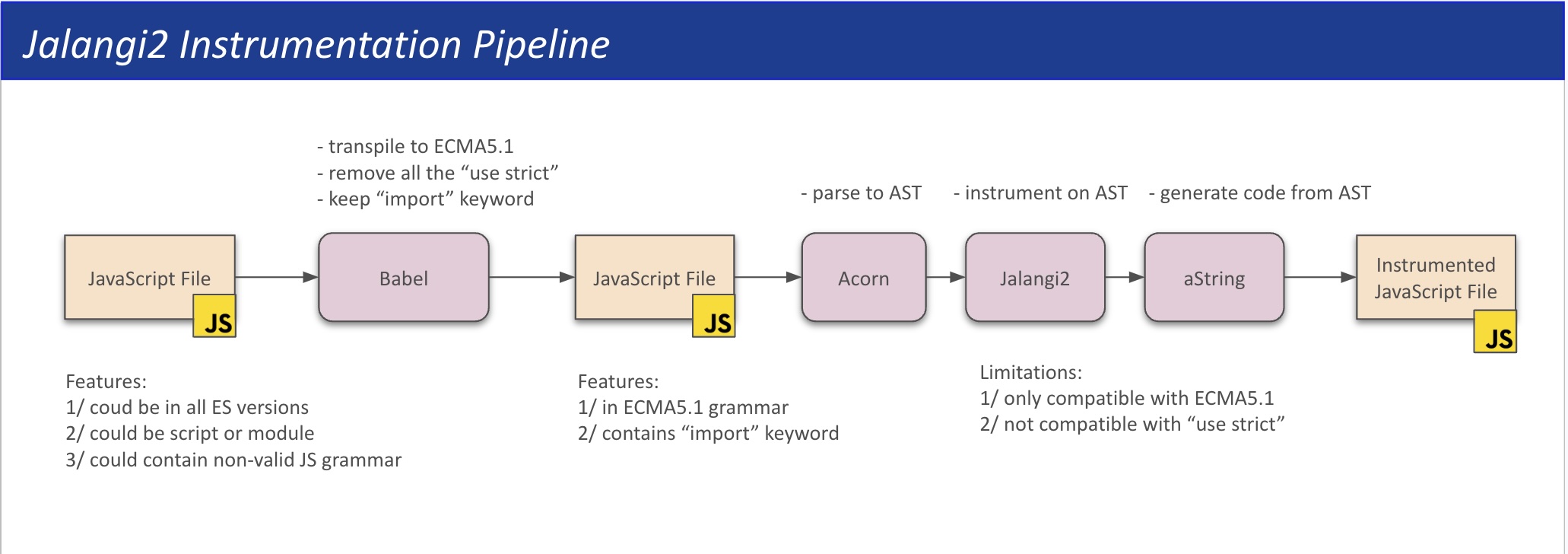
It is mentioned in the document that Jalangi2 supports ECMAScript 5.1. Some ES6 features may work, but have not been tested. Therefore, we need to use babel to convert the javascript to the es5 before the instrumented process. The presets @babel/preset-env will convert all the upper version of JavaScript syntax to ECMAScript 5.1.
function es6Transform(code) {
  // console.log('Transforming');
  if (typeof(babel) !== 'undefined' && !process.env['NO_ES7']) {
    var res = babel.transform(code, {
      retainLines: true,
          sourceType: 'script',
          presets: ['/@babel/preset-env']
    }).code;

    if (res && res.indexOf('use strict') != -1) {
      res = res.replace(/.use strict.;\n?/, '');
    }

    return res;
  } else {
        console.log('There is no babel loaded');
    return code;
  }
}
The babel would complain if the JavaScript try to use delete keyword in strict mode (inserted by babel in its early pass by default). For exmaple, when trying to instrument the following url, it would raise the error. Besides, the jalangi2 instrumeneted code cannot run in the 'use strict' mode as the it uses arguments.callee which is unaccessible in the 'use strict' mode.
https://s.go-mpulse.net/boomerang/E7B88-8P87Z-VT9SJ-BNQSU-2GTUH

{
  ...
  code: 'BABEL_PARSE_ERROR',
  reasonCode: 'StrictDelete',
  loc: Position { line: 12, column: 30059, index: 30560 },
  pos: 30560
}
node /home/jackfromeast/Desktop/TheHulk/jalangi2/src/js/commands/esnstrument_cli.js /home/jackfromeast/Desktop/TheHulk/tests/jalangi2-instrumentation-test/jalangi2-failed-js/fail1.js --out /home/jackfromeast/Desktop/TheHulk/tests/jalangi2-instrumentation-test/jalangi2-failed-js/fail1_jalangi2.js --outDir /home/jackfromeast/Desktop/TheHulk/tests/jalangi2-instrumentation-test/jalangi2-failed-js
The solution would be add the sourceType: 'script' line to the babel config. This is because babel will treat the JavaScript as sourceType: 'module' by defualt, and JavaScript modules are in struct mode by default.
var res = babel.transform(code, {
            retainLines: true,
            sourceType: 'script',
            presets: ['/@babel/preset-env']
          }).code;
Since all the functions are defined under window.J$, J$ cannot be used in the JavaScript programs by default. For example, the following scripts has the variable named J$ and cause the jalangi2 panic.
https://www.youtube.com/s/desktop/5ee39131/jsbin/desktop_polymer.vflset/desktop_polymer.js
In this case, we need to assign another variable for jalangi2: J$$.
To ensure J$$ is available in various web contexts (e.g., main frame, child frame, web worker, etc.), we inject the Jalangi2 runtime and analysis bundle before any script executes in the Playwright-driven browser. Compared to adding them directly in the HTML head, as provided by Jalangi2 by default, our approach is more robust since scripts may load and execute before the script tag in the HTML head.
To handle the main frame and child frames, we use the addInitScript API provided by Playwright. Refer to Playwright API.
However, this method cannot inject scripts into web workers by default. To support this, we listen for the initiation of web workers and evaluate the injected script accordingly. Not sure this works or not for now.
For reference: https://github.com/microsoft/playwright/issues/28029
Previously, we use the babel in this way to transpile the code to es5.
var res = babel.transform(code, {
    retainLines: true,
    sourceType: 'script',
    presets: ['@babel/preset-env'],
}).code;
By default, this configuration transforms the import statements into require calls, which is the module loader for Node.js (CommonJS), as ES5.1 doesn't have import keyword yet. However, we don't have require api on the browser environment. In this case, we retain the import keyword during the transpilation even though it shouldn't live in ECMAScript 5.1 JavaScript.
// Refer to https://github.com/babel/babel/issues/9515
var res = babel.transform(code, {
    retainLines: true,
    sourceType: 'script',
    presets: [
        ['@babel/preset-env'],
        { modules: false }
      ]
}).code;
In the downstream pass, we config the acorn with the following config to make it support import keyword during the AST parsing.
var ast = acorn.parse(code, {sourceType: "module", allowImportExportEverywhere: true, ecmaVersion: 11, locations: true});
Since the defualt code generator, esotope, doesn't support import expression, we replace it with another library, aString.
Configuring acorn to treat the code as a "module" allows it to accept import/export syntax but also forces it into strict mode. This can be problematic for code that is not strict mode compatible (e.g., uses the with statement), as treating such code as a "module" will raise errors. To address this, we implement the "unambiguous" configuration provided by Babel (not acorn) to determine if the code contains import/export syntax. If it does not, we treat it as a script rather than a module. For reference, https://babeljs.io/docs/options.
When using Jalangi2, the function definitions are instrumented with the J$$.N function in the body to declare variables. However, in strict mode (e.g., when a script is set to type=module), this instrumentation may cause an error due to reassignment of constant variables.
Consider the following uninstrumented code:
var e = {
  856: function _(e) {
    e.exports = ...
  }
}
After instrumentation, the function variable is reassigned as follows. This reassignment triggers an error in strict mode because _ is treated as a constant variable. For instance, if the script is set to type=module, the following error will occur: Error: Assignment to constant variable.
e = J$$.N(921, "e", e, 0);
var e = J$$.X1(865, J$$.W(857, "e", J$$.T(849, {
  856: J$$.T(841, function _(e) {
    jalangiLabel2: while (true) {
      try {
        J$$.Fe(817, undefined, this, arguments);
        _ = J$$.N(825, "_", _, 0);
        e = J$$.N(833, "e", e, 4);
...
However, I think this assgment is unnessary. Therefore, I remove the re-assginment expression and only keep the J$$.N function call.
// libs/jalangi2/src/js/instrument/esnstrument.js:syncDefuns
if (scope.vars[name] === "defun") {
  if (!Config.INSTR_INIT || Config.INSTR_INIT(node)) {
      ident = createIdentifierAst(name);
      ident.loc = scope.funLocs[name];
      ret = ret.concat(createCallInitAsStatement(node,
          createLiteralAst(name),
          wrapLiteral(ident, ident, N_LOG_FUNCTION_LIT),
          false,
          ident, false, false)); // Change this to false for "use strict" mode compatibility
  } else {
      ident = createIdentifierAst(name);
      ident.loc = scope.funLocs[name];
      ret = ret.concat(
          createExpressionStatement(ident,
              wrapLiteral(ident, ident, N_LOG_FUNCTION_LIT)));
  }
}
if (scope.vars[name] === "lambda") {
  if (!Config.INSTR_INIT || Config.INSTR_INIT(node)) {
      ident = createIdentifierAst(name);
      ident.loc = scope.funLocs[name];
      ret = ret.concat(createCallInitAsStatement(node,
          createLiteralAst(name), ident,
          false,
          ident, false, false)); // Change this to false for "use strict" mode compatibility
  }
}
When transpiling code to an ES5-compatible version, Babel assumes individual files have their own scope and may create global variables. For example, the plugin-transform-template-literals plugin processes template literals in the code and creates a global variable _templateObject to hold the template strings. This can lead to conflicts when multiple scripts transpiled by Babel are included on the same webpage.
Consider the following code:
(function () {
  let t = "#";
  let e = "type";
  // The following line will create the _templateObject due to the babel tranpilation
  // However, _templateObject is a global variable and it will be overwritten by other babel transpiled code
  // This is because the babel only see one file at a time
  foo`${t}/${e}`;

})();

function foo(e, ...t) {
  if (e[0] != '' || e[1] != '/' || e[2] != '') {
    throw new Error('Invalid template call');
  }

  if (t[0] != '#' || t[1] != 'type') {
    throw new Error('Invalid template call');
  }
}
After transformation, the code becomes:
var _templateObject;function _taggedTemplateLiteral(strings, raw) {if (!raw) {raw = strings.slice(0);}return Object.freeze(Object.defineProperties(strings, { raw: { value: Object.freeze(raw) } }));}
(function () {
  var t = "#";
  var e = "type";
  // The following line will create the _templateObject due to the babel tranpilation
  // However, _templateObject is a global variable and it will be overwritten by other babel transpiled code
  // This is because the babel only see one file at a time
  foo2(_templateObject || (_templateObject=_taggedTemplateLiteral(["", "?", ""]), t, e));
})();

function foo2(e) {
  if (e[0] != '' || e[1] != '?' || e[2] != '') {
    throw new Error('Invalid template call');
  }

  if ((arguments.length <= 1 ? undefined : arguments[1]) != '#' || (arguments.length <= 2 ? undefined : arguments[2]) != 'type') {
    throw new Error('Invalid template call');
  }
}
In the above example, the variable _templateObject is defined globally. When multiple scripts that have template literals are included in a client-side webpage, they will conflict with each other as they all define and assign their own _templateObject variable. This happens because Babel processes one file at a time and does not account for the potential conflicts across multiple files.
To address this issue, we considered several options: 1/ Wrapping each file with an IIFE to ensure they have their own isolated scopes and avoid conflicts, 2/ Removing the shortcut (eliminating the || operator) to create the template literal directly, and 3/ Assigning unique, non-conflicting names to _templateObject across different files.
Finally, we chose the second solution because the first option could interfere with scripts that need to share global variables. The third option was impractical since it would be challenging to assign unique names to _templateObject across files, especially when processing responses individually in the proxy without knowledge of their dependencies.
Finally, we patch the plugin-transform-template-literals module with the following diff:
63a64,68
>         // path.replaceWith(_core.types.callExpression(node.tag, [_core.template.expression.ast`
>         //       ${_core.types.cloneNode(tmp)} || (
>         //         ${tmp} = ${this.addHelper(helperName)}(${helperArgs})
>         //       )
>         //     `, ...quasi.expressions]));
65,68c70,73
<               ${_core.types.cloneNode(tmp)} || (
<                 ${tmp} = ${this.addHelper(helperName)}(${helperArgs})
<               )
<             `, ...quasi.expressions]));
---
>           (
>             ${tmp} = ${this.addHelper(helperName)}(${helperArgs})
>           )
>         `, ...quasi.expressions]));
Script tag with type='module' is forced to use strict-mode while jalangi2 runtime is not strict-mode compatible.
For this problem, we currently cannot run the code imported by the type='module' script tag.
<script src="./type-module/scripts/type-module-1.js" type="module"></script>
We will get the following error. This error looks like a JavaScript parse error because in strict mode, we cannot assign arguments or get access to arguments.callee in strict mode.
type-module-1.js:9 Uncaught SyntaxError: Unexpected eval or arguments in strict mode (at type-module-1.js:9:11)

TypeError: 'caller', 'callee', and 'arguments' properties may not be accessed on strict mode functions or the arguments objects for calls to them

J$$.Fe(193, arguments.callee, this, arguments);
arguments = J$$.N(201, "arguments", arguments, 4);
Currently, here is a workaround to fix the first SyntaxError by commenting out the arguments setting part. And since we don't need to have the Fe, Function Enter callback, we can also comment out the J$$.Fe part.
Refer to https://github.com/Samsung/jalangi2/issues/120.
The function wrapLogicalOr in jalangi2/src/js/instrument/esnstrument.js convert the logical or to contional expression ?:. For example, let x = a || b => let x = J$.C(a) ? J$._() : b and J$._() retruns the last computed value which is J$.C(a) or b.
The problem is that if a is an symbolic value, in J$.C(a) convert a to its concrete value, otherwise, the condition will always return true due to our symbolic object wrapper. Then J$._() will be the concrete value of a, and we will lose the symbolic variable.
To solve this problem, my first solution is to modify the instrumentation: let x = a || b => let x = J$.C(a) ? a : b. But this would cause a problem when instrumenting chained logical or:
let x = a() || b() || c() =>
J$.C((J$.C(a()) ? a():b())) ? (J$.C(a()) ? a():b()) : c()

// in stead of generating something like:
let x = J$.C(a()) ? a() : J$.C(b()) ? b() : c()
Currently, I use the second solution in the following code:
let J$._() = a instead of let J$._() = J$.C(a)
This shouldn't become a problem again, due to the fix of (Performance drop introduced by mitmproxy).
JavaScript files can become significantly larger after instrumentation. For instance, a script initially containing 31,130 lines of code (1.3 MB) can grow to over 80 MB post-instrumentation. This increase in size can lead to errors related to socket.send() raised exception when reading the file from the cache and sending it to the network stream.
The quick workaround would be:
- Increase the
stream_large_bodiesargument for mitmdump.
mitmdump --set stream_large_bodies=500m --anticache --quiet -p 8899 -s "proxy.py"
Another two alternative workarounds would be:
- Skip instrumenting large files and send them back directly.
- Use an offline minification tool to compress the instrumented file. Although the minification process is time-consuming, it can reduce the file size by up to 53%.
Here is an example illustrating this issue. The following URL points to a large JavaScript file, which hinders the loading of youtube.com:
- URL:
https://www.youtube.com/s/desktop/5ee39131/jsbin/desktop_polymer.vflset/desktop_polymer.js - JS File:
/home/xxxxxxxxxxxx/Desktop/TheHulk/proxy-server/cache/www.youtube.com/d842e6c5816b064198143e38f1266ba5.js - Instrumented Version:
/home/xxxxxxxxxxxx/Desktop/TheHulk/proxy-server/cache/www.youtube.com/d842e6c5816b064198143e38f1266ba5_jalangi_.js - Minified Version:
/home/xxxxxxxxxxxx/Desktop/TheHulk/proxy-server/cache/www.youtube.com/d842e6c5816b064198143e38f1266ba5_jalangi_.min.js
Overall, we still need give enough time for the browser side to get all the script loaded. In the youtube.com's case, in the first time, we encounter the timeout error and in the second time, it takes 40s to load the second script desktop_polymer.js.


TODO: Talk about the import/export and use strict grammar compatibility in Jalangi2.
- 1/ Script tag with
type='module'is forced to usestrict-modewhile jalangi2 runtime is not strict-mode compatible

- Related Works
- HTML Injection
- DOM Clobbering
- Evaluation
- Discussion
- Others