


An IntelliJ plugin for Flutter development. Flutter is a multi-platform app SDK to help developers and designers build modern apps for iOS, Android and the web.
Flutter's hot reload helps you quickly and easily experiment, build UIs, add features, and fix bugs faster. Experience sub-second reload times, without losing state, on emulators, simulators, and hardware for iOS and Android.
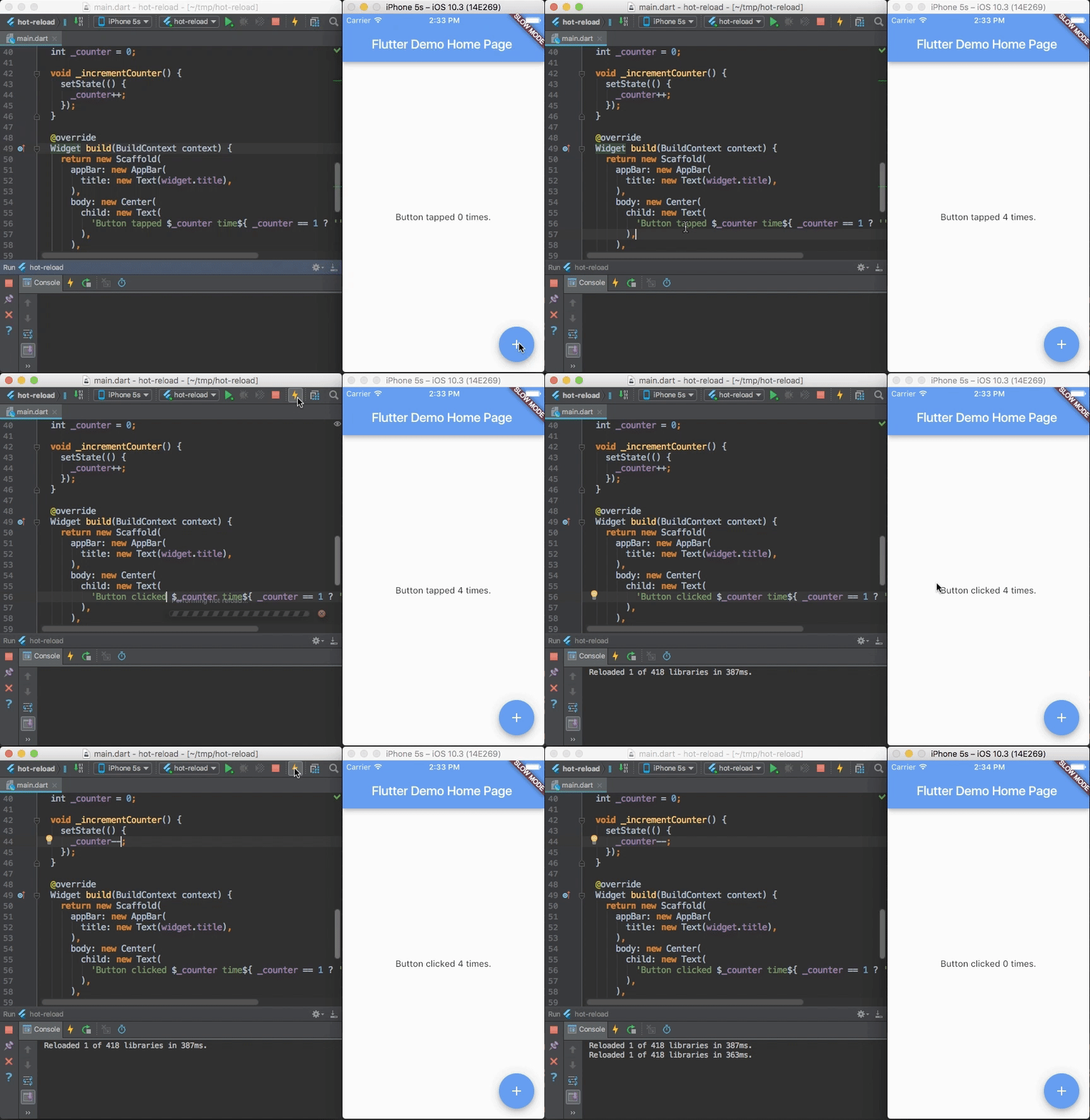
A brief summary of the getting started guide:
- install the Flutter SDK
- run
flutter doctorfrom the command line to verify your installation - ensure you have a supported IntelliJ development environment; either:
- the latest stable version of IntelliJ, Community or Ultimate Edition (EAP versions are not always supported)
- the latest stable version of Android Studio (note: Android Studio Canary versions are generally not supported)
- open the plugin preferences
Preferences > Pluginson macOS,File > Settings > Pluginson Linux, select "Browse repositories…"
- search for and install the 'Flutter' plugin
- choose the option to restart IntelliJ
- configure the Flutter SDK setting
Preferenceson macOS,File>Settingson Linux, selectLanguages & Frameworks > Flutter, and set the path to the root of your flutter repo
Please use our issue tracker for Flutter IntelliJ issues.
- for more general Flutter issues, you should prefer to use the Flutter issue tracker
- for more Dart IntelliJ related issues, please use the Dart Plugin issue tracker
Please note the following known issues:
- #601: IntelliJ will read the PATH variable just once on startup. Thus, if you change PATH later to include the Flutter SDK path, this will not have an effect in IntelliJ until you restart the IDE.
- If you require network access to go through proxy settings, you will need to set the
https_proxyvariable in your environment as described in the pub docs. (See also: #2914.)
If you like getting new features as soon as they've been added to the code then you might want to try out the dev channel. It is updated daily with the latest contents from the "main" branch. It has minimal testing. Set up instructions are in the wiki's dev channel page.
These are the versions of Flutter SDK that current and previous Flutter plugins support:
| Flutter SDK version | Flutter plugin version |
|---|---|
| up to v3.7.12 | 83.0.4 and earlier |
| v3.10.0 to v3.10.2 | 85.3.2 and earlier |
| v3.10.3 to v3.10.6 | 86.0.2 and earlier |
| v3.13.0 to v3.13.9 | 88.1.0 and earlier |
| v3.16.0 and above | Currently supported |
Here is more information on the Flutter plugin's support for Flutter SDKs: https://docs.flutter.dev/tools/sdk#sdk-support-for-flutter-developer-tools.
This repository comes with custom configuration and automation skills for AI coding agents (such as Gemini Code Assist / Antigravity).
These skills are located in the .agents/skills/ directory. They are automatically discovered and loaded by agentic workflows when they analyze the workspace.
- Add Missing Unit Test: Add a new unit test for a class that currently lacks one or add a new test case to an existing test file, verifying improvement with Kover.
- Accessibility (A11y) Audit: Ensure the plugin's custom UI components are accessible to users with screen readers and other assistive technologies.
- Dependency & Library Audit: Optimize plugin size and security by removing unused dependencies and updating outdated libraries.
- UI Thread Safety Audit: Prevent UI freezes and ensure a responsive user experience by validating threading rules and migrating blocking calls off the Event Dispatch Thread (EDT).
- Code Inspection Cleanup: Reduce technical debt and improve code quality by systematically resolving static analysis warnings.
- Unused Asset Cleanup: Reduce plugin size by scanning
resources/iconsand removing unreferenced assets. - Code Review: Performs a pedantic, multi-perspective code review (covering logic, correctness, resource safety, design, and styleguide compliance) on your uncommitted changes.
- Migrate IntelliJ Util: Optimize memory usage, consistency, and performance by migrating standard Java/Kotlin classes to IntelliJ's specialized
com.intellij.utilimplementations. - Remove Platform Version: Remove support for an older IntelliJ Platform / Android Studio version from the project and clean up obsolete code, baselines, and CI configurations.
- Resolve Verification Issues: Eliminate plugin verification warnings and errors identified by
./gradlew verifyPlugin. - Verify EAP Compatibility: Ensure the plugin remains compatible with the latest IntelliJ Platform releases and EAP (Early Access Program) builds.
Tell your AI assistant to run the desired skill (e.g. by typing /code-review or asking "Run the code-review skill on my changes"). The agent will automatically find, load, and follow the instructions in the corresponding SKILL.md file.