Releases: denizsafak/AutoSubSync
AutoSubSync v6.4

267d905 denizsafak
Deniz Şafak
denizsafak
Deniz Şafak
-
Headless CLI: Added headless CLI for autonomous subtitle sync pipelines. Contributed by @Aidenir in PR #86, also mentioned by @nacho692 in #66:
Introduces assy-cli with five subcommands (sync, shift, batch, config, version), JSON output mode, structured exit codes, and a slim Docker image - so AutoSubSync can run in CI/CD, scheduled jobs, and containers without a display or Qt event loop. The sync engine logic was extracted from SyncProcess into a new sync_core module that knows nothing about Qt; SyncProcess is now a thin adapter that wires Qt signals to sync_core callbacks. The pairing logic moved to a new pairing module the GUI re-imports. utils.py drops its top-level QtWidgets/QtGui imports so the CLI never loads Qt display libraries at runtime.
See Command-line interface (assy-cli) for detailed instructions.
-
Python 3.14+ Compatibility: Added a shim for
pkg_resourcesto ensure compatibility with legacy dependencies (likeautosubsync) that fail in recent Python versions wheresetuptoolsis not installed by default, Updatedpyproject.tomlto allow installation on Python 3.14. Contributed by @MateusSantos14 in PR #85 -
Custom Subtitle Suffix: Added a new option called
Add custom suffix for subtitlesin settings to define a default custom suffix for processed subtitles. All save locations (except "Overwrite input subtitle") will append this suffix to the output file name, added--suffixparameter in both CLI subcommands (syncandbatch), mentioned by @StalOlympus in issue #69 -
Fixed
No executable found for alasserror in Windows with PyPI build, mentioned by @Milor123 in issue #84 -
Auto-Pairing with Season/Episodenow sorts paired items correctly before adding to batch view, mentioned by @enchained in issue #71
Downloads
- Windows (x64): AutoSubSync-windows-amd64.zip
- macOS (Apple Silicon): AutoSubSync-macos-arm64.zip
- macOS (Intel): AutoSubSync-macos-amd64.zip
- Linux (AppImage): AutoSubSync-linux-amd64.AppImage
- Linux (Tarball): AutoSubSync-linux-amd64.tar.gz
MacOS users please read the instructions.
Included:
ffmpeg: 7.1
ffsubsync: 0.4.31
alass: 2.0
autosubsync: 1.0.1
Contributors


Assets 7
AutoSubSync v6.3

f1480ac
denizsafak
Deniz Şafak
v6.3 only includes the following changes on top of v6.2:
- Added new language:
zh_TW(Taiwan Chinese) contributed by @ceshizhuanyong895 in PR #68. - Fixed an issue where the application would not restart correctly, due to incorrect handling of entry points in the
restart_applicationfunction. Improved error logging to provide clearer information if a restart fails in the future. - Improvements in code and documentation.
Keeping the v6.2 changelog here for reference:
- PyPI package now available! You can install AutoSubSync directly with
pip install assyand run withassyorassy-cli. This provides an easier installation method for users who prefer pip. - Added Sync tracking system for Batch Mode. This system keeps track of all videos that have been successfully synced, so when you add a large library of videos to the batch list, the app automatically identifies and skips the ones you've already processed before. This is especially useful when working with large media collections where you periodically add new content and want to avoid re-syncing existing files. Feature requested by @M10pnl in #54.
- Designed for video files only; reference or output subtitle files are not tracked.
- Videos are identified by their content using a unique fingerprint (hash), not by filename or path. This means you can rename, move, or reorganize your files and the system will still recognize them as already processed.
- When you add videos to the batch list, previously processed ones automatically appear greyed out with a
Status: Skippedtooltip, making it easy to see at a glance which files will be skipped. - When sync tracking is disabled: No videos will be automatically skipped, newly synced videos will not be added to the database, and sync-related options will not appear in Batch Mode.
- Access all sync tracking features via multiple locations:
- Batch Mode:
Sync trackingbutton (shows green text when enabled) or right-click context menu - Settings Menu:
Sync trackingsubmenu (shows "Enabled" or "Disabled" status in title)
- Batch Mode:
- Sync tracking menu options:
Sync tracking system: Enabled/Disabled- Toggle the system on or offClear processed items database- Reset the tracking database (Please be careful with this action, as it cannot be undone if you have not backed up your database.)Backup processed items database- Export your database for safekeepingImport processed items database- Import items from another database (merges without duplicates)Manage library folders- Open the Library Folders ManagerLoad library- Quickly load all saved library folders into Batch Mode (Batch Mode menu only)
- Right-click context menu provides manual control over individual items:
Force process selected video(s)- Temporarily override the skip and process the video againSkip processing selected video(s)- Manually mark videos to be skipped without adding them to the databaseAdd selected video(s) to processed items database- Mark videos as already processed without syncing themRemove selected video(s) from processed items database- Remove videos from the database so they can be processed again
Refreshbutton re-checks all videos in the current list against the database.- Database file location:
processed_items.dbin the config directory (accessible viaSettings→Open config file directory).
- Added Library Manager system for Batch Mode. The Library Manager allows you to save frequently used folders for quick access in Batch Mode. Add folders containing video files and their corresponding subtitle files. These folders will be remembered between sessions, so you don't have to re-add them each time. You can add, remove, or clear folders as needed. When 'Load library' is clicked, it will load all videos and subtitles that exist in the folders you added.
- Access via the
Sync trackingmenu →Manage library foldersor directly in Batch Mode via theSync trackingbutton - Add, remove, and organize your library folders
- Folders that no longer exist are highlighted in red
- Click
Load libraryto load all saved folders, or press OK in the manager to load and close - Database file location:
library_folders.dbin the config directory (accessible viaSettings→Open config file directory).
- Access via the
- Batch Input system now supports adding multiple subtitle files to a single Video/Reference parent item. Each subtitle file is automatically interpreted as its own individual processing task, all linked to the same parent video/reference file, feature mentioned by @StalOlympus in #58.
- Added Undo/Redo support to the Batch Input, including
Ctrl+ZandCtrl+Yshortcuts and new right-click menu options, allowing users to easily revert or reapply actions while managing items. - Added new option Auto-rename files if needed: When enabled (and
alassis selected), AutoSubSync will automatically rename any file or folder path components that contain[or](replacing them with(and)) to fix an error wherealasscannot work with paths containing these characters. When disabled, AutoSubSync will display a 30-second prompt asking whether to rename the affected paths; if the prompt times out, the rename will be skipped. Possibly fixes the issue mentioned by @SilfraTheDragon in #63. - Upgraded ffsubsync from
0.4.30to0.4.31. - Linux: Now distributed as AppImage for easier installation and portability.
- macOS: Now distributed as a native .app bundle with improved code signing.
- Improvements in documentation, translations, and code.
Note
If you installed using pip, you can upgrade using this command:
pip install --upgrade assyIf you installed using uv:
uv tool update assyMacOS users please read the instructions.
Included:
ffmpeg: 7.1
ffsubsync: 0.4.31
alass: 2.0
autosubsync: 1.0.1
Contributors


Assets 6
AutoSubSync v6.2
- PyPI package now available! You can install AutoSubSync directly with
pip install assyand run withassyorassy-cli. This provides an easier installation method for users who prefer pip. - Added Sync tracking system for Batch Mode. This system keeps track of all videos that have been successfully synced, so when you add a large library of videos to the batch list, the app automatically identifies and skips the ones you've already processed before. This is especially useful when working with large media collections where you periodically add new content and want to avoid re-syncing existing files. Feature requested by @M10pnl in #54.
- Designed for video files only; reference or output subtitle files are not tracked.
- Videos are identified by their content using a unique fingerprint (hash), not by filename or path. This means you can rename, move, or reorganize your files and the system will still recognize them as already processed.
- When you add videos to the batch list, previously processed ones automatically appear greyed out with a
Status: Skippedtooltip, making it easy to see at a glance which files will be skipped. - When sync tracking is disabled: No videos will be automatically skipped, newly synced videos will not be added to the database, and sync-related options will not appear in Batch Mode.
- Access all sync tracking features via multiple locations:
- Batch Mode:
Sync trackingbutton (shows green text when enabled) or right-click context menu - Settings Menu:
Sync trackingsubmenu (shows "Enabled" or "Disabled" status in title)
- Batch Mode:
- Sync tracking menu options:
Sync tracking system: Enabled/Disabled- Toggle the system on or offClear processed items database- Reset the tracking database (Please be careful with this action, as it cannot be undone if you have not backed up your database.)Backup processed items database- Export your database for safekeepingImport processed items database- Import items from another database (merges without duplicates)Manage library folders- Open the Library Folders ManagerLoad library- Quickly load all saved library folders into Batch Mode (Batch Mode menu only)
- Right-click context menu provides manual control over individual items:
Force process selected video(s)- Temporarily override the skip and process the video againSkip processing selected video(s)- Manually mark videos to be skipped without adding them to the databaseAdd selected video(s) to processed items database- Mark videos as already processed without syncing themRemove selected video(s) from processed items database- Remove videos from the database so they can be processed again
Refreshbutton re-checks all videos in the current list against the database.- Database file location:
processed_items.dbin the config directory (accessible viaSettings→Open config file directory).
- Added Library Manager system for Batch Mode. The Library Manager allows you to save frequently used folders for quick access in Batch Mode. Add folders containing video files and their corresponding subtitle files. These folders will be remembered between sessions, so you don't have to re-add them each time. You can add, remove, or clear folders as needed. When 'Load library' is clicked, it will load all videos and subtitles that exist in the folders you added.
- Access via the
Sync trackingmenu →Manage library foldersor directly in Batch Mode via theSync trackingbutton - Add, remove, and organize your library folders
- Folders that no longer exist are highlighted in red
- Click
Load libraryto load all saved folders, or press OK in the manager to load and close - Database file location:
library_folders.dbin the config directory (accessible viaSettings→Open config file directory).
- Access via the
- Batch Input system now supports adding multiple subtitle files to a single Video/Reference parent item. Each subtitle file is automatically interpreted as its own individual processing task, all linked to the same parent video/reference file, feature mentioned by @StalOlympus in #58.
- Added Undo/Redo support to the Batch Input, including
Ctrl+ZandCtrl+Yshortcuts and new right-click menu options, allowing users to easily revert or reapply actions while managing items. - Added new option Auto-rename files if needed: When enabled (and
alassis selected), AutoSubSync will automatically rename any file or folder path components that contain[or](replacing them with(and)) to fix an error wherealasscannot work with paths containing these characters. When disabled, AutoSubSync will display a 30-second prompt asking whether to rename the affected paths; if the prompt times out, the rename will be skipped. Possibly fixes the issue mentioned by @SilfraTheDragon in #63. - Upgraded ffsubsync from
0.4.30to0.4.31. - Linux: Now distributed as AppImage for easier installation and portability.
- macOS: Now distributed as a native .app bundle with improved code signing.
- Improvements in documentation, translations, and code.
MacOS users please read the instructions.
Included:
ffmpeg: 7.1
ffsubsync: 0.4.31
alass: 2.0
autosubsync: 1.0.1
AutoSubSync v6.1
e0f18f4
denizsafak
Deniz Şafak
- Added new option
Pair multiple subtitles with single sourcein batch mode, allowing users to pair multiple subtitle files with a single video or reference subtitle file, mentioned by @StalOlympus in #58. - Added Docker support by @IlmariKu.
- Added
mov_textas extractable subtitle format for ffmpeg. - Fixed autosubsync creating 0‑byte files when overwriting existing files, mentioned by @chschmit in #59.
- Improvements in code and documentation.
MacOS users please read this.
Included:
ffmpeg: 7.1
ffsubsync: 0.4.30
alass: 2.0
autosubsync: 1.0.1
Contributors


Assets 6
AutoSubSync v6.0
4ca85bd
denizsafak
Deniz Şafak
✨ AutoSubSync has been completely redesigned and rebuilt from scratch with the PyQt6 framework, bringing you a modern interface and a smoother, better user experience!
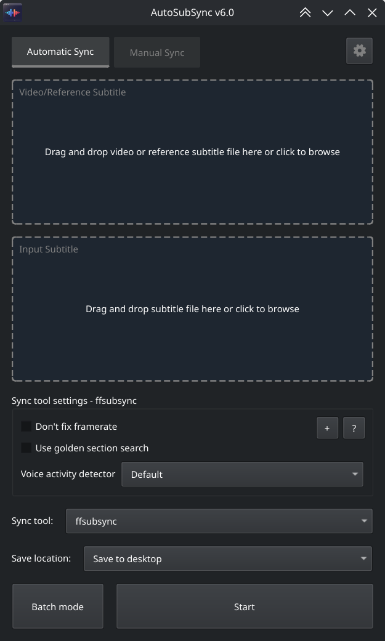
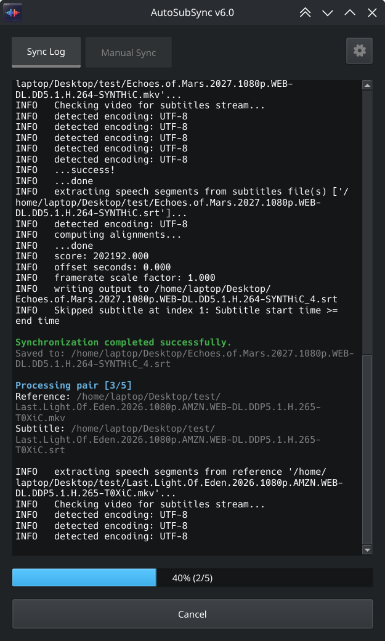
Key changes:
- Added a new tool: autosubsync
- ffsubsync now runs at the module level instead of as an external executable, improving integration and performance.
There are too many improvements and fixes to list here.
Full changelog: v5.8...v6.0
Note
I haven't tested the macOS build. Please open an issue if you encounter any problems.
MacOS users please read this.
Included:
ffmpeg: 7.1
ffsubsync: 0.4.29
alass: 2.0
autosubsync: 1.0.1
AutoSubSync v5.8
61c871a
denizsafak
Deniz Şafak
- Added
Output subtitle encodingoption to allow users to force the encoding of the output subtitle file, mentioned in #36 by @babywin - Added
.smisubtitle format support, mentioned in #40 by @SHRIMP159 - Added
.vttto supported extensions for ffsubsync. - Switched to platformdirs for finding paths in different operating systems.
- Separated some utility functions and configurations into different files.
- Fixed alass not working in MacOS, fixes #38
MacOS users please read this.
Included:
ffmpeg: ffmpeg version 7.1-essentials_build
ffsubsync: ffsubsync 0.4.29
alass: alass-cli 2.0.0
Contributors


Assets 6
AutoSubSync v5.7
28f2b4a
denizsafak
Deniz Şafak
- Added a 'Copy' option to the right-click menu in the log window, enabling users to copy the log content to their clipboard.
- Added an information label for font selection window.
- Fixed an issue where the program failed to operate correctly when located in directories with non-Latin characters, mentioned in #34 by @Cerastia
- During batch synchronization, pairs that failed are now assigned their original sequence numbers from the synchronization process, instead of being re-numbered from 1.
- Improvements in code and translations.
MacOS users please read this.
Included:
ffmpeg: ffmpeg version 7.1-essentials_build
ffsubsync: ffsubsync 0.4.29
alass: alass-cli 2.0.0
Contributors

Assets 6
AutoSubSync v5.6
22fcc1c
denizsafak
Deniz Şafak
- Fixed freezing batch sync when giving conversion errors, mentioned in #33 by @Stooovie
- Fixed completed/total items is not displaying correctly in batch sync.
- Added a warning dialog when canceling batch sync.
- Added padding for scroll to bottom button.
MacOS users please read this.
Included:
ffmpeg: ffmpeg version 7.1-essentials_build
ffsubsync: ffsubsync 0.4.29
alass: alass-cli 2.0.0
Contributors

Assets 6
AutoSubSync v5.4
bc4de23
denizsafak
Deniz Şafak
- Updated ffsubsync to v0.4.29.
- Fixed
Unable to detect speecherror in Linux distributions. - Fixed
GLIBC_*not found error caused by ffsubsync in most Linux distributions. - Fixed
charmap' codec can't encode charactererror in some subtitles.
MacOS users please read this.
Included:
ffmpeg: ffmpeg version 7.1-essentials_build
ffsubsync: ffsubsync 0.4.29
alass: alass-cli 2.0.0
AutoSubSync v5.3
37684e0
denizsafak
Deniz Şafak