
Rigorous Alignment Curation: Cleanup Of Outliers and Noise
This is a nextflow implementation of https://github.com/artic-network/raccoon which you can access at https://github.com/Desperate-Dan/raccoon-nf. Raccoon is a lightweight toolkit for alignment and phylogenetic QC workflows. It identifies problematic sites (e.g., clustered SNPs, SNPs near Ns/gaps, and frame‑breaking indels) and produces mask files and summaries for downstream analyses. In depth details on Raccoon and it's workings can be found here.
The Raccoon Nextflow pipeline has only one mandatory input, which is either a single fasta file or a directory of fasta files. It then runs Raccoon seq-qc on the samples, followed by alignment with mafft, and then the Raccoon aln-qc module. The workflow can be stopped at this point if desired by choosing the Only run alignment steps option. You can optionally choose to mask the generated alignment using Raccoon mask at this stage by selecting Run masking step, or use an unmasked alignment file (default behaviour) for phylogenetic tree building using IQ-TREE. If an outgroup has been provided an additional step will be carried out to prune the outgroup from the resulting treefile, before running the Raccoon tree-qc module. Below is a diagram of the Raccoon-nf workflow (a larger version of the workflow figure can be found here).
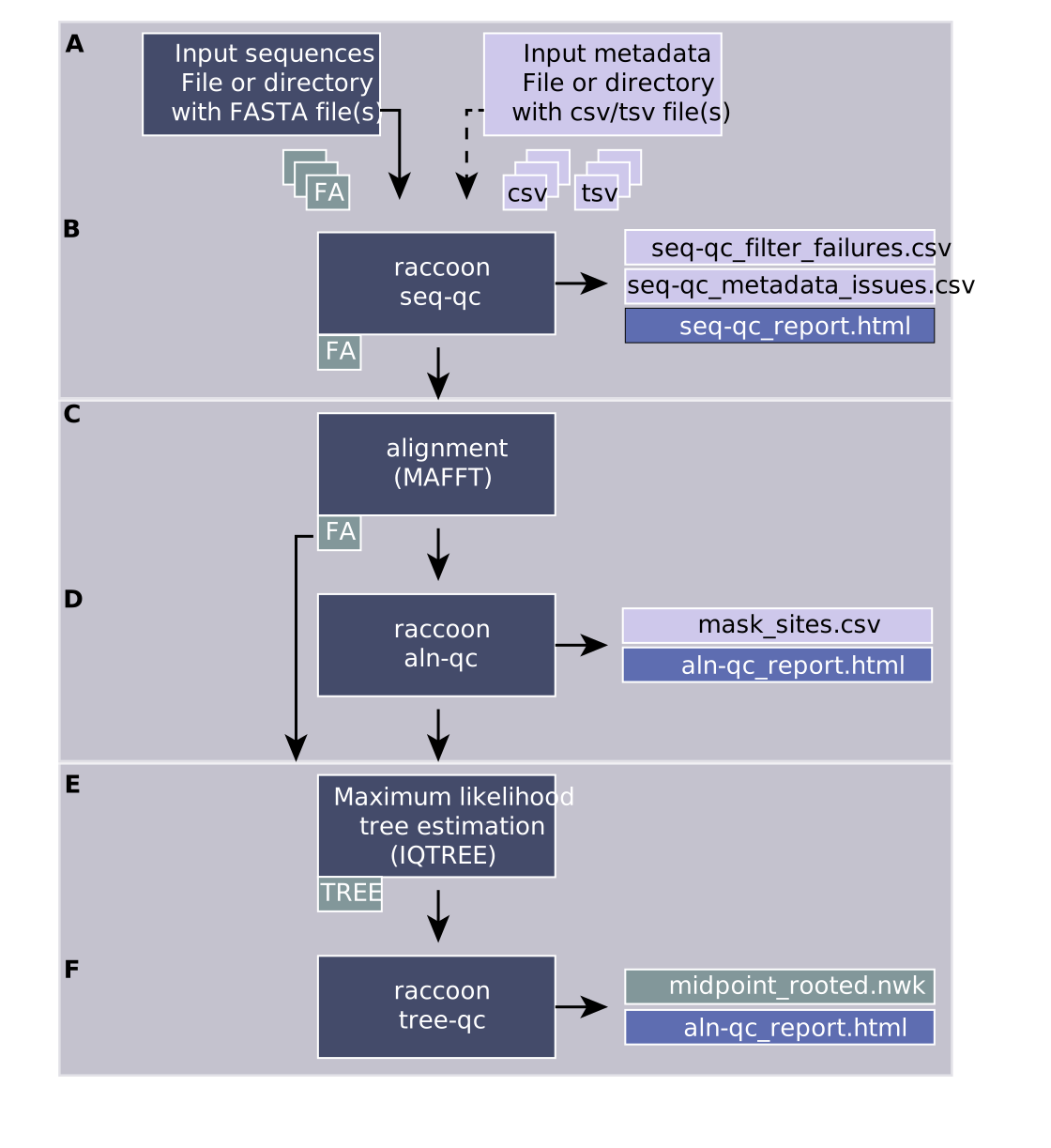

A comprehensive tutorial covering sequence metadata harmonisation, multiple sequence alignment, alignment curation, phylogenetic inference, and tree assessment is available at artic.network/tutorials/raccoon.nf. The tutorial includes:
- Step-by-step guidance on preparing sequence and metadata files.
- Instructions for running raccoon-nf through the EPI2ME interface.
- Interpretation of QC reports and identification of common data issues.
- Best practices for curating alignments and assessing phylogenetic results.
- Interactive exercises using provided example datasets.
The tutorial is suitable for both guided workshop delivery and self-paced learning.
After adding the workflow to you EPI2ME instance as detailed in the tutorial above, you can test if the pipeline is running correctly by navigating to the Nextflow configuration tab when launching a new run. Here, under the profile section replace standard with test. Then you can specify any directory of your choice in the fasta field of the input section (this is a mandatory field, but will be ignored when running test) and hit Launch Workflow. This will run Raccoon with some test data, which can be found in the test_data directory of this repository.