A complete AM / FM / SW / LW + SSB DSP radio sketch for the
LILYGO T-Embed SI4732,
based on the PU2CLR OLED_ALL_IN_ONE example and Ralph Xavier's port to the
T-Display S3, with fixes and UX tweaks to make it work cleanly on the
T-Embed SI4732 hardware running the Arduino ESP32 core 3.x.
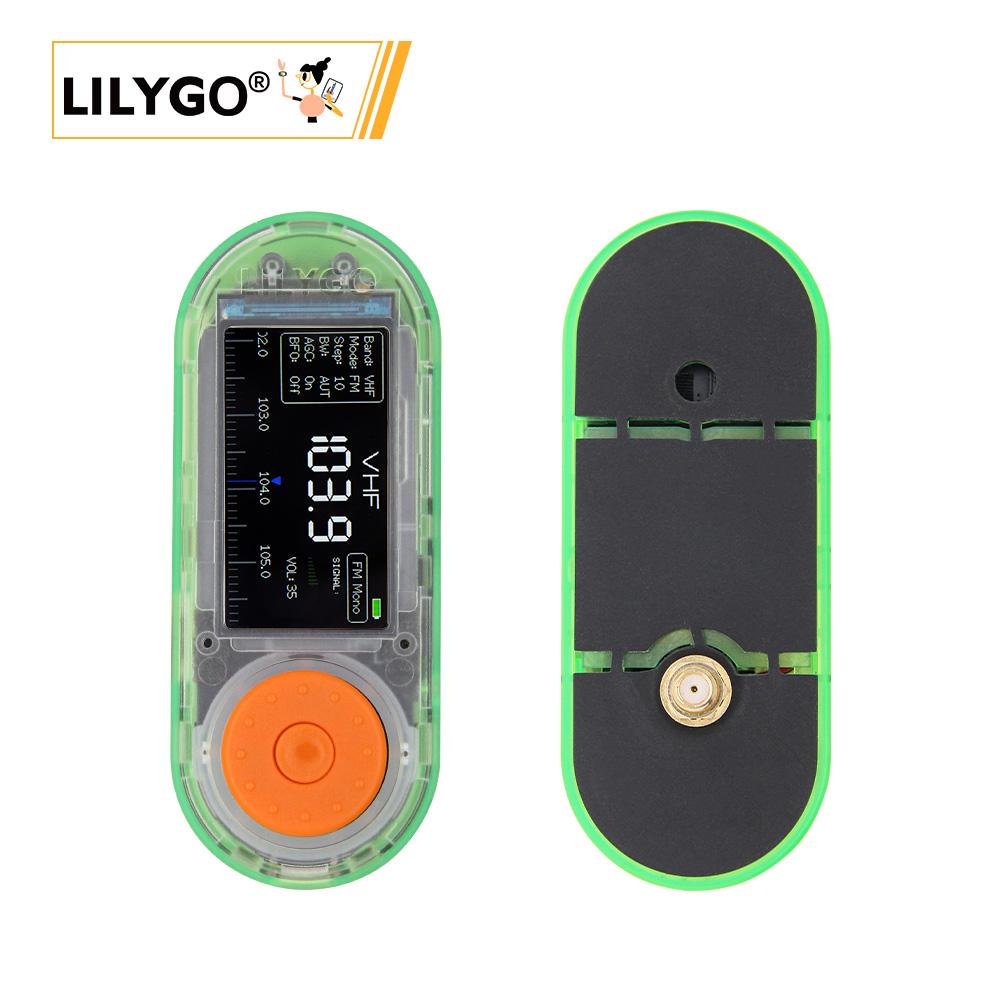
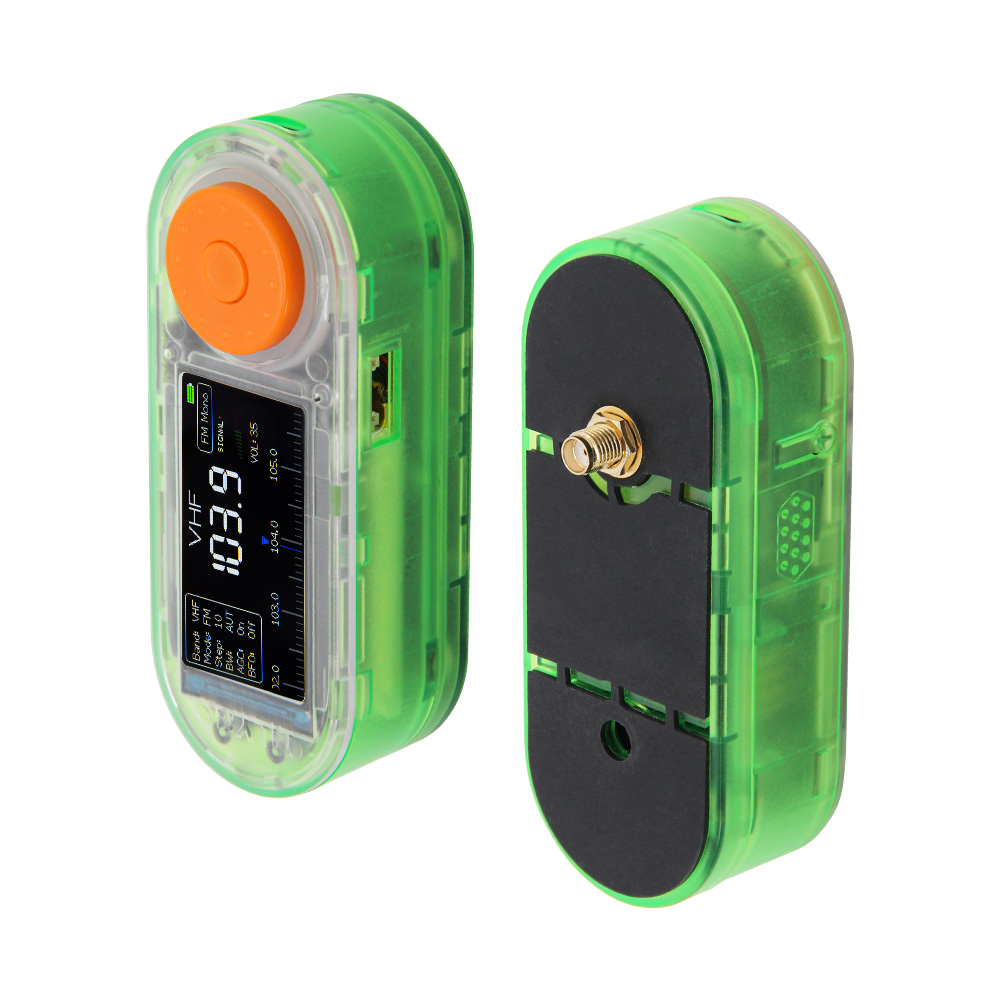
Photograph © LILYGO, from the T-Embed SI4732 wiki page. Reproduced for identification; not covered by this repository's licence.
A shorter write-up, with the story behind the more interesting bugs, is at andu.ro/lilygo_t-embed_si4732_receiver.
- AM / FM / SW / LW reception with SSB (LSB / USB) demodulation
- 1, 5, 10, 50, 500 kHz steps on AM; 10 Hz step on SSB
- External-mute pin, AGC, attenuation, soft-mute, bandwidth control
- Encoder-driven UI with band menu (single-press) and full menu (double-press)
- 1.9" 320×170 ST7789V display driven via TFT_eSPI
- RDS (FM) and signal-strength indicators
- Remote control (CAT) over USB serial and/or WiFi TCP, with a captive-portal WiFi setup — see Remote control
This repo started from
Xinyuan-LilyGO/T-Embed/examples/SI473x_Shield
(which itself is a port of
PU2CLR's OLED_ALL_IN_ONE
by Ralph Xavier, drawing UI inspiration from
Volos's T-Embed FM radio).
The original example was written against Arduino ESP32 core 2.x. This version makes it work on core 3.x and refines the UX:
- LEDC API migrated from
ledcSetup/ledcAttachPin/ledcWrite(channel,…)(core 2.x) toledcAttach(pin, freq, res)/ledcWrite(pin, …)(core 3.x). - TFT_eSPI patch (external): on ESP32-S3 + core 3.x, TFT_eSPI's default
SPI_PORT = FSPIresolves to0, which crashes insidetft.begin()withGuru Meditation: StoreProhibited, EXCVADDR=0x10. Workaround:#define USE_HSPI_PORTin the active User_Setup file. Details and the exact edits live inLIBRARY_PATCHES.md. - Display setup switched to
Setup210_LilyGo_T_Embed_S3.hwith RGB colour order enabled. - UX: double-press of the encoder now opens the menu with the cursor on Volume (was Band) — quicker volume access.
- UX: encoder direction reversed — turning the encoder left now
increments (frequency, volume, etc.). Personal preference; one-line flip
in the
rotaryEncoder()ISR if you want the original behaviour back. - UI colours: peak-signal bars, frequency-grid centre marker, and the "FM Stereo" indicator are green instead of red.
- Boot diagnostics:
Serial.begin(115200)+ boot prints insetup()so USB-CDC shows the boot flow and any crash trace. - Screen timeout: backlight dims off after 20 s of no encoder/button activity; any interaction wakes it.
- APA102 LED ring around the encoder (FastLED, 7 LEDs, GPIO 42 / 45) — green comet sweeps clockwise on right-turn and counter-clockwise on left-turn. Free-running animation so fast turning produces a smooth spin; the comet finishes one full revolution after the last tick before going dark. Brightness kept low (22/255) so it's a discreet indicator.
- Remote control (CAT) over USB serial and WiFi TCP, with a multi-network store and a captive-portal setup page — the whole of Remote control below. Served from its own core so a reply never waits on a sprite push.
- Reset Cfg menu entry replacing upstream's "hold the encoder while powering on" wipe, which on this board could only ever fire by accident (GPIO0 is the boot strapping pin and the deep-sleep wake source).
- Stored settings are validated on load. Upstream gated only on a magic byte,
so editing the band table left an out-of-range
bandIdxindexingband[]out of bounds anddrawSprite()dereferencing a garbagebandName— a boot loop with no way back in, since the recovery gesture above was unreachable. - Encoder detents accumulate in the ISR instead of latching a single ±1, so a fast spin during a redraw no longer throws counts away.
- Robustness pass on the concurrency between the CAT task, the radio loop and the WiFi stack — see Concurrency.
See LIBRARY_PATCHES.md for the full step-by-step:
required library versions, the TFT_eSPI edits (in
Arduino/libraries/TFT_eSPI/User_Setup_Select.h and
User_Setups/Setup210_LilyGo_T_Embed_S3.h), the Arduino IDE board settings
from the LilyGO wiki, and the equivalent arduino-cli FQBN.
build_opt.h in the sketch folder is part of the build, not a stray file. It
carries -DFASTLED_LOG_VERBOSITY=0, which silences FastLED 3.10.x's runtime
driver logging. That logging goes to Serial from inside FastLED.addLeds() —
the port CAT USB owns — so without it every boot injected ten lines of
ChannelManager: Added driver ... into the CAT command stream. It cannot be a
#define in the sketch: Arduino compiles each library into its own translation
units, which never see the sketch's defines. Deleting the file costs you 76 KB of
flash and a dirty CAT port.
Quick FQBN reference:
esp32:esp32:esp32s3:PSRAM=opi,USBMode=hwcdc,CDCOnBoot=cdc,MSCOnBoot=default,DFUOnBoot=default,UploadMode=default,CPUFreq=240,FlashMode=qio,FlashSize=16M,PartitionScheme=app3M_fat9M_16MB,LoopCore=1,EventsCore=1,EraseFlash=none,UploadSpeed=921600,DebugLevel=none
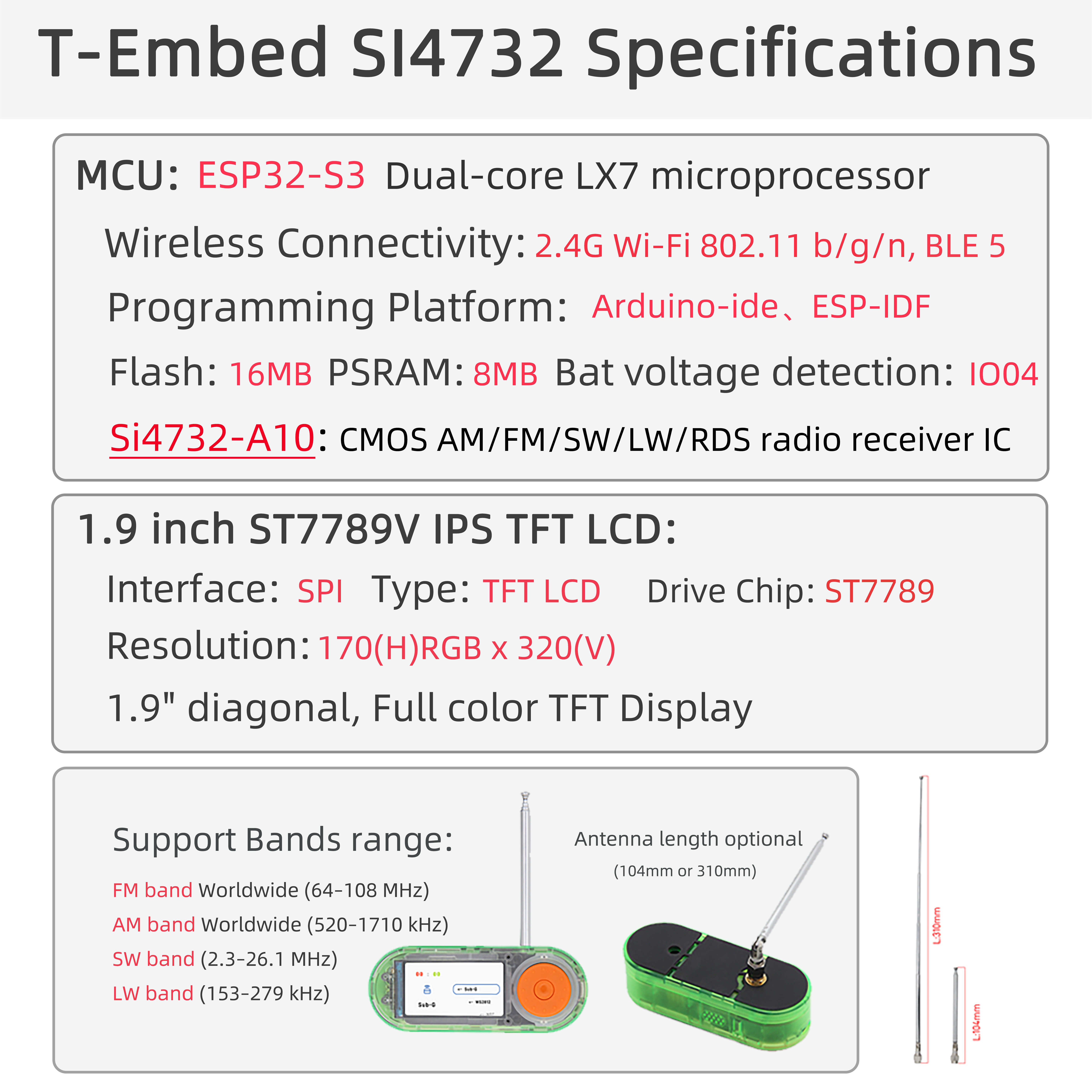
Photograph © LILYGO, from the T-Embed SI4732 wiki page. Reproduced for identification; not covered by this repository's licence.
- LILYGO T-Embed SI4732 (ESP32-S3, 16 MB flash, 8 MB OPI PSRAM, ST7789V 1.9" 320×170 display, SI4732-A10 DSP receiver, rotary encoder with push)
- Power on GPIO46, backlight on GPIO15, encoder button on GPIO0 (also BOOT strapping pin — pressing it during reset enters download mode)
- SI4732 on I²C: SDA=GPIO18, SCL=GPIO8, RESET=GPIO16
- Audio mute control: GPIO17
- APA102 LED ring around encoder: data GPIO42, clock GPIO45, 7 LEDs
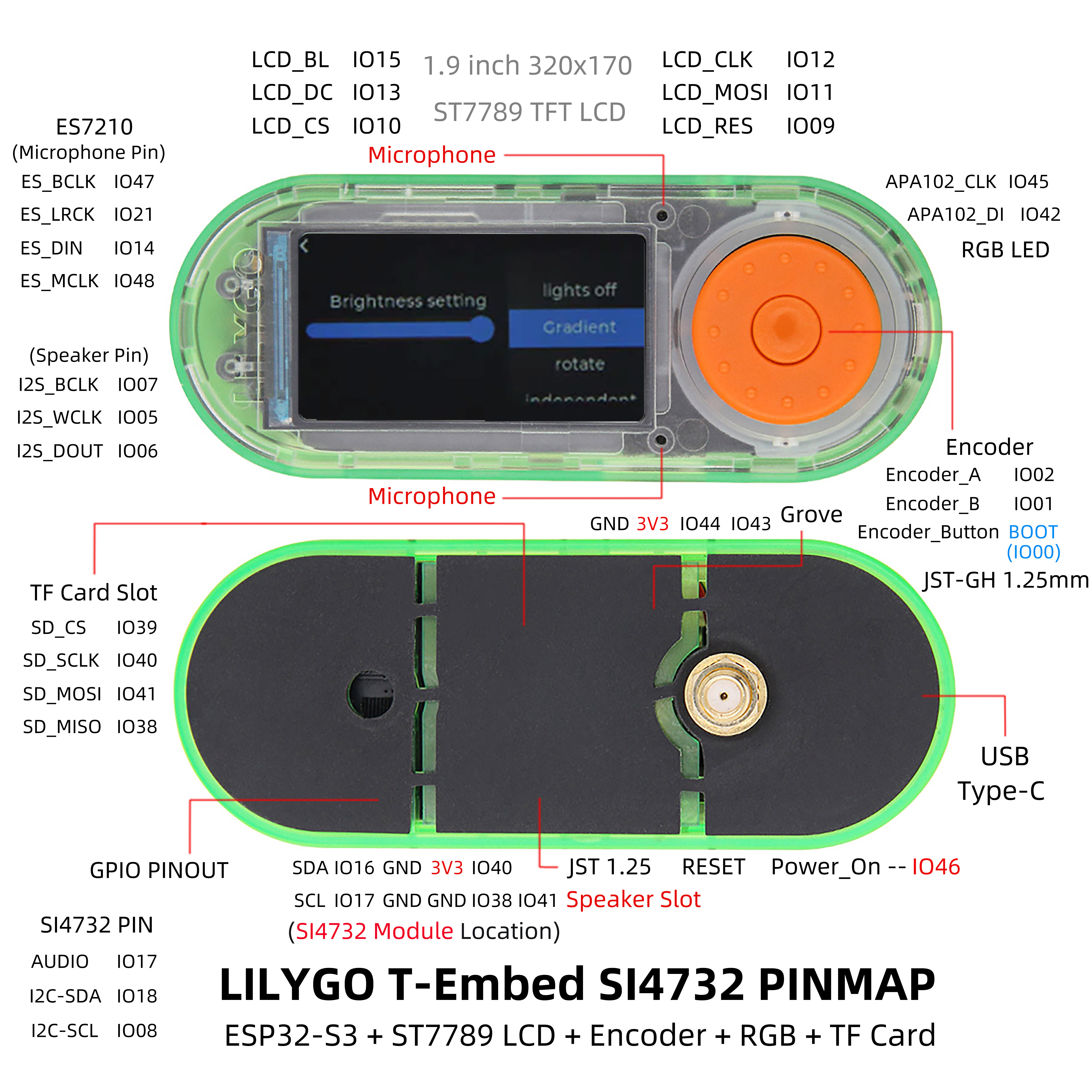
Photograph © LILYGO, from the T-Embed SI4732 wiki page. Reproduced for identification; not covered by this repository's licence.
- Rotary encoder turn — change frequency, or change the selected value when in menu mode
- Single click — Band selection mode (rotate to pick band; click again to exit)
- Double click — Full menu (Volume, Step, Mode, BFO, BW, AGC/Att, SoftMute, Seek Up / Down, Band, Mute, CAT USB, CAT WiFi, WiFi Cfg, Reset Cfg). Defaults to Volume.
- Triple click — Volume straight away. The second click opens the menu
on Volume and the third selects it, so the encoder is changing volume with no
further presses. It falls out of the click ladder rather than being a special
case: a click with the menu already open activates whatever is highlighted.
The clicks have to land inside the same window as a double click
(
ELAPSED_CLICK, 1.5 s).
Reset Cfg erases the stored receiver settings, the CAT preference and the saved
WiFi networks, then restarts. It opens a confirmation with Cancel selected —
rotate to ERASE and click to go through. It replaces the upstream "hold the
encoder while powering on" gesture, which could not work here: GPIO0 is the ESP32-S3
boot strapping pin, so holding it at a cold boot enters download mode and the sketch
never runs, while the one reset that did reach it was a deep-sleep wake — where the
wake source is that same button held low, so switching the radio on by holding the
button wiped everything.
The receiver has two band types and that distinction drives almost everything: FM (the VHF broadcast band) and AM-type (everything from long wave to 30 MHz, including SSB). A function that makes no sense for the current type is either hidden or does nothing.
Single-click the encoder to pick one. 20 entries, tuned by the encoder within the band's limits:
| Entry | Range | Type | What it is |
|---|---|---|---|
VHF |
64.0–108.0 MHz | FM | FM broadcast (with RDS and stereo detection) |
MW1 |
150–1720 kHz | MW | Long + medium wave, the widest MW span |
MW2 |
531–1701 kHz | MW | Medium wave on the ITU 9 kHz raster |
MW2 |
1700–3500 kHz | MW | 160 m and the tropical bands |
80M |
3500–4000 kHz | MW | 80 m amateur |
SW1 |
4000–5500 kHz | SW | 75 m / 60 m broadcast |
SW2 |
5500–6500 kHz | SW | 49 m broadcast |
40M |
6500–7300 kHz | SW | 40 m amateur |
SW3 |
7200–8000 kHz | SW | 41 m broadcast |
SW4 |
9000–11000 kHz | SW | 31 m / 25 m broadcast |
SW5 |
11100–13000 kHz | SW | 25 m / 22 m broadcast |
SW6 |
13000–14000 kHz | SW | 22 m broadcast |
20M |
14000–15000 kHz | SW | 20 m amateur |
SW7 |
15000–17000 kHz | SW | 19 m broadcast |
SW8 |
17000–18000 kHz | SW | 16 m broadcast |
15M |
20000–21400 kHz | SW | 15 m amateur |
SW9 |
21400–22800 kHz | SW | 13 m broadcast |
CB |
26000–28000 kHz | SW | Citizens band |
10M |
28000–30000 kHz | SW | 10 m amateur |
ALL |
150 kHz–30 MHz | SW | One continuous sweep of everything below VHF |
The band's last frequency, step and filter are remembered per band and restored.
Double-click to open the menu. What each entry does, and where it applies:
| Entry | Bands | What it does |
|---|---|---|
| Volume | all | Audio level, shown as 0–100 %. Triple-click the encoder to land here directly. |
| Step | all | Tuning increment per detent. FM: 50/100/200 kHz (5, 10, 20 × 10 kHz). AM/SSB: 1, 5, 9, 10, 50, 100 kHz — 9 kHz is the European MW channel raster, 10 kHz the Americas'. |
| Mode | not FM | Cycles AM → LSB → USB. Entering an SSB mode uploads the SSB patch to the DSP (a few hundred ms, "Loading SSB" appears); leaving it drops the patch. Does nothing while the VHF band is selected — the mode follows the band, so to reach AM from FM change Band, not Mode (any non-FM band selects AM automatically). |
| BFO | SSB only | Fine tune in 10 Hz steps for zero-beating a voice or CW signal, on top of the coarse step. Shown as an offset; ignored in AM and FM. |
| BW | all, per type | IF filter width. AM: 1.0/1.8/2.0/2.5/3.0/4.0/6.0 kHz. SSB: 0.5/1.0/1.2/2.2/3.0/4.0 kHz — 0.5 or 1.0 is what makes CW and crowded bands usable. FM: automatic, or force 110/84/60/40 kHz. |
| AGC/Att | all | Position 0 is AGC on. Past that AGC is off and the value is manual attenuation, 1–34. Use it when a strong local transmitter is desensitising the front end. |
| SoftMute | AM/SSB only | 0–32. Attenuates the audio as the signal falls toward the noise floor, so a dead channel is quiet instead of hissing. Has no effect on FM. |
| Seek Up / Seek Dn | all | Automatic scan for the next signal within the current band, then stops. |
| Band | all | Same list as the single-click band picker. |
| Mute | all | Audio on/off, via the external mute pin. Frequency and scanning carry on. |
| CAT USB | — | Remote control over the USB port. Takes over the port, so the [BOOT] log goes quiet while it is on. |
| CAT WiFi | — | Remote control over TCP. Connects to a saved network, or raises the setup portal if there is none. Off means the WiFi hardware is powered down — no station, no beacons, no scanning. |
| WiFi Cfg | — | Opens the setup portal to manage networks and the CAT port. Does not switch the transport on: close it without saving a network and the WiFi radio powers back down. |
| Reset Cfg | — | Erases stored settings, the CAT preference and saved networks, then restarts. Asks first, with Cancel selected. |
Long-press the button (3 s) for deep sleep; press again to wake.
Frequency and band, mode, step, filter, AGC/attenuation and BFO on the left;
signal-strength bars and volume on the right; a tuning scale along the bottom.
On FM, RDS station name and an FM Stereo / FM Mono indicator. Battery at the
top right, with the CAT and WiFi icons beside it.
The radio can be driven from a computer. Both transports are off by default and toggle independently from the menu; the setting survives a power cycle.
| Menu entry | What it does |
|---|---|
CAT USB |
CAT over the USB CDC port (115200 8N1) |
CAT WiFi |
CAT over a TCP socket; connects to a saved network, or raises the setup portal |
WiFi Cfg |
Force the setup portal up (or take it down), even when already online |
Status icons sit in the top strip, right of the band name:
| Icon | Meaning |
|---|---|
| USB trident | CAT USB is on. Grey = idle, green = a client is driving the radio |
| WiFi arcs | grey = connected and idle, green = a client is driving the radio, yellow = connecting, cyan = portal mode |
AP cyan chip |
the setup access point is running |
BTN? red |
the encoder button pin reads stuck; the button is ignored so the radio stays usable |
Each glyph appears only when its transport is actually powered, and its colour
carries both facts — enabled, and whether anyone is talking. Lettered U/N chips
were tried first and were too easy to miss.
Toggling CAT USB, CAT WiFi or WiFi Cfg also shows a short banner saying what
happened, because a small icon changing in the corner is not obvious enough to
serve as confirmation.
The SI4732 is a hardware DSP receiver, not an SDR front end — it has no IQ output, so no waterfall program can show a spectrum from it. What CAT gives you is rig control: the PC sets frequency, mode and volume and reads the S-meter, while the radio's own DSP does the demodulation and the audio still comes out of the headphone jack. To decode anything on the PC (FT8, WSPR, RTTY, NAVTEX) feed that audio into a sound card.
Kenwood TS-480 ASCII CAT, the best-supported protocol in free ham software.
Commands are terminated with ;. Implemented: ID PS AI FA FB FR FT MD SM AG SQ MU IF RX TX, plus the ZZ* diagnostics below. A query is answered; a set is
silent whether it succeeds or is rejected; an unknown query returns ?;. See
Reply discipline for why a rejected set stays
silent and how to see what was refused.
The exact byte layout of the IF; answer was taken from Hamlib's own Kenwood
backend rather than guessed, so the field offsets Hamlib dereferences all land
correctly — see the comment block at the top of
CatControl.h. Setting a frequency outside the current band
automatically switches to whichever band covers it; on SSB the sub-kHz part goes
to the BFO, so 7074300 Hz tunes 7074 kHz with the BFO at +300 Hz.
Every command, and what to send:
| Send | Kind | Answer / effect |
|---|---|---|
ID; |
query | ID020; — the TS-480 identifier |
PS; |
query | PS1; — powered, always true while we can answer |
AI; |
query | AIn; — this connection's auto-info level |
AIn; |
set | n = 0–4. 0 is off. Non-zero pushes an IF; frame on frequency or mode change. Per connection, so one client's choice cannot desynchronise another's stream |
FA; |
query | FAnnnnnnnnnnn; — frequency in Hz, 11 digits |
FAnnnnnnnnnnn; |
set | Tune. Switches band automatically if another band covers it; out of range everywhere is refused silently (see ZZE;) |
FB; / FBnnnnnnnnnnn; |
query / set | Shadow VFO B. Single-VFO radio, so it is remembered per connection and never tuned |
FR; / FT; |
query | FR0; / FT0; — always VFO A |
MD; |
query | MDn; — current mode |
MDn; |
set | 1=LSB 2=USB 3=CW (demodulated as USB, reported back as CW to that client) 4=FM 5=AM. Band-coupled, see below |
SM; / SM0; |
query | SM0nnnn; — S-meter, 0–30 on the Kenwood scale. The selector is echoed back because Hamlib length-checks the answer against what it sent |
AG; / AG0; |
query | AG0nnn; — AF gain, 0–255 |
AGnnn; / AG0nnn; |
set | AF gain. Quantises to the radio's 63 steps; both conversions round |
SQ; |
query | SQ0000; — stub, so clients that probe squelch do not error |
MU; |
query | MU0; / MU1; — mute state |
MU0; / MU1; |
set | Mute off / on. Local extension — Hamlib never sends this to a TS-480 |
IF; |
query | 38-byte composite status: frequency, mode, VFO, RX/TX and the rest |
RX; |
set | Silent success — already receiving |
TX; |
set | N; — refused, this is a receiver |
ZZB; ZZP; ZZN; ZZE; ZZW; |
query | Diagnostics, see below |
Anything else: an unknown query gets ?;, an unknown set gets silence. That
asymmetry is deliberate and load-bearing — see
Reply discipline.
Mode and band are coupled. The DSP does FM on 64–108 MHz and AM/SSB on
150 kHz–30 MHz, so a mode is only reachable from a band that supports it. MD4; (FM)
switches to the VHF band; MD5;/MD1;/MD2; while on VHF switch to the last
AM-type band that was in use (MW1 at first) and apply the mode there, rather than
refusing — refusing gave the client no way to discover it had to send a frequency
first. MD4; then MD5; returns to the same AM band you left.
Because this is a receiver, TX; is refused with N;.
Find your Hamlib model number first — it is not the same as the 020 the radio
reports as its ID:
rigctl -l | grep -i "TS-480"Over USB:
rigctld -m <model> -r /dev/ttyACM1 -s 115200 # check which port is yours firstDo not assume the port: identify it by USB ID, because anything else that enumerates
as a CDC device can take the lower number. The board is 303a:1001:
for p in /dev/ttyACM*; do d=/sys/class/tty/$(basename $p)/device/..; \
  echo "$p $(cat $d/idVendor):$(cat $d/idProduct)"; done
Over WiFi (Hamlib takes host:port directly, no cable):
rigctld -m <model> -r 192.168.1.42:1234
# or, if your machine resolves mDNS:
rigctld -m <model> -r t-embed-cat.local:1234
Flrig needs three settings that are easy to get wrong. Config -> Setup:
| Tab | Field | Value |
|---|---|---|
| TCPIP | address / port | your radio's IP / 1234 |
| TCPIP | use TCPIP | on |
| TCPIP | ping delay | 250 ms — see below; 200 ms breaks Flrig's handshake |
| Transceiver | Rig | TS-480HX (or TS-480SAT) |
| Transceiver | PTT via CAT | off — receiver; TX; is refused by design |
| Polling | Poll every Nth interval (poll_all) |
25 — this one matters more than the delay |
| Polling | volume, PTT, break-in | off — nothing here needs them |
Why those two numbers. ping_delay is a fixed sleep Flrig performs for every
command, not a timeout — it waits the full time even when the answer arrived in
7 ms. So the refresh rate of Flrig's display is commands per cycle × ping_delay.
Out of the box that was 21 × 400 ms = 8.4 s, which is why the frequency shown on
the PC lagged the knob so badly that it looked like the wrong frequency. Raising
poll_all (which makes Flrig sweep the features we do not implement rarely instead
of every cycle) and dropping the delay to 250 ms gives a measured 1.47 s refresh.
250 ms is a floor set by Flrig, not by the radio: its opening handshake fails below that even though a raw socket completes the same exchange at 60 ms, and the radio's own answers measure 6.7 ms median / 14.8 ms worst over 300 samples.
Flrig lists only serial ports in the Transceiver tab, but it has a separate
generic TCPIP transport — that is the one to use. A working config is in
~/.flrig/TS-480HX.prefs.
Then point anything that speaks Hamlib at it — Flrig (GUI front panel), Fldigi, WSJT-X / JS8Call, CQRLOG, Gpredict, Log4OM. On Windows, OmniRig works too. A quick smoke test without any of them:
rigctl -m <model> -r 192.168.1.42:1234 f    # read frequency
rigctl -m <model> -r 192.168.1.42:1234 F 7074000
Or talk to it by hand — every command is human-readable:
printf 'ID;FA;MD;SM0;IF;' | nc 192.168.1.42 1234Turning CAT WiFi on with no saved network (or when none of them answer) raises
an open access point called T-Embed-CAT. Join it and any page you open
redirects to the setup portal at http://192.168.4.1 — the radio's screen shows
the SSID and address on a banner. The portal lists networks in range, stores up
to 5 SSID/password pairs, and lets you set the CAT TCP port (default
1234).
While the portal is open the radio keeps trying the saved list in the background, one network per 30 s cycle. Two things follow from that, both measured on hardware:
- The setup AP moves to your router's channel. An ESP32 in AP+STA mode cannot hold two channels, so the moment the station associates the access point follows it and every phone connected to the portal is briefly dropped. They reconnect on their own; it looks like one stalled page load.
- The portal does not close just because the radio reconnected. It closes when you close it, when the 5-minute idle timeout fires, or 8 s after a network you saved in the form comes up — not after an incidental background reconnect. That distinction cost a fix: without it, opening the page on a radio whose network was in range gave you eleven seconds before the AP vanished.
Saved networks are tried in order, 10 s each; if the whole list fails the portal
comes back. The portal shuts itself down after 5 minutes of nobody finishing
setup, so an open AP is never left running unattended — if nothing was
configured by then, the CAT WiFi toggle switches itself off.
Credentials live in NVS (namespace wifinet), separate from the radio settings
in EEPROM, so neither disturbs the other.
Two rules keep a PC client's request/reply stream in step, and both were learned the hard way against real software:
- An unknown query (no argument) is answered
?;. Flrig sends a pile of these at startup (BC;,PC;,IS;,NB;,MG;...) and treats?;cleanly as "feature absent". - An unknown set (has an argument) is answered with silence, because a real
Kenwood acknowledges a set with silence. Answering
?;there injects a reply nobody reads, so every later answer is off by one. Flrig sendsEXmenu sets on connect; with?;it banked those replies, then read one in place of the frequency and reported "Transceiver not responding" over a perfectly good socket. Rejected sets on commands we do implement are silent for the same reason -- the client's next read shows the unchanged value, which is honest and self-correcting.
TX; stays an explicit N;: refusing PTT on a receiver is information the
client should have, and Hamlib maps it to -RIG_ENAVAIL.
CAT is served by its own FreeRTOS task pinned to core 0, and answers queries from a
snapshot the main loop refreshes once per iteration. Served from loop(), a reply
could be stuck behind a sprite push, an ADC sweep or an I2C read; the task makes a
reply independent of whatever the display is doing. Sets are marshalled back to the
loop and waited for, so a client that writes and immediately reads back — exactly
what Hamlib and Flrig do to verify — sees the new value rather than a stale one.
Four things were measured and fixed, in descending order of how much they hurt:
- Flrig's fixed per-command sleep × commands per cycle. 21 × 400 ms = 8.4 s per refresh. See the Flrig table above; now 1.47 s.
- 21 flash writes per settings save.
EEPROM.commit()sat inside the per-band loop, and EEPROM here is NVS-backed, so each call rewrote the whole 512-byte blob. The resulting flash-cache stalls delayed CAT replies by up to 1.4 s. One commit instead of 21 took the worst case to 14.8 ms. - TX power capped at 11 dBm. Added to limit self-generated noise on AM/SW; it caused 65% packet loss to the AP, which no timeout can paper over. Now 17 dBm, measured 0% loss. If WiFi noise bothers a weak-signal session, switch the transport off — that is what the toggle is for.
- WiFi modem sleep. With it on the station only wakes on the AP's DTIM beacon:
261 ms median round trip.
WiFi.setSleep(false)brings it to ~7 ms, at roughly 80 mA more draw while the transport is on.
Status icons are redrawn ~800 ms after a client connects rather than immediately: the sprite lives in PSRAM and pushing it stalls the other core's flash-cache fetches, and doing that on top of a client's opening handshake was enough to break it.
Measured end to end over WiFi TCP, 100 round trips: 5.6 ms median, 42 ms at the 95th
percentile, 82 ms worst. Seventy queries written as a single burst came back as
seventy well-formed frames with IF; at exactly 38 bytes.
Two cores, and the split matters. The main loop (core 1) owns the SI4735, the display and the WiFi state machine. The CAT task (core 0) owns the USB parser and every TCP socket. Neither reaches into the other's half:
- Queries are answered from a snapshot the loop refreshes; the task never touches I²C or the sprite.
- Sets are marshalled to the loop and waited for, tagged with a sequence number so a request that times out cannot have its slot cleared by a late completion, nor collect somebody else's result.
- The UI never inspects socket handles.
NetworkClient::operator bool()is not a handle test — it callsconnected(), which is arecv(MSG_PEEK)syscall — so the task publishes a client count instead. Reading it from the render path was both ashared_ptrrace and four syscalls per redraw. - Anything that invalidates the station interface — powering WiFi down, a
reconnect, a join timeout — first fences the task out of the socket path and
waits for it to confirm.
esp_wifi_stop()frees lwIP state under whatever is open, and a write to a peer that has stopped reading can sit there for ten seconds, so on a missed fence the teardown is deferred and retried rather than pushed through.
None of this is visible in normal use. It is here because the failure mode is a reboot minutes later with no obvious cause.
Five non-Kenwood commands, added because GPIO, socket and WiFi faults are far easier to measure than to guess at:
| Command | Reports |
|---|---|
ZZB; |
encoder button pin: level, whether it has been seen high, fault state |
ZZP; |
live level of every GPIO the board does not otherwise use |
ZZN; |
TCP client slots: which are live, and how long since each was active |
ZZE; |
the last set that was refused, and why — the answer a silent rejection cannot give |
ZZW; |
WiFi state: enabled, suspended, radio powered, state machine, portal, IP, SSID, saved networks, CAT port |
ZZB is what identified the button fault as an inert pull-up rather than a dead
button, and ZZN made client-slot exhaustion visible.
We identify as a Kenwood TS-480, an HF + 6 m transceiver covering 30 kHz–60 MHz. The FM broadcast band at 88–108 MHz is outside that, and no ham-transceiver model covers it, so this is a limit of the emulated rig rather than a bug here.
What that looks like in practice: the CAT layer reports the right thing and Flrig
even stores it correctly — rig.get_vfo returns 105300000 — but its display
falls back to the band memory it last had (f20:14070000, i.e. 14.070 MHz) and its
log fills with vector::_M_range_check, because the frequency indexes past the end
of the rig's band table. Tune anywhere below 30 MHz and both the display and the
errors behave: verified at 7.074 MHz with zero range errors.
So use Flrig for LW/MW/SW and SSB, and drive FM broadcast from the radio itself. If
you want FM broadcast on the PC too, Hamlib is more tolerant — rigctl -m 2028 f
returns 105300000 for the same radio.
Tethered to a computer, the radio does not need WiFi to be controllable, and the RF is better off quiet next to an AM/SW front end. So whenever a USB host is present, the WiFi hardware is powered down completely: no station, no beacons, no mDNS, and the WiFi icon disappears.
Serial.isPlugged() is the signal, which watches USB start-of-frame traffic — so a
dumb charger does not count, only a real host. The reading is known to flap, so it
has to settle for two seconds before anything happens.
This is a suspend, not a disable: your CAT WiFi choice stays in NVS and the
transport comes back by itself when the cable comes out. An earlier version made the
two transports mutually exclusive by writing the preference, which meant switching
CAT USB on destroyed the WiFi setting permanently — unplugging never brought it
back. The suspend covers the same intent and is reversible.
The practical model: tethered → CAT USB, untethered → CAT WiFi. Enable CAT USB
once and it persists, so plugging in gives you serial CAT and unplugging returns you
to WiFi CAT.
Two consequences worth knowing:
- Switching
CAT WiFion while tethered stores the preference and leaves the hardware down — the banner saysCAT WiFi: USB attached. It comes up on its own when the cable comes out. Nothing is lost either way. WiFi Cfgdoes work while tethered, because it is an explicit request: the setup portal comes up, is driven to completion, and the radio powers WiFi back down as soon as the portal closes. Configuring networks at the desk does not mean unplugging first.
The receiver's volume is 0–63 internally, Kenwood CAT carries 0–255, and PC software
renders that as 0–100 — so one setting used to read 11 on the radio and 17 in
Flrig. The radio now shows the percentage, which agrees with Flrig exactly at all
64 levels (verified by exhausting the range).
- WiFi adds receiver noise. The WiFi radio shares the board with an AM/SW front end, so on weak shortwave signals you will hear the difference — which is exactly why the transport is a toggle. Capping transmit power was tried as a fix and made things worse (65% packet loss; see Latency), so it runs at 17 dBm and the answer to noise is to switch the transport off. Tethered, that happens by itself.
- CAT USB silences the boot log — and the libraries too. They share one port,
and interleaving them corrupts every reply. Three separate sources had to be
gagged, which is more than it sounds: the sketch's own
[BOOT]prints, FastLED's runtime driver log (seebuild_opt.h), and the ESP-IDF'sesp_log, which emits things likeE (283531) wifi:sta is connecting, cannot set configfrom inside the WiFi driver. The last one was found on hardware, arriving glued to the end of a CAT reply and splitting the frame.esp_log_level_setfollows port ownership, so all three come back whenCAT USBis off. - The CDC write timeout follows ownership. A CDC write blocks for ~100 ms
per call when no host is draining the buffer, which would stall the radio loop
while CAT is running, so the timeout drops to 10 ms while
CAT USBis on. Not to 0: that makes every write under backpressure return short, and Kenwood framing is terminator-based, so an answer truncated before its;leaves the client's parser permanently one field out of step. Replies go out through a single bounded-retry write instead, which costs latency rather than framing. With CAT off the stock timeout is kept, so the[BOOT]diagnostics behave exactly as they did before. - Mode switching costs time. Going to LSB/USB re-uploads the SSB patch (a few hundred ms) and a band change costs ~100 ms, during which CAT is not serviced. Well inside Hamlib's default timeout, but it is not instant.
- Four clients are accepted on TCP, and when every slot is taken the least
recently active one is evicted rather than the newcomer refused. A client whose
process is killed can leave a half-open socket that still reports as connected,
and refusing new connections because of those made the radio look dead while the
PC saw an ESTABLISHED socket. All clients share one
AIauto-info setting, so one controlling client is still the sane setup. - AF gain quantises. The radio has 63 volume steps against CAT's 0-255, so
AG0100;reads back as the nearest representable step,AG0101;. Both conversions round rather than truncate, so a value read and written back is stable — truncating made every round trip lose a step, walking the volume to zero for any client that echoed what it read.
- PU2CLR (Ricardo Caratti) — original
SI4735 library and
OLED_ALL_IN_ONEexample - Ralph Xavier — port to LilyGO T-Display S3
- VolosR — UI inspiration
- Xinyuan-LilyGO — T-Embed hardware and the SI473x_Shield example this is forked from
- Ben Buxton —
Rotary.cppencoder library (GPL-3) - LILYGO — the product photographs and pinout diagram on this page, taken from the T-Embed SI4732 wiki. They remain LILYGO's property and are reproduced here to identify the hardware; they are not covered by this repository's licence.
GPL-3.0 (inherited via Rotary.cpp and the PU2CLR SI4735 library). See
LICENSE.
The author does not guarantee these procedures will work in your environment. Proceed at your own risk.