


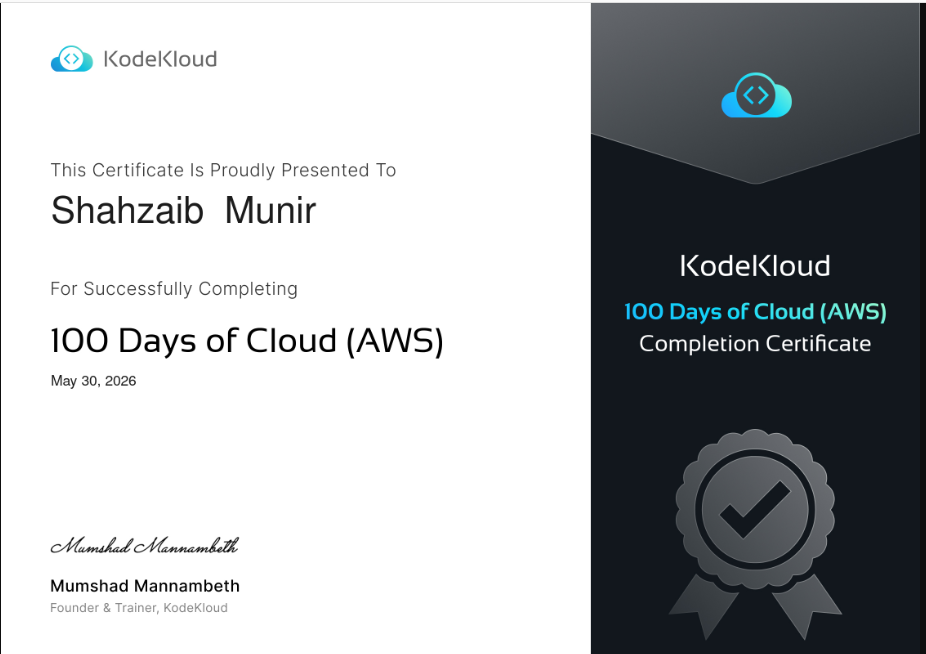
50 practical AWS labs completed on the KodeKloud — 100 Days of Cloud program, covering core services from EC2 and IAM through to EKS, Lambda, and CloudFormation. Every lab was executed in a live AWS environment with real infrastructure — no sandboxes, no shortcuts. This repository documents the full journey as proof of consistent, hands-on cloud practice.
A hands-on 100 Days of Cloud (AWS) challenge completed via KodeKloud, covering core AWS services from compute and storage to networking, security, and serverless architecture.
Each day includes a real-world task, practical implementation, and key takeaways — building a strong foundation in cloud engineering through consistent daily practice.
████████████████████████████████████████████████████  50/50  [100%]

✓ Completed   50    ████████████████████████████████████████  100%
⟳ Pending      0
⏳ Locked       0
EC2            S3             IAM            VPC            RDS
Lambda         ECS            EKS            KMS            DynamoDB
CloudWatch     CloudFormation SQS            SNS            ECR
ALB            NAT-Gateway    VPC-Peering    Auto-Scaling   EBS
AMI            Elastic-IP     ENI            Snapshots      Key-Pairs
Category key:
🖥️ Compute·🌐 Networking·🗄️ Storage·🔐 IAM & Security·🗃️ Database·⚡ Serverless·📦 Containers·📊 Observability·⚙️ IaC
| Day | Task / Lab Description | Category | Status |
|---|---|---|---|
| 01 | Create Key Pair | 🖥️ Compute | ✅ Done |
| 02 | Create Security Group | 🌐 Networking | ✅ Done |
| 03 | Create Subnet | 🌐 Networking | ✅ Done |
| 04 | Enable Versioning for S3 Bucket | 🗄️ Storage | ✅ Done |
| 05 | Create GP3 Volume | 🗄️ Storage | ✅ Done |
| 06 | Launch EC2 Instance | 🖥️ Compute | ✅ Done |
| 07 | Change EC2 Instance Type | 🖥️ Compute | ✅ Done |
| Day | Task / Lab Description | Category | Status |
|---|---|---|---|
| 08 | Enable Stop Protection for EC2 Instance | 🖥️ Compute | ✅ Done |
| 09 | Enable Termination Protection for EC2 Instance | 🖥️ Compute | ✅ Done |
| 10 | Attach Elastic IP to EC2 Instance | 🌐 Networking | ✅ Done |
| 11 | Attach Elastic Network Interface to EC2 Instance | 🌐 Networking | ✅ Done |
| 12 | Attach Volume to EC2 Instance | 🗄️ Storage | ✅ Done |
| 13 | Create AMI from EC2 Instance | 🖥️ Compute | ✅ Done |
| 14 | Terminate EC2 Instance | 🖥️ Compute | ✅ Done |
| Day | Task / Lab Description | Category | Status |
|---|---|---|---|
| 15 | Create Volume Snapshot | 🗄️ Storage | ✅ Done |
| 16 | Create IAM User | 🔐 IAM & Security | ✅ Done |
| 17 | Create IAM Group | 🔐 IAM & Security | ✅ Done |
| 18 | Create Read-Only IAM Policy for EC2 Console Access | 🔐 IAM & Security | ✅ Done |
| 19 | Attach IAM Policy to IAM User | 🔐 IAM & Security | ✅ Done |
| 20 | Create IAM Role for EC2 with Policy Attachment | 🔐 IAM & Security | ✅ Done |
| 21 | Setting Up an EC2 Instance with an Elastic IP for Application Hosting | 🖥️ Compute | ✅ Done |
| Day | Task / Lab Description | Category | Status |
|---|---|---|---|
| 22 | Configuring Secure SSH Access to an EC2 Instance | 🌐 Networking | ✅ Done |
| 23 | Data Migration Between S3 Buckets Using AWS CLI | 🗄️ Storage | ✅ Done |
| 24 | Setting Up an Application Load Balancer for an EC2 Instance | 🌐 Networking | ✅ Done |
| 25 | Setting Up an EC2 Instance and CloudWatch Alarm | 📊 Observability | ✅ Done |
| 26 | Configuring an EC2 Instance as a Web Server with Nginx | 🖥️ Compute | ✅ Done |
| 27 | Configuring a Public VPC with an EC2 Instance for Internet Access | 🌐 Networking | ✅ Done |
| 28 | Creating a Private ECR Repository | 📦 Containers | ✅ Done |
| Day | Task / Lab Description | Category | Status |
|---|---|---|---|
| 29 | Establishing Secure Communication Between Public and Private VPCs via VPC Peering | 🌐 Networking | ✅ Done |
| 30 | Enable Internet Access for Private EC2 using NAT Instance | 🌐 Networking | ✅ Done |
| 31 | Configuring a Private RDS Instance for Application Development | 🗃️ Database | ✅ Done |
| 32 | Snapshot and Restoration of an RDS Instance | 🗃️ Database | ✅ Done |
| 33 | Create a Lambda Function | ⚡ Serverless | ✅ Done |
| 34 | Create a Lambda Function Using CLI | ⚡ Serverless | ✅ Done |
| 35 | Deploying and Managing Applications on AWS | 🖥️ Compute | ✅ Done |
| Day | Task / Lab Description | Category | Status |
|---|---|---|---|
| 36 | Load Balancing EC2 Instances with Application Load Balancer | 🌐 Networking | ✅ Done |
| 37 | Managing EC2 Access with S3 Role-based Permissions | 🔐 IAM & Security | ✅ Done |
| 38 | Deploying Containerized Applications with Amazon ECS | 📦 Containers | ✅ Done |
| 39 | Hosting a Static Website on AWS S3 | 🗄️ Storage | ✅ Done |
| 40 | Troubleshooting Internet Accessibility for an EC2-Hosted Application | 🌐 Networking | ✅ Done |
| 41 | Securing Data with AWS KMS | 🔐 IAM & Security | ✅ Done |
| 42 | Building and Managing NoSQL Databases with AWS DynamoDB | 🗃️ Database | ✅ Done |
| Day | Task / Lab Description | Category | Status |
|---|---|---|---|
| 43 | Scaling and Managing Kubernetes Clusters with Amazon EKS | 📦 Containers | ✅ Done |
| 44 | Implementing Auto Scaling for High Availability in AWS | 🖥️ Compute | ✅ Done |
| 45 | Configure NAT Gateway for Internet Access in a Private VPC | 🌐 Networking | ✅ Done |
| 46 | Event-Driven Processing with Amazon S3 and Lambda | ⚡ Serverless | ✅ Done |
| 47 | Integrating AWS SQS and SNS for Reliable Messaging | ⚡ Serverless | ✅ Done |
| 48 | Automating Infrastructure Deployment with AWS CloudFormation | ⚙️ IaC | ✅ Done |
| 49 | Centralized Audit Logging with VPC Peering | 📊 Observability | ✅ Done |
| 50 | Expanding EC2 Instance Storage for Development Needs | 🗄️ Storage | ✅ Done |
- Compute — EC2 lifecycle management, AMIs, instance types, EBS volumes, snapshots, Auto Scaling
- Networking — VPC design, subnets, security groups, Elastic IPs, ENIs, NAT Gateway, NAT Instance, VPC Peering, ALB
- Identity & Security — IAM users, groups, roles, policies, KMS encryption
- Storage — S3 versioning, static website hosting, CLI migrations, ECR repositories
- Databases — RDS provisioning, snapshots & restore, DynamoDB NoSQL operations
- Serverless & Events — Lambda (console + CLI), S3 event triggers, SQS & SNS messaging
- Containers & Orchestration — ECS deployments, EKS Kubernetes cluster management
- Observability — CloudWatch alarms, VPC audit logging
- Infrastructure as Code — AWS CloudFormation stack deployments
- AWS Certified Solutions Architect – Associate (SAA-C03)
- AWS Certified Developer – Associate (DVA-C02)
- Terraform for AWS infrastructure automation
- CI/CD pipelines with CodePipeline & CodeDeploy
Built with consistency, curiosity, and a lot of AWS console time. ☁️


