

Unified NIRS Analysis Desktop Application
A modern desktop application for Near-Infrared Spectroscopy (NIRS) data analysis, combining the power of the nirs4all Python library with a sleek React-based user interface.



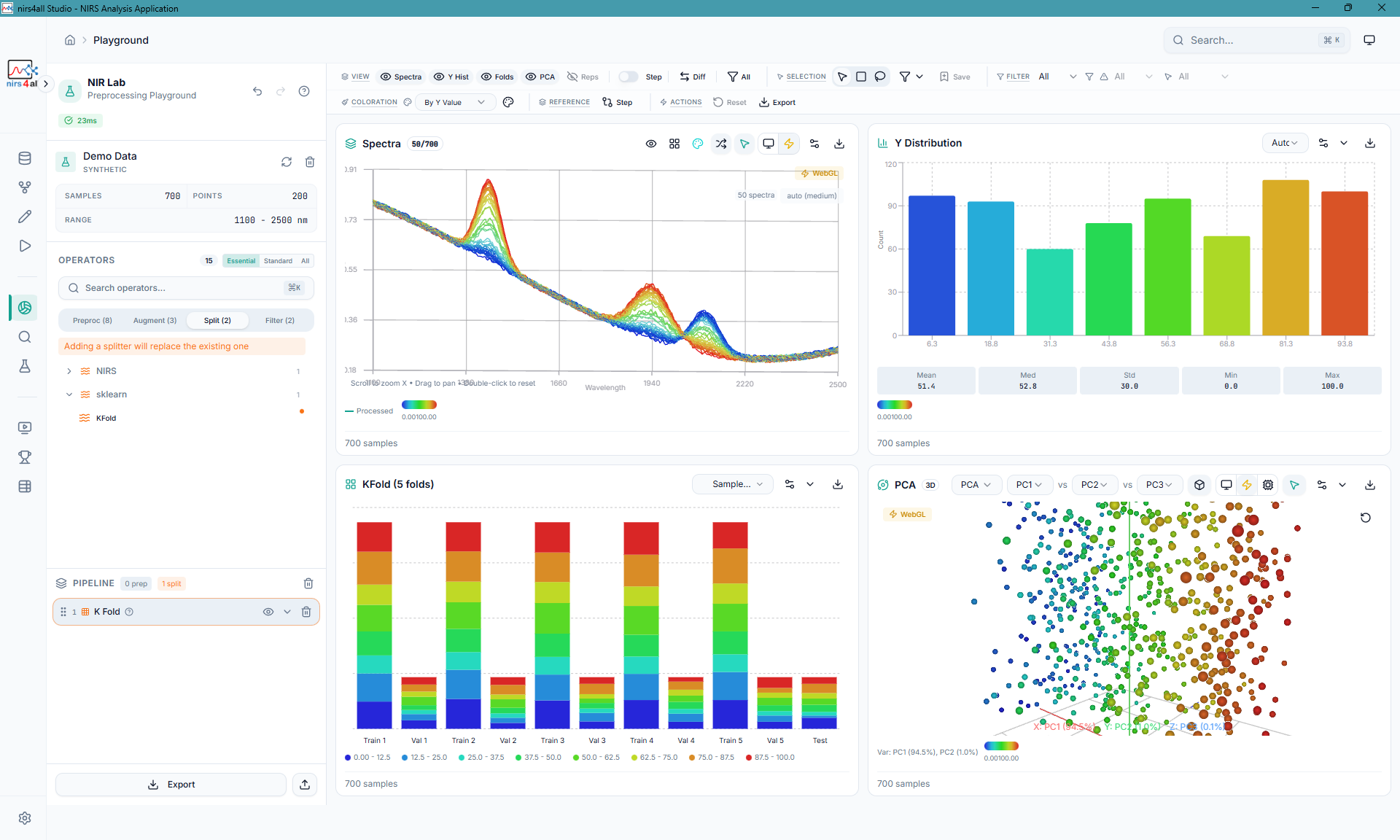
Playground — Interactive spectral exploration with PCA, distributions, and preprocessing preview
nirs4all comes in two flavors — pick the one that fits your workflow:
| nirs4all Studio (Desktop App) | nirs4all (Python Library) | |
|---|---|---|
| Best for | Researchers, technicians, and anyone who prefers a visual interface | Developers, data scientists, and anyone who writes Python scripts |
| What it is | A desktop application with drag-and-drop pipelines, interactive charts, and one-click model training | A pip install Python package with a declarative API for building NIRS pipelines in code |
| Install | Download the installer | pip install nirs4all |
| Repository | You are here | GBeurier/nirs4all |
Not sure? If you've never written Python code, start here with nirs4all Studio. It uses the nirs4all Python library under the hood and gives you all the same capabilities through a graphical interface.
nirs4all Studio offers three ways to get started, depending on your needs:
The simplest option. Downloads and installs like any desktop application.
-
Go to the latest release
-
Download the installer for your platform:
Platform File Windows .exeinstallermacOS (Intel & Apple Silicon) .dmgdisk imageLinux .AppImageor.debpackage -
Run the installer and launch nirs4all Studio
The installer ships the Studio app and backend source, then creates or reuses a writable Python runtime outside the app bundle. You normally don't need Python installed on your machine, but first launch may download and configure the managed runtime.
GPU support: GPU-capable dependencies are selected by the managed runtime profile, not by a separate GPU installer filename. The all-in-one bundle currently ships the locked V1 CPU profile.
A self-contained archive — just extract and run. No installation, no admin rights needed. Ideal for trying nirs4all Studio without committing to an install, or for machines where you can't install software.
-
Go to the latest release
-
Download the all-in-one archive for your platform:
Platform File Windows nirs4all Studio-*-all-in-one-win-x64.zipmacOS nirs4all Studio-*-all-in-one-mac-*.zipLinux nirs4all Studio-*-all-in-one-linux-x64.tar.gz -
Extract the archive and run the executable inside
Everything is bundled — Python runtime, backend, and frontend. Nothing else to install.
For contributors, or if you want to hack on the code. Requires Node.js 20+ and Python 3.11+.
git clone https://github.com/GBeurier/nirs4all-studio.git
cd nirs4all-studio
npm install
Then set up the Python backend and start the servers — see Getting Started below.
| Installer | Standalone | Developer | |
|---|---|---|---|
| Install required | Yes | No (extract & run) | Clone + npm install |
| Python required | No preinstall; managed at first launch | No (bundled) | Yes (3.11+) |
| Auto-updates | Yes | Manual re-download | git pull |
| Runtime profile | Managed CPU/GPU-capable profiles | Locked V1 CPU profile | Your choice |
| Best for | End users | Portable / trial use | Contributors |
This section is for developers running from source (Option 3 above). If you installed via the Installer or Standalone, just launch the app — no setup needed.
- Node.js 20+ (recommended: use
nvm+ the version in.nvmrc) - Python 3.11+
- nirs4all library (optional for UI development)
This project supports development on:
- Windows Native - PowerShell, cmd.exe, or Windows Terminal
- Linux - Any distribution with Node.js and Python
- macOS - Intel and Apple Silicon
- WSL2 - Windows Subsystem for Linux
-
Install Node dependencies:
npm install
-
Install Python dependencies:
python -m venv .venv
.venv\Scripts\activate
pip install -r requirements-cpu.txt
-
Check your environment:
npm run doctor
-
Start development servers:
Use the cross-platform launcher for the full web stack:
scripts\launcher.cmd start web:dev
scripts\launcher.cmd stop
Or run frontend and backend separately:
npm run dev REM Frontend (Vite) at http://localhost:5173Terminal 2:
.venv\Scripts\activate
python -m uvicorn main:app --reload --port 8000
Desktop mode:
npm run start:desktop
-
Install Node dependencies:
npm install
-
Install Python dependencies:
python -m venv .venv
source .venv/bin/activate
pip install -r requirements-cpu.txt  # or requirements-gpu.txt for GPU
-
Check your environment:
npm run doctor
-
Start development servers:
Use the cross-platform launcher for the full web stack:
./scripts/launcher.sh start web:dev
./scripts/launcher.sh stop
Or run frontend and backend separately:
npm run dev # Frontend (Vite) at http://localhost:5173Terminal 2:
source .venv/bin/activate
python -m uvicorn main:app --reload --port 8000
Desktop mode:
npm run start:desktop
If you prefer using WSL2, make sure you're using Linux node/npm (not the Windows ones mounted under /mnt/c).
-
One-time: permanently disable Windows PATH injection into WSL (prevents UNC/cmd.exe install failures):
sudo tee /etc/wsl.conf <<'EOF'
[interop]
appendWindowsPath=false
EOF
Then restart WSL from Windows:
wsl.exe --shutdown
-
Install/use Node via nvm (WSL-native):
npm run setup:wsl
nvm use
Quick check (should NOT point to /mnt/c/...):
which node
which npm
Then follow the Linux setup instructions above.
To run as a desktop application:
# Development mode (with hot reload)
npm run dev:electron

# Build and preview (production mode)
npm run electron:preview
The Electron main process automatically spawns the Python backend and manages its lifecycle.
Note: The webapp can run without nirs4all installed for pure UI development. The backend will report missing capabilities but the frontend is fully functional.
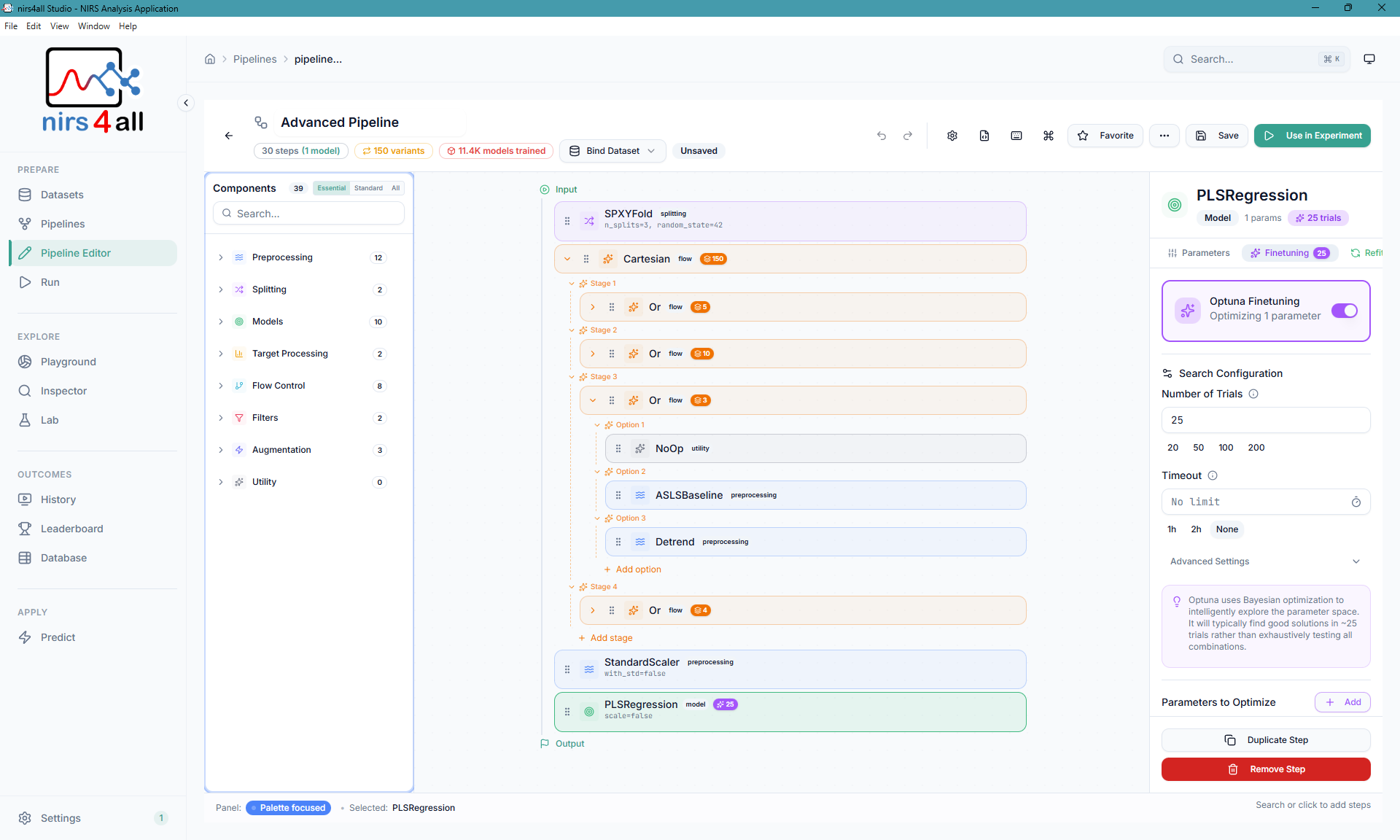
Pipeline Editor — Drag-and-drop builder with component library, validation, and hyperparameter tuning
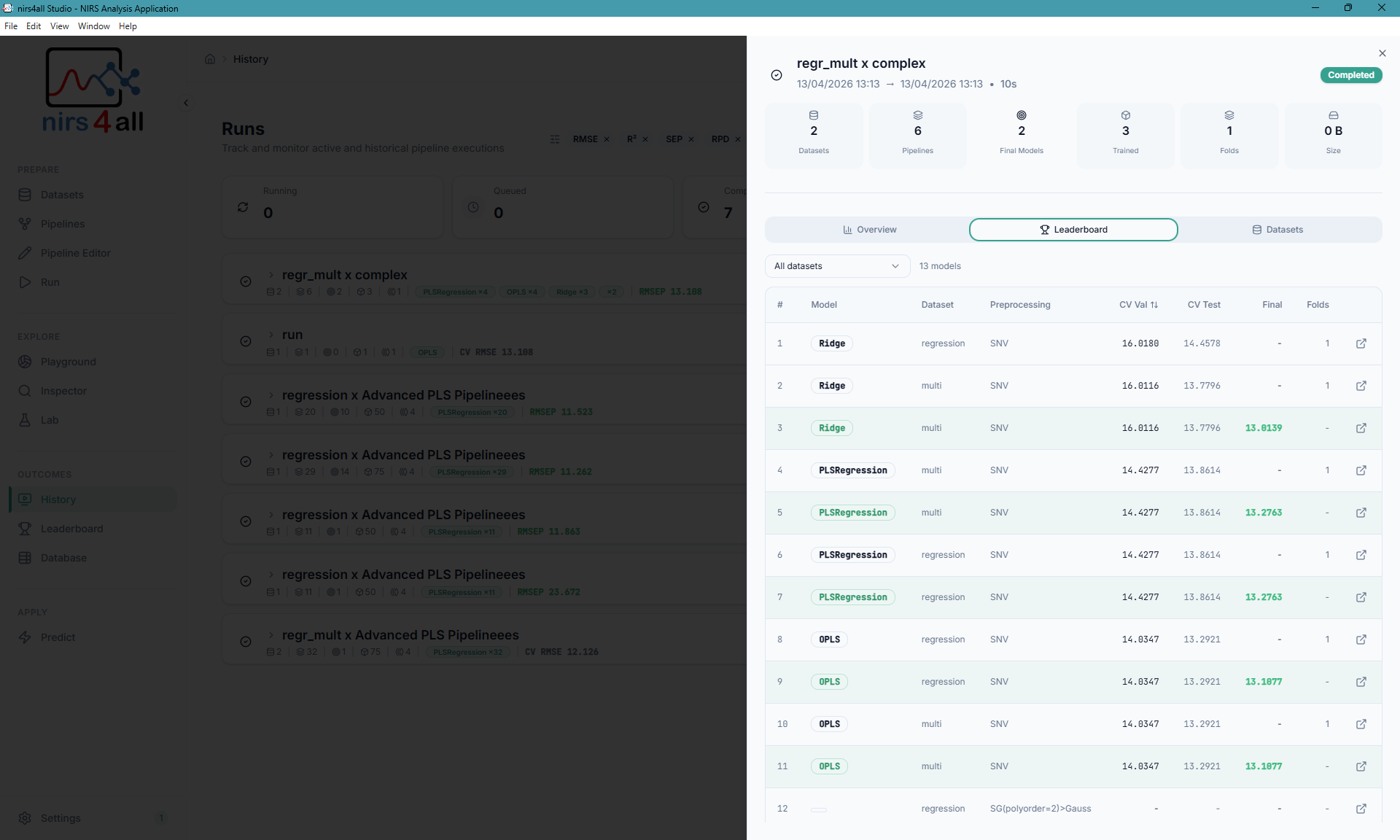
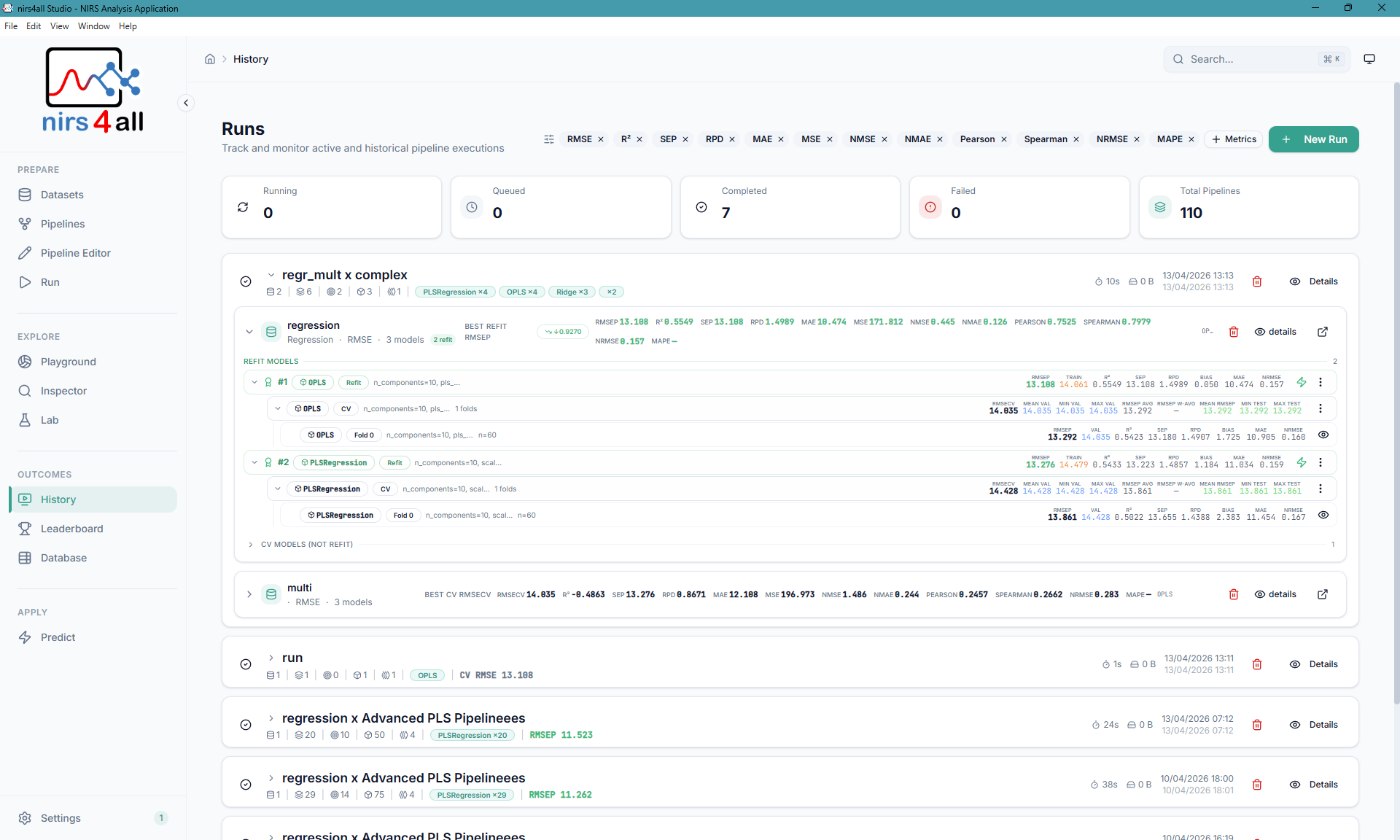
Left: Results with model ranking and CV scores — Right: Runs overview and monitoring
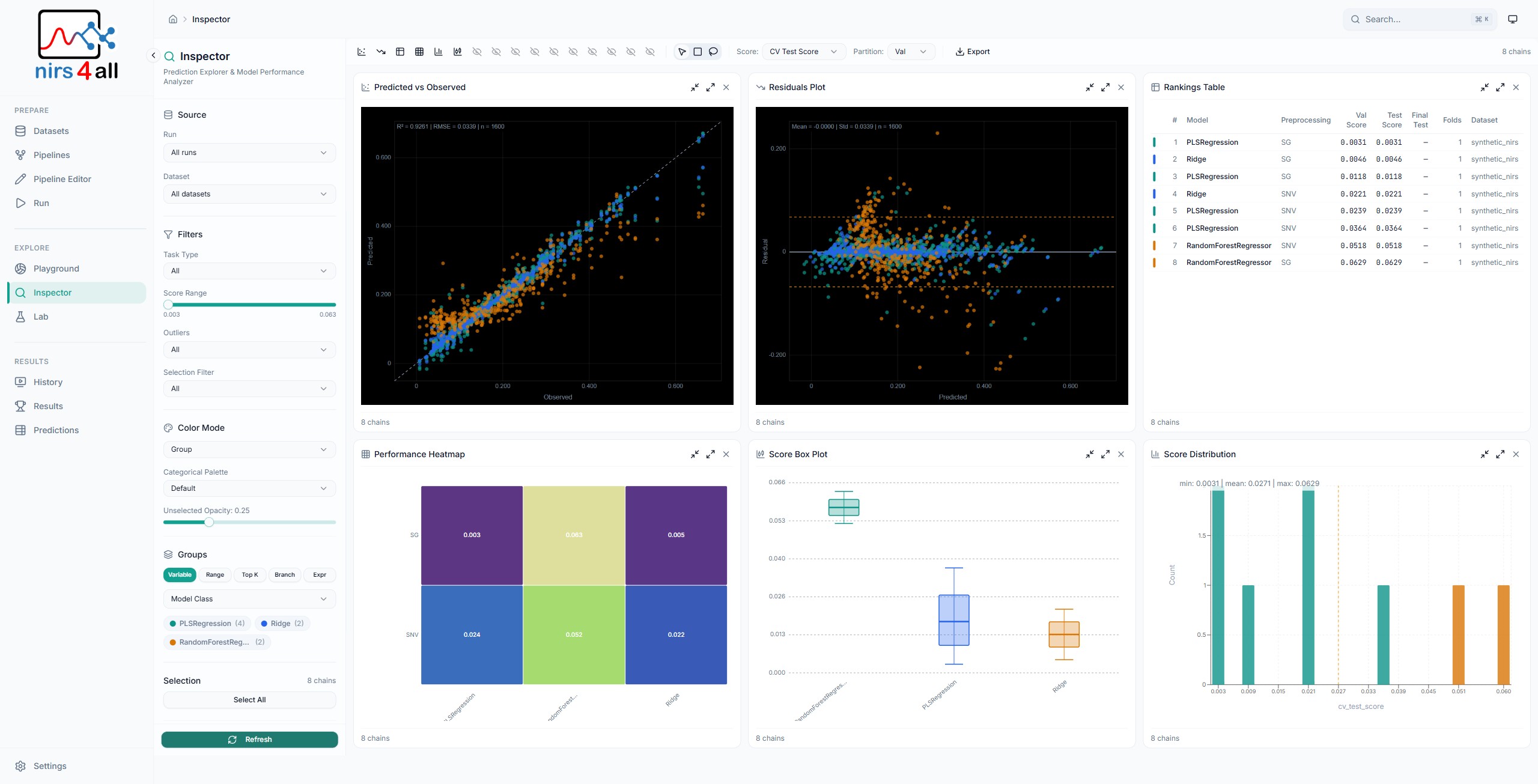
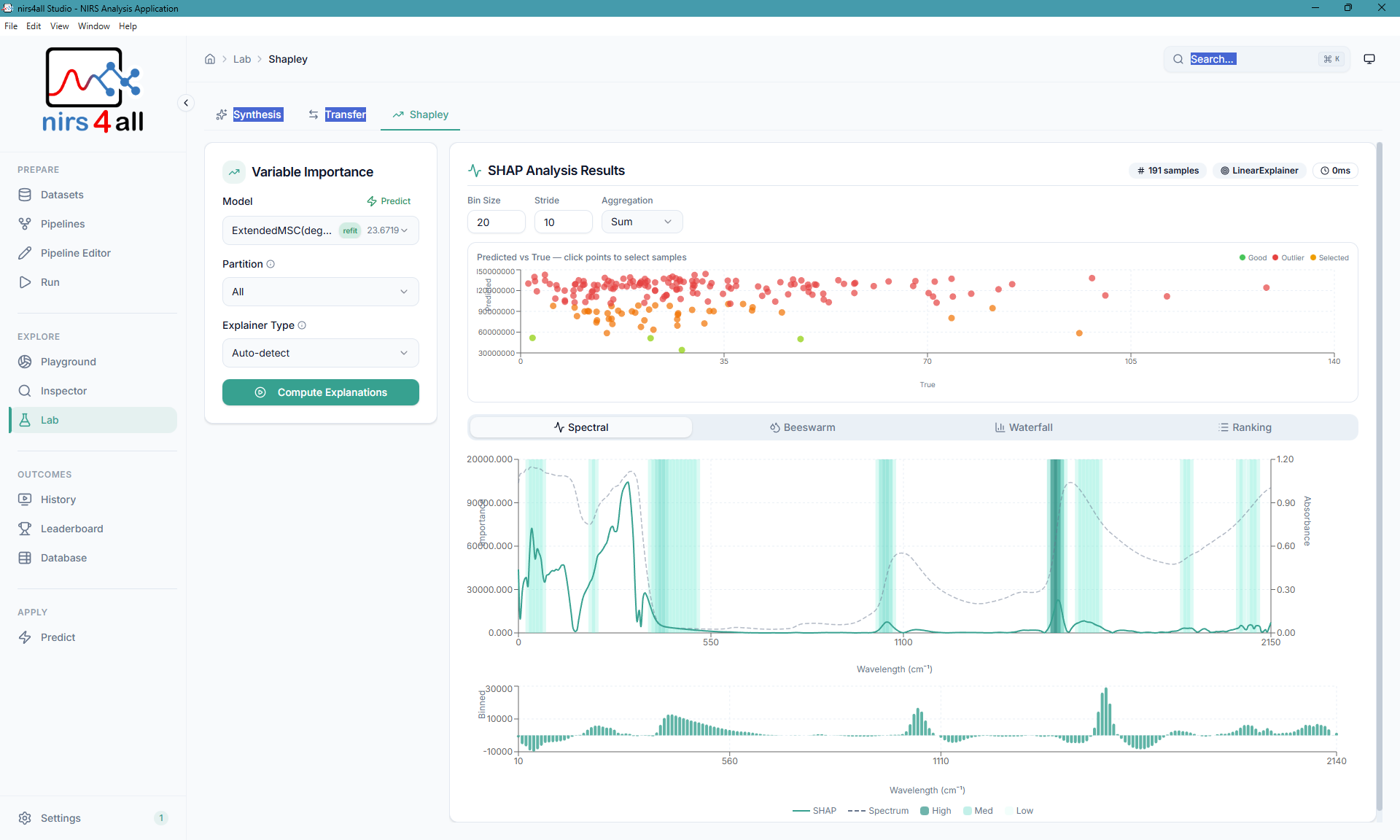
Left: Inspector — prediction analysis and model diagnostics — Right: SHAP variable importance
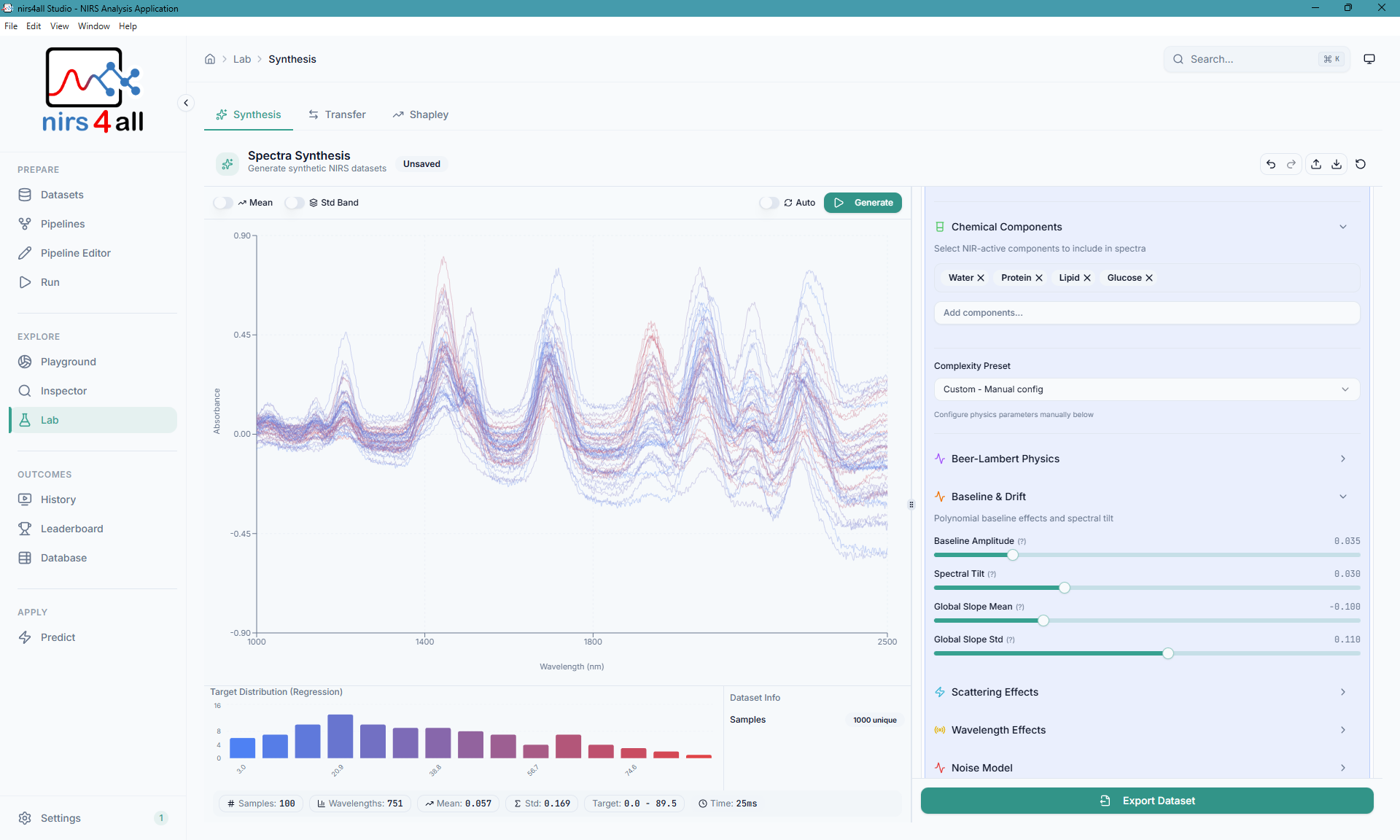
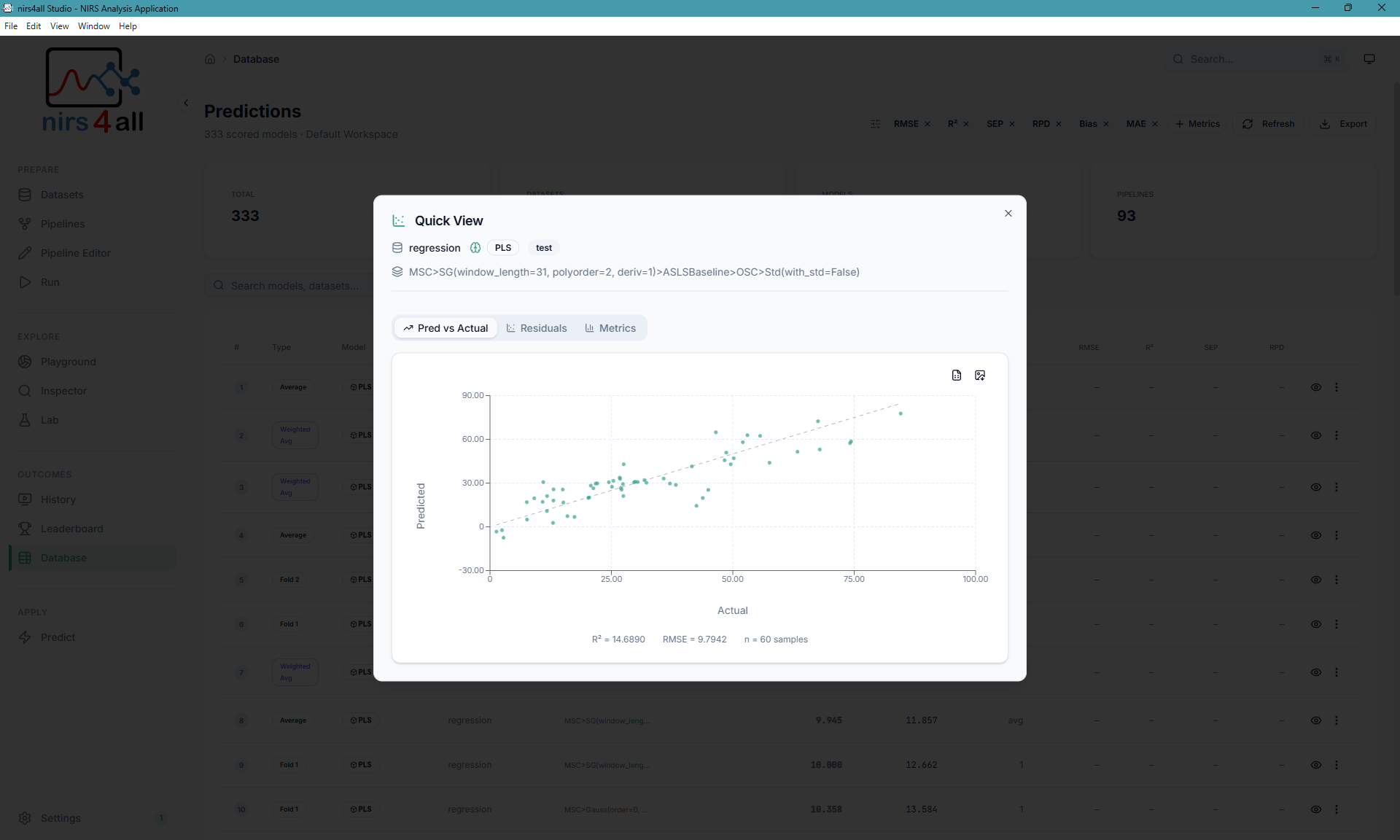
Left: Spectra Synthesis — realistic NIR data generation — Right: Predictions analysis
- Spectral Data Visualization — Interactive charts for exploring NIRS spectra
- Pipeline Builder — Visual drag-and-drop pipeline construction
- Experiment Wizard — Guided experiment setup with preset templates
- Prediction Engine — Run trained models on new samples
- SHAP Explainability — Variable importance and model interpretation
- Spectra Synthesis — Generate realistic synthetic NIR data
- Transfer Analysis — Instrument transfer and domain adaptation tools
- Workspace Management — Organize datasets, pipelines, and results
- Native Desktop Experience — Runs as a standalone desktop app via Electron
- GPU Acceleration — CUDA (Linux/Windows) and Metal (macOS) support
- React 19 with TypeScript (strict mode)
- Vite for fast development and optimized builds
- Tailwind CSS with custom scientific design system
- shadcn/ui component library
- TanStack Query for API state management
- Framer Motion for smooth animations
- Electron 40 for cross-platform desktop experience
- Chromium for consistent WebGL support across all platforms
- IPC Bridge for secure main/renderer communication
- FastAPI for high-performance REST API
- nirs4all Python library for all NIRS analysis
- WebSocket for real-time training progress updates
- PyInstaller for standalone backend packaging
nirs4all_webapp/
├── src/                    # React frontend source
│   ├── components/         # UI components
│   │   ├── layout/         # App layout (sidebar, header)
│   │   ├── pipeline-editor/# Pipeline Editor (see Architecture)
│   │   └── ui/             # shadcn/ui components
│   ├── context/            # React context providers
│   ├── data/               # Data models and registries
│   │   └── nodes/          # Node registry system
│   ├── lib/                # Utilities and helpers
│   ├── api/                # API client
│   ├── types/              # TypeScript type definitions
│   │   └── electron.d.ts   # Electron IPC types
│   └── pages/              # Route components
├── electron/               # Electron main process
│   ├── main.ts             # Main entry point (window management)
│   ├── preload.ts          # Secure IPC bridge (contextBridge)
│   ├── backend-manager.ts  # Python backend lifecycle management
│   ├── env-manager.ts      # Python environment detection and setup
│   └── logger.ts           # Persistent file logging
├── api/                    # FastAPI backend
│   ├── workspace.py        # Workspace management routes
│   ├── datasets.py         # Dataset operations
│   ├── pipelines.py        # Pipeline CRUD
│   ├── predictions.py      # Prediction storage
│   └── system.py           # Health, system info, and GPU detection
├── scripts/                # Build and utility scripts
│   ├── build-backend.cjs   # Python backend packaging (cross-platform)
│   └── build-release.cjs   # Full release build (cross-platform)
├── build/                  # Build configuration
│   └── entitlements.mac.plist  # macOS code signing entitlements
├── docs/                   # Documentation
│   └── _internals/         # Developer guides
├── public/                 # Static assets
├── main.py                 # FastAPI application entry
├── backend.spec            # PyInstaller spec file (backend executable)
├── electron-builder.installer.yml  # Electron packaging config (installer)
├── electron-builder.archive.yml    # Electron packaging config (portable archive)
└── package.json            # Node dependencies
Use the unified launcher for all modes:
| Windows | Linux/macOS | Description |
|---|---|---|
scripts\launcher.cmd start web:dev |
./scripts/launcher.sh start web:dev |
Start frontend + backend (web dev) |
scripts\launcher.cmd start desktop:dev |
./scripts/launcher.sh start desktop:dev |
Start Electron desktop (dev) |
scripts\launcher.cmd stop |
./scripts/launcher.sh stop |
Stop all servers |
scripts\launcher.cmd status |
./scripts/launcher.sh status |
Show server status |
Direct scripts are also available: npm run dev for Vite, python -m uvicorn main:app --reload --port 8000 for the backend, and npm run start:desktop for Electron.
| Command | Description |
|---|---|
npm run doctor |
Check Node, npm, Python, lockfile, and requirement files |
npm run dev |
Start Vite dev server |
npm run dev:electron |
Start Electron with hot reload |
npm run start:desktop |
Alias for Electron development mode |
npm run lint:parallel |
Run ESLint, TypeScript, node registry, Ruff, and dependency checks |
npm run test:frontend |
Run Vitest tests |
npm run test:backend |
Run pytest backend tests |
npm run test:routes |
Check FastAPI route table uniqueness |
npm run test:parallel |
Run Vitest and pytest together |
npm run test:e2e |
Run Playwright web Chromium tests |
| Command | Description |
|---|---|
npm run build |
Build frontend for production |
npm run build:electron |
Build Electron app |
npm run electron:preview |
Preview Electron production build |
npm run release |
Build an installer release |
npm run release:clean |
Clean and rebuild an installer release |
npm run release:all-in-one |
Build a portable all-in-one archive |
npm run release:all-in-one:clean |
Clean and rebuild a portable all-in-one archive |
Installer and all-in-one builds use separate entry points:
- Installer —
npm run release -- --platform win|mac|linuxpackages withelectron-builder.installer.ymland produces platform-native installers plus the Windows portable executable. - All-in-one —
npm run release:all-in-one:clean -- --platform win32|linux|darwin --arch x64|arm64bakes the embedded runtime, packages withelectron-builder.archive.yml, and produces the portable archive.
npm run release -- --clean --platform win
npm run release:all-in-one:clean -- --platform win32 --arch x64| Command | Description |
|---|---|
npm run release -- --platform win |
Package for Windows |
npm run release -- --platform mac |
Package for macOS |
npm run release -- --platform linux |
Package for Linux |
npm run release -- --platform all |
Package for all platforms |
In desktop mode, all main process logs are written to rotating log files:
| OS | Log location |
|---|---|
| Windows | %APPDATA%\nirs4all-webapp\logs\ |
| macOS | ~/Library/Application Support/nirs4all-webapp/logs/ |
| Linux | ~/.config/nirs4all-webapp/logs/ |
Automatic crash reporting via Sentry can be enabled by setting the SENTRY_DSN environment variable. This captures errors from the Electron main process, the React frontend, and the Python backend.
# Set before launching the app
SENTRY_DSN=https://your-key@o123456.ingest.sentry.io/1234567

# For the React frontend (build-time), add to .env.production:
VITE_SENTRY_DSN=https://your-key@o123456.ingest.sentry.io/1234567
When SENTRY_DSN is not set, crash reporting is completely disabled with zero overhead. See docs/ELECTRON.md for details.
| Document | Description |
|---|---|
| docs/ELECTRON.md | Electron architecture, logging, and crash reporting |
| docs/PACKAGING.md | Build system, CI/CD, and release process |
| docs/UPDATE_SYSTEM.md | Auto-updater implementation |
| docs/sources/custom-nodes-guide.md | Custom node development |
This project is licensed under the CeCILL-2.1 License. Third-party notices are listed in THIRD_PARTY_NOTICES.md, and the corresponding license texts are bundled in LICENSES/.
- CIRAD for supporting this research
- The nirs4all library for the NIRS analysis engine
- The open-source scientific Python and React communities
Made for the spectroscopy community