Installation
You need python2.7 with tkinter support and working pip. Then you can use pip install bCNC to install bCNC and all it's dependencies (except for tkinter, which has to be installed/compiled as integral part of python). After that it can be launched using python -m bCNC command.
Note that if you have both python2 and python3 installed, you might need to use python2 and/or pip2 binaries rather than just python and pip, to make sure that correct version of python is used. (update: recently we added support for python3, some things are still broken, but most of it seems to work). If you don't have pip binary for correct python in your PATH, you can launch it by calling python -m pip rather than just pip.
https://pypi.org/project/bCNC/
That's all you need to know. Rest of this document are just examples of how to do that in special cases on specific OS:
If you want to use pip install --upgrade git+https://github.com/vlachoudis/bCNC to install latest development version from github (because you are a developer, or you want to try new cool features), you will also need git binary installed and available in your PATH, so pip can use it to fetch the source code from github.
If you don't have git installed, you can use pip install --upgrade https://github.com/vlachoudis/bCNC/archive/master.zip
Alternatively you can use pip2 install . directly in git folder.
Or just download sources from github, unpack it and launch it by python -m bCNC in that folder or double clicking the main .py file. It will work given that you've previously done pip install bCNC, which downloaded and installed all the required dependencies.
- Update your system (Optional) and install git, python (with tkinter support) and pip:
	#This is specific for Debian/Ubuntu, other distros have other package managers than apt-get
	sudo apt-get update
	sudo apt-get upgrade
	sudo apt-get install git python python-tk python-pip
- Install bCNC using pip and launch it:
	sudo pip2 install --upgrade bCNC
	#sudo pip2 install --upgrade git+https://github.com/vlachoudis/bCNC #if you want git version
	python2 -m bCNC
Happy milling!
If you are package maintainer of distribution, there's likely some unified way to make Python packages for your distro. Eg.:
- Py2deb is tool to build Debian packages from Python packages: https://pypi.org/project/py2deb/
- ArchLinux has guidelines: https://wiki.archlinux.org/index.php/Python_package_guidelines
1.) Install python 2.7: https://www.python.org/downloads/
Do not forget to install Tcl/Tk and PIP modules while doing so. Also check that python will be added to path:

2.) Open commandline and install bCNC using pip:
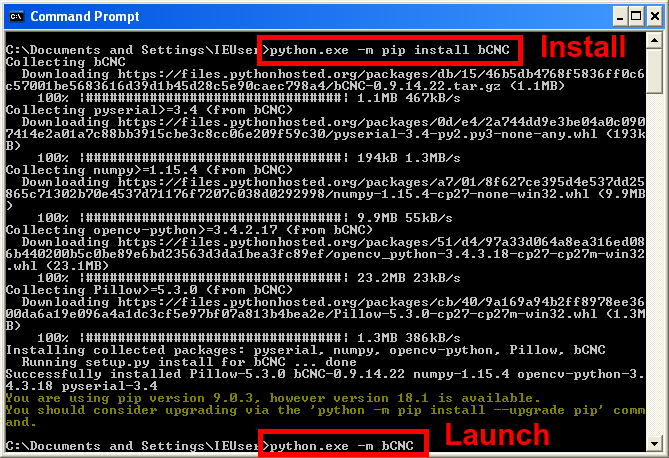
This installs bCNC to C:\Pyhton27\Lib\site-packages\bCNC\ and launches it using python -m bCNC
There might be experimental .exe build available at https://github.com/vlachoudis/bCNC/releases Such build does not need anything, since it comes bundled with python and all needed libraries. Only download, unpack zip and launch bCNC.exe
If you want to build .exe yourself, it's possible. But first you need to install python+pip and non-exe version of bCNC with all it's requirements on Windows. Then there is make-exe.bat in the bCNC install directory to build the exe.
| OS | Python | Notes |
|---|---|---|
| Windows XP SP3 | 2.7.5 | pyserial newer than 3.0.1 will not work |
| Windows Vista SP2 | 2.7.9 | |
| Windows 7 | 2.7.* | Any 2.7 version should work |
| Windows 8.1 | 2.7.10 is known to work | |
| Windows 10 | 2.7.* | Any 2.7 version should work |
The instructions from below link worked : guide on Medium
Here is the recap :
- Install pyenv and tcl-tk =brew install pyenv= =brew install tcl-tk=
- Add environment variables into ~/.zshrc or other shell rc and restart the shell/terminal
export PATH="$HOME/.pyenv/bin:$PATH" if which pyenv > /dev/null; then eval "$(pyenv init -)"; fi
if which pyenv-virtualenv-init > /dev/null; then eval "$(pyenv virtualenv-init -)"; fi
export PATH="/usr/local/opt/tcl-tk/bin:$PATH" export LDFLAGS="-L/usr/local/opt/tcl-tk/lib" export CPPFLAGS="-I/usr/local/opt/tcl-tk/include" export PKG_CONFIG_PATH="/usr/local/opt/tcl-tk/lib/pkgconfig" export PYTHON_CONFIGURE_OPTS="--with-tcltk-includes='-I/usr/local/opt/tcl-tk/include' --with-tcltk-libs='-L/usr/local/opt/tcl-tk/lib -ltcl8.6 -ltk8.6'"
- install pyenv virtual env =brew install pyenv-virtualenv=
=pyenv install 3.8.0=
=exec $SHELL=
- Test tcl tk setup
  mkdir ~/foo; cd ~/foo
  pyenv local 3.8.0
  pyenv version
  python -m tkinter -c 'tkinter._test()'
pip install --upgrade bCNC python -m bCNC
- Install and launch bCNC
    pip install --upgrade bCNC
    #pip install --upgrade git+https://github.com/vlachoudis/bCNC #if you want git version
    python -m bCNC
Installs the same way as any other Linux. But bear in mind that opencv-python can't be currently installed using PIP on ARM, this might give you some problems.
Some packages might be needed in order to install source distribution of python modules:
apt-get install python-pip python-setuptools python-dev python-tk libjpeg-dev zlib1g zlib1g-dev
On this page there is mention of way to build .deb and .exe packages. I wish to do this automaticaly, but don't have the needed infrastructure. If you manage to setup automatic builds of bCNC, please let us know.


