

|
UPDATE: THIS SOLUTION IS OUTDATED AND DOES NOT WORK ANY MORE WITH NEWER VERSIONS OF BIRDNETPI +++++++++++++++++++++++++++++++++++++++++++++
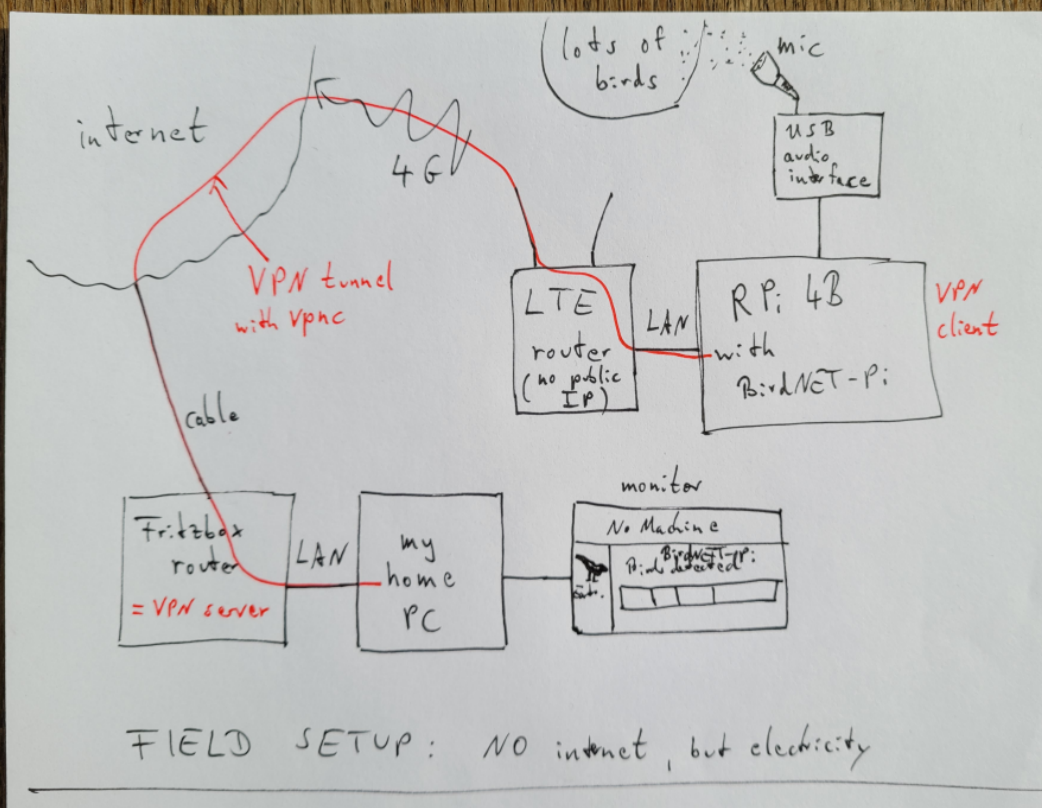
One solution that I found (which I tested and realized that it works, but which is not yet perfect). Note that this is a very special use case and a very special solution (I use a FritzBox as my home router, where I am able to obtain a dynDNS service):
1.) Install vpnc on the RPi:
3.) Connect the VPN:
6.) Reconnect network & VPN, if network connection is lost (which occurs often with RPi, especially with WiFi)
Then add this line into your crontab file to check the connection every 5 minutes
I am not sure, whether you need to assign rights to the shell file!?
It now checks every 5 minutes whether the router in the home network can be pinged. if not, it reboots the RPi. While rebooting, the internet connection is established and the vpnc VPN service is restarted. With the help by Patrick (see below) this seems to work now!!! Thanks a lot! I can now connect to the RPi inside my home network by NoMachine and look/listen to the browser output. UPDATED 2021/10/25 to incorporate Patricks hints I used code from the following resources: https://www.kuemmel.wtf/?p=363 |
Replies: 7 comments 4 replies

|
I'll elaborate when I'm home, but: Then whatever command you need This will wait for internet before proceeding |

|
I used:
But ping does not execute, when in a shell file. |
|
It seems my method described above does not work any more with the latest version of BirdNET-Pi. I do not know why. There is a different Crontab file now? And on every command in the terminal I get "could not resolve hostname birdnetpi"? |

|
The resolving hostname error has to do with the VNC installation seeming to go fine, but likely didn't set the hostname properly. That makes the most sense to me. |
|
Oh, that sounds like a good explanation, I will check that! Thanks! |
|
What shebang are you using for the shell script?
…Sent from my iPhone
On Oct 24, 2021, at 2:32 PM, DD4WH ***@***.***> wrote:
I used:
`ping -c4 192.168.1.1 > /dev/null
if [ $? != 0 ]
then
sudo /sbin/shutdown -r now
fi`
But ping does not execute.
The very same command does execute in the terminal.
—
You are receiving this because you commented.
Reply to this email directly, view it on GitHub, or unsubscribe.
|
|
I am finally home. It seems you may have given up on this, but if not: placing "set -x" at the top of your shell script just below the shebang will enable shell debuging:
then then That should show you why the ping seems to fail. |
|
Patrick, thanks a lot for your hints! Will try to go through them systematically later this week. It was too late yesterday to continue debugging. Yes, my idea was to check whether the internet connection is there AND the VPN connection works properly. So I thought it would be good to check connection to the IP adress of my home router (which can only be reached if the internet connection AND VPN tunnel work). I had to look up, what a "shebang" is, have not yet fully understood its purpose. If I store a file as
Sorry for my questions, which seem to be on very basic Linux topics, I fear. I am learning a lot from all your help! |
|
@mcguirepr89 : Patrick, thanks a lot for your awesome hints! After a good night of sleep everything turned out well and now fully working as expected! What I did wrong and had to correct:
I will now put in this additional info into the first post in this thread. |
|
I'm really glad I could be of help. I was thinking about this more, and I might have another solution. The LTE router definitely has a public IP address (that is how it is reached and how you know it's online) -- the issue is that it is dynamic, likely new every power cycle. The possible solution I think may work would be setting up a postfix mailserver (standard baked in linux stuff that just needs configuration) that can email you with the LTE router's public IP address daily/hourly/whatever is needed. Then you should be able to use NoMachine to access the desktop remotely, or alternately, I could probably cook up something that will adjust your Caddyfile when that IP changes to make the installation reachable at whatever that IP address turns out to be. To discover the LTE public IP address at any given time, from the Pi issue Let me know if you'd like to explore this possible solution any further. My best! PS -- please take a look at the annotation for the "Headless VNC Installation" if you have a chance and let me know if there is anything missing or unclear. |
|
This is the most elegant solution to the dynamic dns problem -- and it provides a free domain name for all users! NoIP.comI will provide screenshot step-by-step guides for this, but will ultimately tuck this into an optional service (since it's just an executable and only supports init and not systemd).
That's it!! Now, the Dynamic Update Client (on the BirdNET-Pi) will update the DDNS (NoIP) that it has a new IP address, and the A record (the public IP address associated with the free No-IP hostname). This is basically what AnyDesk does to keep its clients updated with its servers. I am mocking up a diagram to explain how it works: I will update this shortly and make a discussion for all users who may suffer from this issue and/or want to use this solution as a free way to share their installations who may have dynamic public IP addresses (@christoph-lauer) Diagram: When the ISP/LTE Carrier issues a new public IP address to the Modem/Router, the DUC running on the BirdNET-Pi sends an update to the DDNS that it has a new IP address. The DDNS updates its A record so that requests to "http://birdnetpi.ddns.net" resolve to the newly updated IP address. |


@mcguirepr89 : Patrick, thanks a lot for your awesome hints!
After a good night of sleep everything turned out well and now fully working as expected!
What I did wrong and had to correct:
#!/bin/bashin the first line of/usr/local/bin/checkwifi.shI will now put in this additional info into the first post in this thread.