A deep dive into our off-thread rendering engine, which uses asymmetric batching and a secure DomApiRenderer to
eliminate jank at an architectural level.
In a world where some frameworks declare the VDOM "pure overhead," we've made a radical bet: we've doubled down on the VDOM and moved it entirely off the main thread. This isn't a defense of the traditional VDOM; it's a redefinition of its purpose.
The debate between VDOM-based and "VDOM-less" frameworks misses the point. Both are fundamentally limited by the same bottleneck: the single main thread where your application logic, state management, and rendering all compete for resources. The result is inevitable—every complex calculation is a potential source of UI jank.
The recent introduction of the React Compiler is a brilliant validation of this very problem. By automating memoization, the React team acknowledges that managing performance on the main thread is a major burden. But automated memoization is still memoization—an extra layer of overhead added to your application, just hidden by a tool. It’s the most advanced solution possible for a single-threaded architecture.
Neo.mjs offers a different path. Our architecture is designed to make the cost of updates so low that performance memoization becomes unnecessary. We don't automate the tax; we eliminate it.
Neo.mjs solves this by changing the battlefield. For any true off-main-thread architecture, a VDOM isn't a choice—it's a necessity. Since a Web Worker cannot directly access the DOM, it needs a serializable, abstract representation of the UI to send to the main thread. That representation is a Virtual DOM. We treat it not as a rendering engine, but as the essential cross-thread communication protocol. This same protocol is the foundation for true multi-window applications, allowing a single App Worker to seamlessly synchronize the UI across multiple browser windows—a feat impossible for single-threaded frameworks.
This architectural shift is the real revolution. It forces us to answer fascinating new questions: How do you best communicate UI changes between threads? And, most critically, what is the ideal language for describing a UI when it's being built not by a human, but by a machine? The answer is simple, structured data—a language that AI understands natively. This is the foundation for the next generation of applications.
This article explores the solutions to those problems, focusing on two key concepts:
- Three Philosophies of UI Definition: How Neo.mjs offers multiple layers of abstraction for building UIs, from high-level declarative trees to low-level VDOM blueprints.
- Asymmetric Rendering: How using different, specialized strategies for creating new UI vs. updating existing UI leads to a more performant and secure system.
(Part 4 of 5 in the v10 blog series. Details at the bottom.)
Before diving into how the VDOM works, it's crucial to understand what we're building. Neo.mjs offers three distinct approaches to defining your UI, each with its own strengths.
The most powerful and abstract way to build complex applications in Neo.mjs is the Object-Oriented approach. You compose
your UI by creating Container classes and declaratively defining their child items as a configuration object.
// Example of a declarative component tree
import Container from '../../../../src/container/Base.mjs';
import Toolbar   from '../../../../src/toolbar/Base.mjs';
import Button    from '../../../../src/button/Base.mjs';

class MyComponent extends Container {
    static config = {
        className: 'MyComponent',
        layout   : {ntype: 'vbox', align: 'stretch'},
        items    : [{
            module: Toolbar,
            items : [{module: Button, text: 'Button 1'}]
        }, {
            ntype: 'component',
            text : 'Content Area'
        }]
    }
}
With this method, you are not thinking about HTML, divs, or even the VDOM. You are describing your application in terms of its logical components and their relationships. This is the classic approach for building robust, enterprise-scale applications where separation of concerns and maintainability are paramount.
From a Micro-Frontends perspective: The named configs here are the contract (API) available from the outside. Any run-time value change is reactive and will update the UI.
For functional components, or when you need to dynamically generate UI structures, you can drop down a level of abstraction and work directly with JSON Blueprints. This is the "native language" of the Neo.mjs rendering engine.
The component's createVdom() method returns a structured JSON object that describes the VDOM tree.
We've seen this movie before. In the world of APIs, the verbose, heavyweight, and human-readable XML standard was inevitably supplanted by the lighter, simpler, and more machine-friendly JSON. We believe the same evolution is happening for defining complex UIs. While HTML is the language of the document, structured data is the language of the application.
This approach has profound advantages:
- Extreme Data Efficiency: A JSON blueprint is drastically smaller than its equivalent rendered HTML.
- AI's Native Language: This is the most critical advantage for the next generation of applications. An LLM's natural output is structured text. Asking it to generate a valid JSON object that conforms to a component's API is a far more reliable and constrained task than asking it to generate nuanced HTML.
- Ultimate Control: It gives you precise, programmatic control over the generated VDOM.
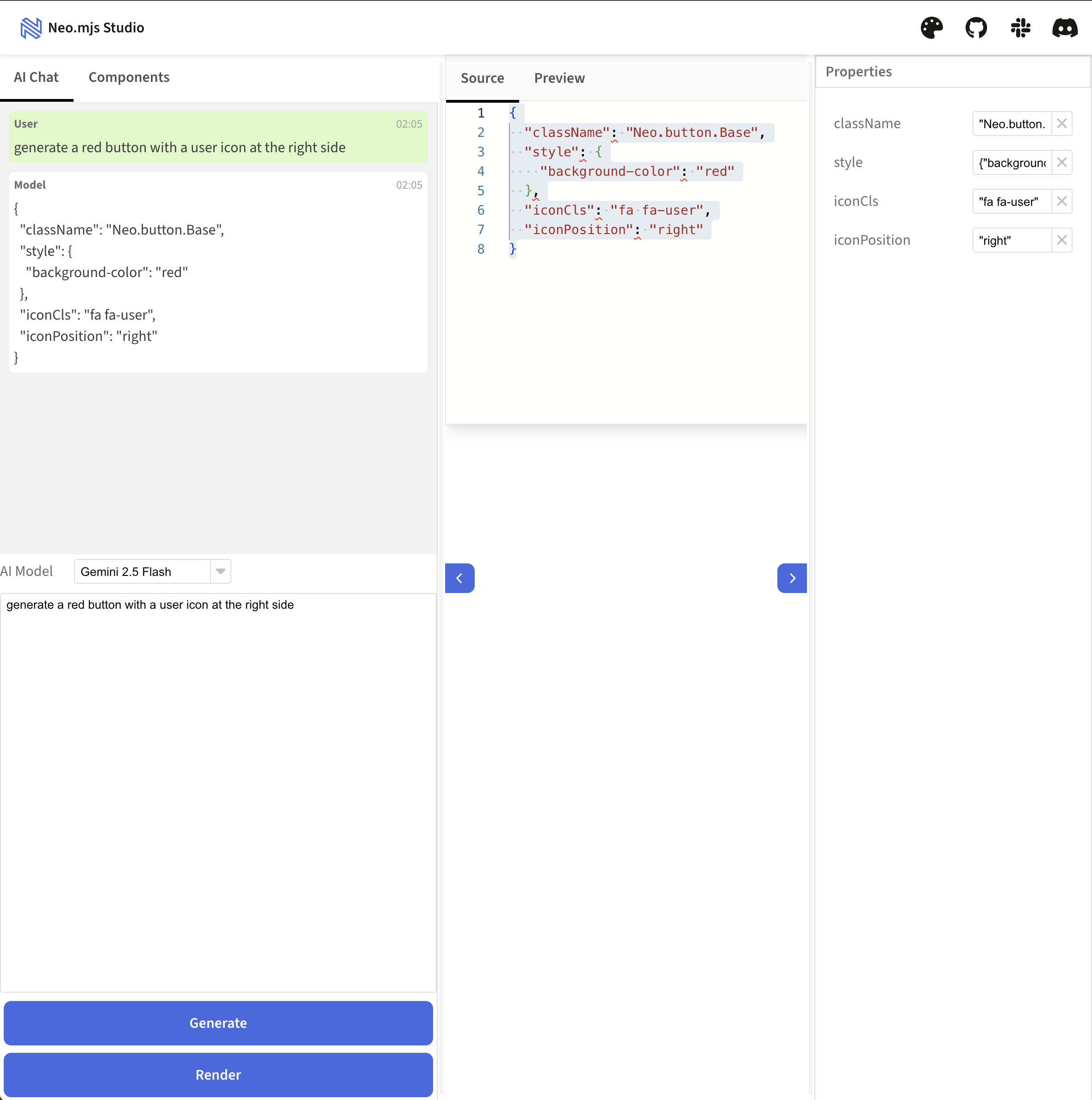
This philosophy is the engine behind our AI-powered Neo Studio (super early spoiler),, which generates these JSON blueprints from natural language prompts.
While JSON is the framework's native tongue, we recognize the universal fluency of HTML. To lower the barrier to entry and provide a familiar authoring experience, the recent v10.3.0 release introduced an intuitive, HTML-like syntax built on standard JavaScript Tagged Template Literals.
// Inside a component's render() method:
return html`
    <div class="my-container">
        <p>${config.myText}</p>
        <${Button} text="Click Me" handler="${this.onButtonClick}" />
    </div>
`;
This is the beginner mode—an easy on-ramp for developers new to the framework. Crucially, this is not JSX. It's built on our core principle of a zero-builds development experience, running directly in the browser.
To achieve this without sacrificing performance, we use a dual-mode architecture:
- Development: Templates are parsed live in the browser.
- Production: A build-time process transforms the templates directly into the same optimized JSON VDOM blueprints used by the functional approach. The parser is completely removed, resulting in zero runtime overhead.
This gives developers a choice: start with the familiar comfort of HTML templates, or use the raw power of JSON blueprints. For complex functional components, we still recommend using JSON directly for maximum clarity and performance. But for simpler components or for developers who prefer it, the template syntax is a powerful and welcome alternative.
All three philosophies feed into the same revolutionary rendering engine. Now let's look at that engine.
The traditional VDOM diff/patch algorithm is a cornerstone of modern frameworks. It's brilliant for calculating the minimal set of changes needed to update an existing UI. But this one-size-fits-all approach has limitations.
Neo.mjs v10 introduces a true Asymmetric VDOM, which applies different, highly-specialized strategies for different tasks. This revolution happens on two fronts: how we build update blueprints in the App Worker, and how we apply them to the DOM in the Main Thread.
On the Main Thread, the Neo.main.DeltaUpdates manager acts as a central orchestrator. It receives a stream of commands
from the VDOM worker and uses the right tool for every job.
Deltas are pushed into requestAnimationFrame().
Whenever a new piece of UI needs to be created, the VDOM worker sends an insertNode command. This isn't just for the
initial page load. It applies any time you dynamically add a new component to a container or, in a capability that
showcases the power of the multi-threaded architecture, move an entire component tree into a new browser window.
For all these creation tasks, our pipeline uses the DomApiRenderer.
This renderer is not only fast but also secure by default. It achieves this by treating all content as plain text
unless explicitly told otherwise. When processing a VDOM blueprint, it uses the safe node.textContent property for any
text configs. This simple default required a framework-wide effort to ensure our entire component library uses text
instead of html, fundamentally eliminating the risk of XSS attacks that plague innerHTML-based rendering. While
developers can still use the html property at their own risk for trusted content, the framework's secure-by-default
posture provides a crucial safety net, especially for UIs where an LLM might generate content or even structure.
This zero-trust approach to rendering means that even if a malicious or malformed string were to be injected into a
component's data, it is physically incapable of being executed as code in the browser.
The renderer builds the entire new UI tree on a DocumentFragment that is detached from the live DOM, preventing layout
thrashing. Only when the entire structure is complete is it appended to the document in a single, efficient operation.
// A simplified look at the DomApiRenderer's core logic
// Note: This runs on the Main Thread
const createFragment = (vnode) => {
    const fragment = document.createDocumentFragment();

    // Recursively build the entire tree off-screen
    vnode.childNodes?.forEach(child => {
        const el = document.createElement(child.tag);
        // ... logic for setting attributes, styles, etc.
        fragment.appendChild(el);
    });

    return fragment;
};

// Later, in a single operation:
parentElement.appendChild(createFragment(vnode));
Enabling this superior rendering engine is as simple as setting a flag in your project's configuration (Default value in v10):
{
    // ...
    "useDomApiRenderer": true
}
But its real genius lies in how it handles complex insertions. This isn't just about performance; it's about preserving the state of live DOM nodes.
Consider a <video> element that is currently playing. In many frameworks, moving that video component to a different
part of the UI would destroy the old DOM node and create a new one, causing the video to jarringly restart from the
beginning. This is because the rendering engine only knows how to create new things, not how to relocate existing ones.
Neo.mjs avoids this entirely. Our architecture understands that the component instance is a persistent entity. When you
move it, the DomApiVnodeCreator sees that the video component's DOM
already exists. Instead of generating a VDOM blueprint to recreate it, it prunes that entire branch from the
insertNode delta. The VDOM worker then issues a separate, highly efficient moveNode delta.
The result on the main thread is a single, clean DOM operation: the existing <video> element is simply moved to its
new location, continuing to play without interruption. This is the power of the pruned graph: it's an optimization
that not only boosts performance but preserves the integrity and state of your UI.
When you change a property on an existing component—like its text, style, or attributes—the VDOM worker sends different
commands, such as updateNode or moveNode.
For these tasks, our pipeline uses direct, surgical DOM manipulation. It doesn't need to re-render anything. It simply applies the precise change:
element.setAttribute(...)element.classList.add(...)parentNode.insertBefore(...)
This combination of a powerful creation engine and a precise modification engine gives Neo.mjs its unique blend of performance, security, and flexibility.
The other half of the revolution happens before an update is even sent. It’s about creating the smartest, most minimal blueprint possible.
In v9, Neo.mjs already had a powerful solution for this: Scoped VDOM Updates. Using an updateDepth config, a
parent container could intelligently send its own VDOM changes to the worker while treating its children as simple
placeholders. This prevented wasteful VDOM diffing on child components that weren't part of the update.
However, this had a limitation. The updateDepth was an "all or nothing" switch for any given level of the component tree.
Consider a toolbar with ten buttons. If the toolbar's own structure needed to change and just one of those ten buttons
also needed to update, the v9 model wasn't ideal.
This is the exact challenge that v10's Asymmetric Blueprints were designed to solve. The magic lies in a sophisticated pre-processing and negotiation phase that happens entirely within the App Worker, before anything is sent to the VDOM worker.
Here's how it works, with a more realistic example. Imagine a dashboard container with four cards. A user action causes the container's background to change, and simultaneously, the content of the second and fourth cards needs to update.
1. Negotiation & Aggregation:
The VDomUpdate manager is notified of three separate changes: one for the container and one for each of the two cards.
Instead of sending three separate update requests across the worker boundary (which would be inefficient), it aggregates
them. It initiates a single update on the top-most component in the hierarchy (the container) and passes the IDs of the
other changed components (card-2, card-4) into the TreeBuilder via the mergedChildIds parameter.
2. The Asymmetric Build:
The TreeBuilder is called on the container. It knows it needs to generate the
container's own VDOM, but instead of expanding all children, it follows a simple rule: "Expand only the children whose
IDs are in the mergedChildIds set. For all others, create a lightweight placeholder."
Here is the power of this approach in action.
Before: The Container's Own VDOM Blueprint This is the simple structure the container holds before the update. It just references its children.
// The container's vdom property just lists its children
{
    id: 'dashboard-container-1',
    tag: 'div',
    cn: [
        { componentId: 'card-1' },
        { componentId: 'card-2' },
        { componentId: 'card-3' },
        { componentId: 'card-4' }
    ]
}
After: The Optimized Blueprint Sent to the VDOM Worker
The TreeBuilder produces a highly specific, asymmetric blueprint. It's a mix of detailed VDOM for the changed items
and placeholders for the unchanged ones.
// The TreeBuilder intelligently expands only what's necessary
{
    id: 'dashboard-container-1',
    tag: 'div',
    style: { background: '#f0f0f0' }, // The container's own change
    cn: [
        // Card 1 is untouched, so it becomes a placeholder
        { componentId: 'card-1', neoIgnore: true },

        // Card 2 changed, so its full VDOM is included
        {
            id: 'card-2',
            tag: 'section',
            cn: [
                { tag: 'h2', text: 'Card 2 Header' },
                { tag: 'p',  text: 'This is the NEW updated content.' }
            ]
        },

        // Card 3 is untouched
        { componentId: 'card-3', neoIgnore: true },

        // Card 4 also changed
        {
            id: 'card-4',
            tag: 'section',
            cn: [
                { tag: 'h2', text: 'Card 4 Header' },
                { tag: 'p',  text: 'Another card with new text.' }
            ]
        }
    ]
}
The Result: A Revolution in Efficiency and Correctness
The VDOM worker receives this pre-optimized blueprint. When it sees a node with neoIgnore: true, it completely skips
diffing that entire branch of the UI, saving significant computation time.
But the placeholders serve a second, equally critical purpose: they preserve the structural integrity of the child list. By keeping the original order and count of siblings intact, they ensure the diffing engine can correctly calculate where to insert a new node or move an existing one. Without them, the engine would see a list of two items instead of four and incorrectly create deltas to delete the other two cards. The placeholders allow the engine to distinguish between a simple update and a structural change, producing a minimal and—most importantly—accurate set of deltas to send to the main thread.
This is the essence of the Asymmetric VDOM. It's not just about batching updates; it's about creating the smartest, most minimal blueprint possible before the expensive diffing process even begins.
Once the optimized blueprint arrives at the VDOM worker, the second half of the revolution begins. Here, the plain JSON
blueprint is inflated into a tree of VNode instances. This is a key architectural point: the VNode is a very
lightweight wrapper class that exists only inside the VDOM worker. It performs no complex logic, but normalizes the
raw JSON blueprint, ensuring every node has a consistent structure (e.g., an id and a childNodes array) for the
diffing engine to process reliably.
The vdom.Helper singleton then acts as the core diffing engine. It compares the new VNode tree to the previous one
and, instead of generating HTML, produces an array of deltas—highly specific, low-level instructions for the main
thread to execute.
It’s the ultimate optimization: instead of sending the entire blueprint for a skyscraper just to fix a window, we now send the floor plan for the lobby and the specific blueprint for that one window on the 50th floor, ignoring everything else in between. As a developer, you don't do anything to enable this. You simply change state, and the framework automatically creates the most efficient update possible.
The VDOM Revolution in Neo.mjs isn't just a performance enhancement; it's a paradigm shift that fundamentally changes what's possible on the web.
By combining the declarative power of JSON Blueprints with the intelligent efficiency of Asymmetric Rendering, we've created an architecture that delivers on the promise of a truly non-blocking UI. For you, the developer, this means you can finally build applications that are:
- Fast by Default: Blazing-fast initial renders and surgically precise updates keep the UI fluid at all times, without you having to think about it.
- Intelligent & Unrestricted: The multi-threaded design allows for intensive AI logic, complex calculations, or heavy data processing to run in the background without ever freezing the user experience.
- Future-Proof & AI-Native: An engine where AI is not an afterthought, but a first-class citizen. It provides the perfect, secure, and efficient foundation for building applications with AI, where LLMs can generate, manipulate, and render complex UIs by speaking their native language: structured data.
This is what it means to build a framework not just for the web of today, but for the applications of tomorrow.
- See it in Action: Explore our Online Examples to experience the fluid UI for yourself.
- Dive into the Code: The entire framework is open source. Check out the repo on GitHub and see how it works.
- Join the Community: Have questions? Join our Slack Channel and connect with the team and other developers.
In our final article, we'll bring all three revolutions—Reactivity, Functional Components, and the VDOM—together and show you why it's time to fall in love with frontend development all over again.
- A Frontend Love Story: Why the Strategies of Today Won't Build the Apps of Tomorrow
- Deep Dive: Named vs. Anonymous State - A New Era of Component Reactivity
- Designing Functional Components for a Multi-Threaded World
- The VDOM Revolution: How We Render UIs from a Web Worker
- Designing a State Manager for Performance: A Deep Dive into Hierarchical Reactivity